
Professional Communication Unit 1 Notes cover Professional Communication and Workplace Readiness. The unit develops the ability to exchange information clearly, prepare useful workplace documents and present yourself professionally.
These AAS105/AAS205 notes for AKTU B.Tech 1st Year, Semester I & II apply to CSE, EE, ECE, CE, ME, BT, CH, TX and AG streams.
The unit connects communication principles with situations faced in laboratories, project teams, student applications, interviews and online collaboration.
Unit Overview
Professional communication begins with understanding the audience and purpose. The sender must organise the message, provide relevant evidence and make the next action clear.
The unit develops three connected abilities:
- Communicating a task: Explain what must happen, who is responsible and when it is required.
- Preparing documents: Write emails, notices, agendas, minutes, reports, proposals and application documents.
- Presenting yourself professionally: Use truthful evidence in interviews, networking, online profiles and digital meetings.
The worked examples use fictional people, organisations and classroom results. Adapt them using accurate details and follow any prescribed institutional format.
Topics Covered
| Section | Topic | Source PDF pages |
|---|---|---|
| 1.1 | Fundamentals and importance of communication | 2 |
| 1.2 | Communication process, feedback, noise and context | 3 |
| 1.3 | Forms, flows and channel selection | 4 |
| 1.4 | Barriers and practical remedies | 5 |
| 1.5 | Seven Cs and message improvement | 6–7 |
| 1.6 | Professional email writing and worked emails | 8–9 |
| 1.7 | Notice writing | 10 |
| 1.8 | Agenda and meeting preparation | 11 |
| 1.9 | Minutes and action logs | 12 |
| 1.10 | Technical report writing and worked report | 13–14 |
| 1.11 | Technical proposal writing | 15 |
| 1.12 | Resume writing and first-year model | 16–17 |
| 1.13 | Curriculum vitae | 18 |
| 1.14 | Cover letter writing | 19 |
| 1.15 | Interview skills, STAR and mock practice | 20–21 |
| 1.16 | Networking, professional branding, LinkedIn and X | 22 |
| 1.17 | ATS and resume readability | 23 |
| 1.18 | Digital communication etiquette | 24 |
| 1.19 | Virtual meeting etiquette | 25 |
| 1.20 | Integrated workplace case | 26 |
| 1.21 | Syllabus activities and application practice | 27 |
| 1.22 | Revision and examination practice | 28 |
Learning Outcomes
After studying this unit, you should be able to:
- Explain communication, its process, importance and feedback with an example.
- Identify barriers and choose suitable remedies and channels.
- Apply the seven Cs to improve a message.
- Draft professional emails, notices, agendas and meeting minutes.
- Record actions with clear owners and deadlines.
- Organise a technical report and a feasible proposal.
- Distinguish observations, interpretations and estimates.
- Prepare an honest resume, CV and targeted cover letter.
- Answer interview questions using relevant evidence.
- Build a credible professional network and online profile.
- Explain the limitations of ATS scores.
- Participate responsibly in digital communication and virtual meetings.
Key Vocabulary
| Term | Meaning |
|---|---|
| Encoding | Expressing an idea through words, symbols or other signs |
| Decoding | Interpreting a message in context |
| Feedback | A response that helps check understanding |
| Noise or barrier | Interference with receiving or understanding a message |
| Correspondence | Written professional exchanges |
| Etiquette | Respectful and appropriate conduct |
| ATS | Applicant Tracking System |
Core Study Question
Before communicating, ask:
Who is the audience, what must they understand, what evidence or details do they need, and what should happen next?
Use these questions to evaluate every document and example in the unit.
1.1 Fundamentals of Communication
Meaning of Communication
Communication is the process of creating and exchanging meaning through messages in a context.
It involves interpretation as well as transmission. A message can reach the receiver successfully and still be misunderstood.
Professional communication is purposeful, audience-aware communication used to carry out academic or workplace responsibilities.
It combines:
- Accurate information.
- Suitable tone.
- Appropriate channel.
- Relevant context.
- Clear expected action.
- Feedback.
Information Versus Understanding
Consider this instruction:
“Submit it soon.”
Information has been sent, but the receiver does not know the document, format, destination or deadline.
A clearer version is:
“Upload the signed laboratory report as a PDF to the course portal by 4 p.m. on 12 November.”
The revised message makes the required action verifiable.
Purposes of Communication
| Purpose | Engineering example |
|---|---|
| Inform | Share a revised laboratory timetable |
| Request | Ask for access to a dataset |
| Instruct | Explain an approved shutdown sequence |
| Persuade | Recommend a suitable prototype |
| Record | Document a design decision |
| Build relationships | Welcome a new project member |
Importance of Professional Communication
Coordination and accountability: Clear requirements, owners and deadlines reduce repeated work and support fair follow-up.
Technical accuracy: An unlabelled value such as “12” can be ambiguous. “12 V DC” communicates the relevant quantity more precisely.
Responsible action: An unclear instruction that could affect safety should be clarified before proceeding.
Employability and trust: Honest explanations make skills and judgement understandable to others.
Audience Adaptation
To a teammate:
“The sensor output remains at zero after calibration. Please check the wiring before our 2 p.m. test.”
To a supervisor:
“Calibration is complete, but the sensor has no output. Wiring checks are underway; I will send an update after the 2 p.m. test.”
Both messages preserve the same facts. Their emphasis changes according to the reader’s role.
1.2 The Communication Process
Communication is often represented as a cycle. In real interaction, people may send and receive messages at the same time.
The model separates the stages so that failures can be identified.
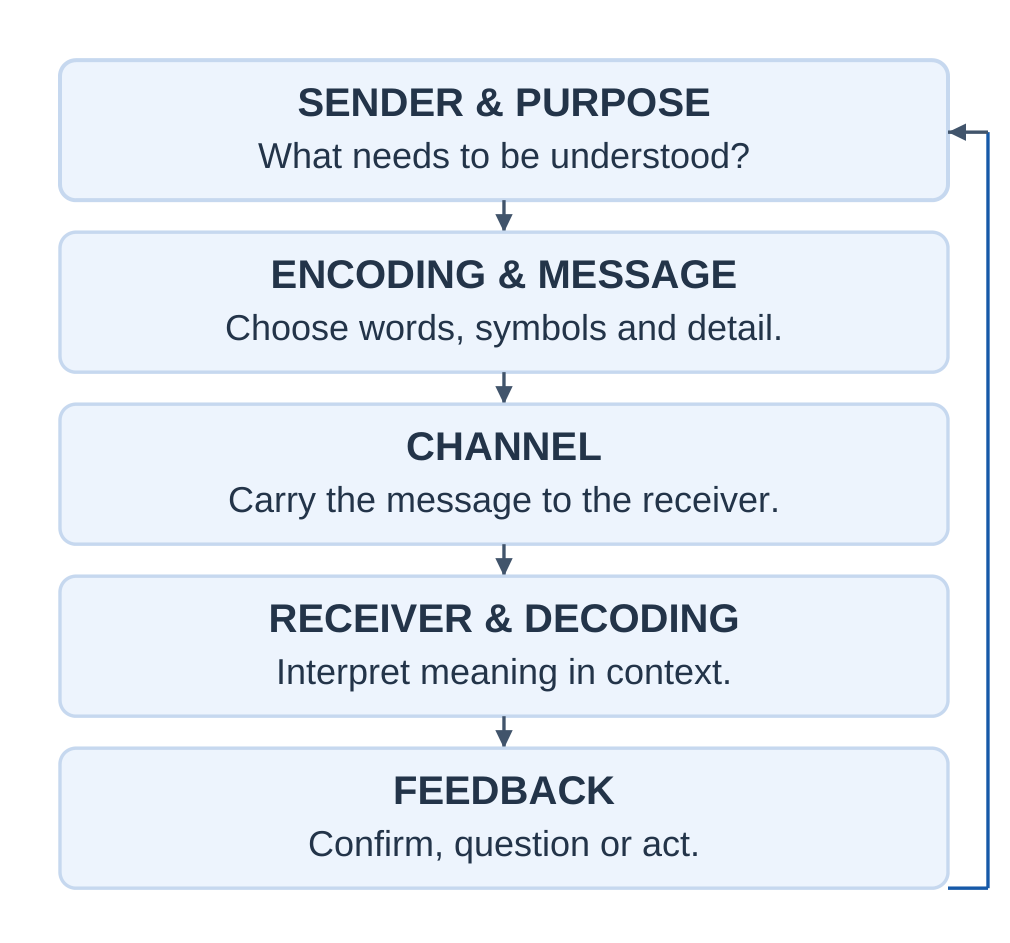
| Element | Function |
|---|---|
| Sender | Initiates communication for a purpose |
| Encoding | Converts an idea into language, drawings, numbers or signs |
| Message | Contains the information being communicated |
| Channel | Carries the message |
| Receiver | Receives and interprets the message |
| Decoding | Interprets the signs using knowledge and context |
| Feedback | Confirms, questions or acts on the message |
| Noise | Interferes with communication |
| Context | Supplies the surrounding circumstances |
Feedback
Feedback helps determine whether the intended meaning was understood.
It can be:
- A clarification question.
- A paraphrase.
- A revised document.
- Confirmation of responsibility.
- Completed work.
A weak check is:
“Understood?”
A stronger check is:
“Please confirm which file you will upload, where you will upload it and the deadline.”
Silence is not reliable proof of agreement or comprehension.
Noise
Noise is broader than audible sound.
Examples include:
- A noisy room.
- Confusing terminology.
- Anxiety.
- An unreadable diagram.
- A wrong attachment.
- An inaccessible file.
- A message lost among notifications.
Context
Context includes the setting, relationship, urgency, previous discussion and cultural expectations.
“Approved” is incomplete when several proposals are being discussed. The sender should identify what was approved and any conditions.
Worked Laboratory Handover
| Element | Application |
|---|---|
| Sender and purpose | Coordinator requests a test log |
| Encoding | Uses a numbered checklist |
| Message | Specifies log, format and deadline |
| Channel | Course email with a template |
| Receiver | Project team |
| Feedback | Team confirms owner and deadline |
| Noise | Attachment cannot be opened |
| Repair | Coordinator supplies an accessible copy |
Closed-loop example:
Coordinator: “Send the voltage log in the supplied table by noon.”
Student: “I will record the readings in volts and email the supplied table by noon. Is one file per team required?”
Coordinator: “Yes, one file per team.”
The clarification resolves a missing condition before work begins.
1.3 Forms, Flows and Channels
Forms of Communication
| Form | Strength | Limitation |
|---|---|---|
| Spoken | Allows quick clarification | Details may be forgotten |
| Written | Provides a reviewable record | Tone or urgency may be misread |
| Visual | Shows patterns and relationships | Requires labels and context |
| Non-verbal | Supports attention and attitude | Cues can have different interpretations |
Verbal communication uses words in spoken or written form.
Non-verbal communication includes gestures, posture, expression and spatial behaviour. Vocal qualities are often discussed as paralanguage.
Formal and Informal Communication
Formal communication follows authorised roles and channels, such as an official notice or project report.
Informal communication develops through everyday interaction.
Informal discussion can build trust, but important decisions should be confirmed through the appropriate formal channel.
Directions of Communication
| Flow | Meaning | Example |
|---|---|---|
| Downward | From a higher level to a lower level | Supervisor gives instructions |
| Upward | From a lower level to a higher level | Student reports progress |
| Horizontal | Between peers | Team members coordinate tasks |
| Diagonal | Across levels and departments | Student representative contacts a laboratory officer |
An email is a channel. Upward describes its direction. Formal describes its organisational character.
One email can therefore be written, formal and upward.
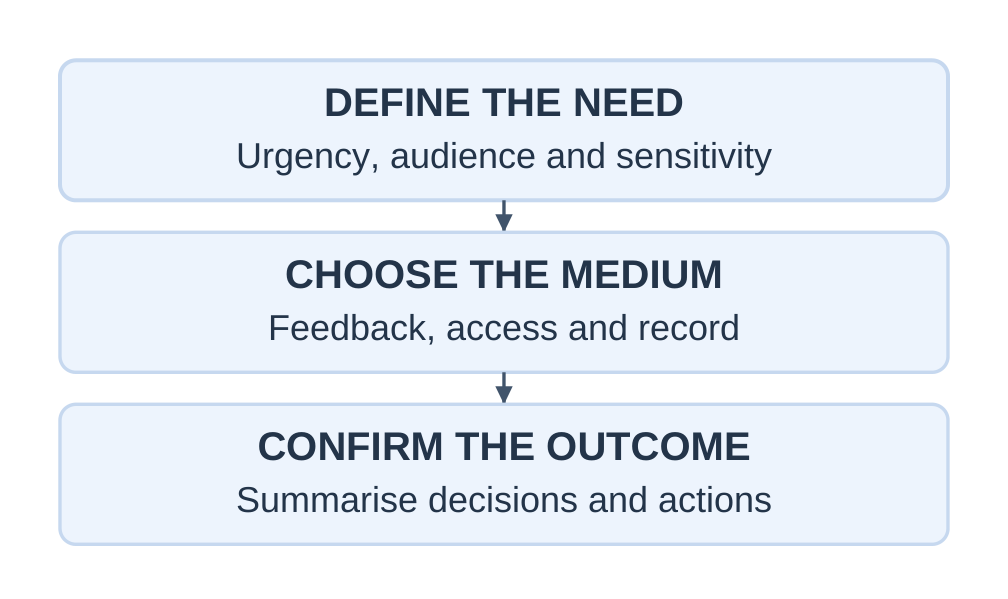
Channel Selection
Consider:
- Urgency.
- Complexity.
- Sensitivity.
- Accessibility.
- Need for feedback.
- Need for a permanent record.
| Situation | Suitable approach |
|---|---|
| Simple deadline update | Notice or email |
| Complex misunderstanding | Conversation followed by a written summary |
| Sensitive performance issue | Private discussion with an appropriate record |
| Immediate equipment concern | Approved urgent channel to the responsible person |
| Detailed design comparison | Report with labelled tables or figures |
For an unresolved prototype choice, hold a short discussion using shared criteria. Afterwards, record the selected option, reasons, owners and deadlines.
1.4 Barriers to Communication
A barrier prevents a message from being received, interpreted or acted upon as intended.
Identify the cause before choosing a remedy. Speaking louder does not solve unfamiliar terminology.
| Barrier | Example | Remedy |
|---|---|---|
| Physical | Noisy workshop | Use a suitable safe setting or approved visual instruction |
| Semantic | “Current” has more than one meaning | Define the intended meaning |
| Psychological | Fear prevents questions | Invite clarification respectfully |
| Organisational | Request reaches the wrong person | Clarify responsibility and route |
| Cultural | Gesture is interpreted differently | Ask rather than assume |
| Perceptual | Expectations distort interpretation | State evidence and context |
| Technological | File cannot be opened | Supply an accessible agreed format |
| Information overload | Deadlines are buried in chat | List tasks, owners and dates |
Jargon
Jargon can be efficient among specialists but confusing for beginners.
Instead of:
“Check the SNR ASAP.”
Write:
“Please measure the signal-to-noise ratio (SNR) before the 3 p.m. test and record the method used.”
Define unfamiliar terms without replacing precise terminology with inaccurate everyday language.
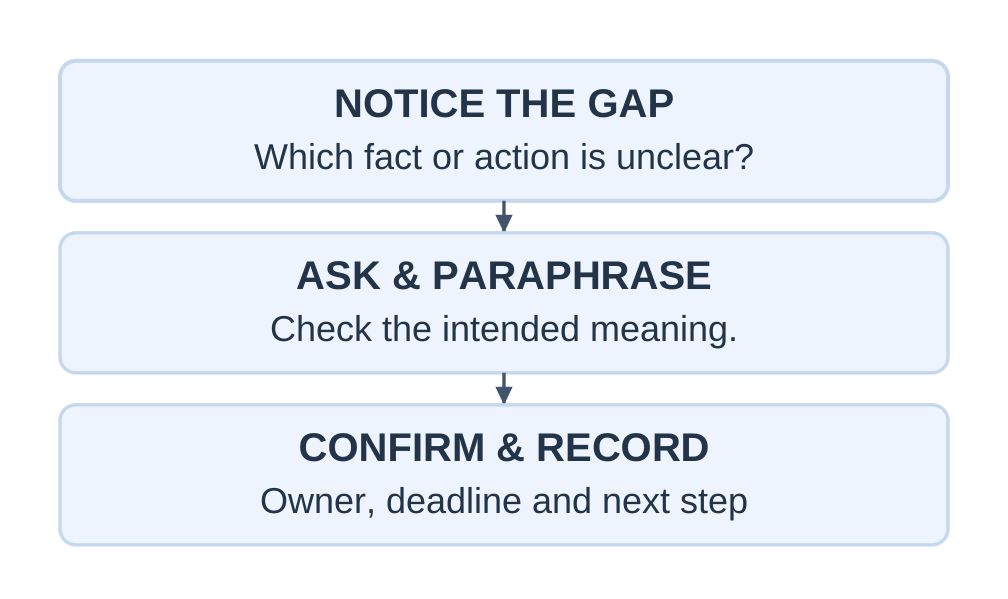
Active Listening
- Give attention.
- Let the speaker finish.
- Ask a focused question.
- Paraphrase the important point.
- Confirm the next action.
Understanding a position does not require agreeing with it.
Worked Case: Missing Temperature Units
A student sends readings labelled “temperature” without units. The supervisor assumes degrees Celsius, but the instrument was set to kelvin.
Problem: Incomplete encoding and unchecked assumptions.
Repair: Verify the instrument setting, add the correct units and confirm interpretation before using the data.
Prevention: Use a template containing quantity, unit, date, method and unusual conditions.
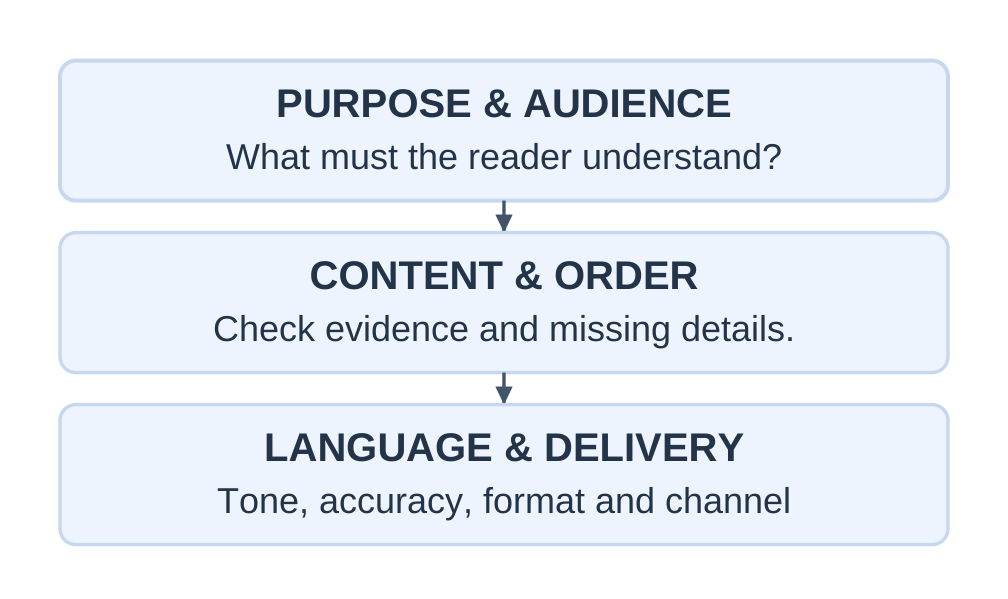
1.5 The Seven Cs of Communication
This unit uses:
Clear, concise, concrete, correct, coherent, complete and courteous.
Some frameworks use consideration in place of coherence. Audience consideration remains necessary.
Clear
Use familiar words, an identifiable purpose and a specific action.
Unclear: “Send that after it is done.”
Clear: “Email the revised circuit diagram to the project coordinator after the wiring check.”
Concise
Remove repetition and empty wording while retaining necessary information.
Wordy: “I am writing this email for the purpose of requesting you to kindly provide an extension.”
Concise: “Could I have a two-day extension for the report?”
Add the genuine reason and proposed deadline where needed.
Concrete
Use relevant, verifiable details.
Vague: “The test took a long time.”
Concrete: “The test ran from 10:00 to 10:18 a.m.”
If the time was estimated, describe it as an estimate.
Correct
Check names, figures, units, dates, grammar, spelling and attachments.
Correctness includes factual accuracy. A polished message with the wrong deadline is still incorrect.
Coherent
Arrange ideas logically:
Purpose → background → evidence → requested action
Use consistent terminology and connected paragraphs.
Complete
Provide enough information for the reader to proceed.
Use the 5W1H questions where relevant:
- Who?
- What?
- When?
- Where?
- Why?
- How?
Completeness depends on the task. Not every message needs equally detailed answers to all six questions.
Courteous
Use fair, respectful wording without personal attacks.
Discourteous: “You failed to send the file again.”
Professional: “The revised file has not arrived. Please upload it by 2 p.m., or let me know what is preventing completion.”
Courtesy can be firm. Explain consequences factually rather than as threats.
Worked Revision
Original:
“Hey, everyone knows our report is bad. Fix it quickly and send everything.”
Revised:
“Team, please revise the test report by noon on 13 November. Add units to Table 2, correct the sensor label in Figure 1 and upload one PDF to the course portal. Asha will combine the sections. Please report any difficulty by 4 p.m. today.”
The revised message identifies the document, corrections, owner, route and deadline without personal blame.
1.6 Professional Email Writing
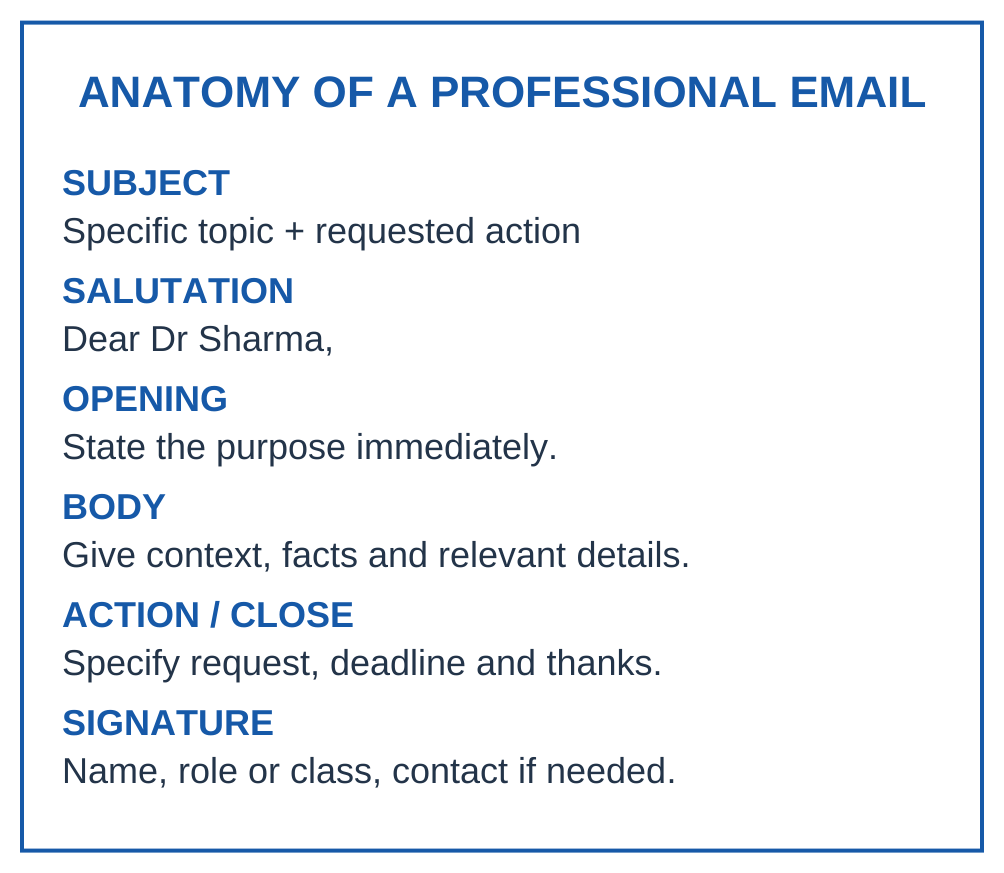
An email should make its purpose easy to identify, provide relevant context and end with a clear action or conclusion.
Email Structure
- Subject.
- Salutation.
- Opening purpose.
- Relevant details.
- Requested action and response point.
- Courteous close.
- Signature.
Subject Lines and Tone
“Request for lab access on 13 November” is more useful than “Important.”
Use an appropriate name or role in the salutation. Avoid sarcasm, unexplained abbreviations and all-capital demands.
Recipients
- To: People expected to respond or act.
- Cc: People who need visibility.
- Bcc: Recipients whose addresses are concealed from other recipients.
Do not copy senior staff merely to create pressure. Use Reply All when everyone needs the reply.
Attachments
Mention the attachment and its purpose. Use a descriptive name such as TeamB_TestReport_v2.pdf.
Check the version, readability and sharing permissions.
Model 1: Request for Laboratory Access
Fictional classroom example
To: Laboratory Coordinator Subject: Request for supervised lab access on 13 November
Dear Laboratory Coordinator,
Our first-year project team requests access to the electronics laboratory from 2 to 3 p.m. on 13 November to test a low-voltage sensor circuit. Four students will attend.
We will use the approved equipment under supervision and follow the laboratory instructions. Our test plan is attached for review.
Could you confirm availability and any preparation required by noon on 12 November?
Thank you.
Regards, Asha Verma Team B Representative, B.Tech First Year
The email requests permission rather than assuming approval.
Model 2: Acknowledgement
Subject: Re: Request for supervised lab access on 13 November
Dear Laboratory Coordinator,
Thank you for confirming access from 2 to 3 p.m. on 13 November. We will bring the approved test plan and report to the supervisor before starting.
Please let us know if any additional form is required.
Regards, Asha Verma
Model 3: Follow-Up
Subject: Follow-up: review of Team B test plan
Dear Dr Sharma,
I am following up on the test plan sent on 10 November. We need your approval before booking the laboratory.
Could you share your comments by noon on 12 November? If more review time is needed, we can revise the proposed test date.
Thank you.
Regards, Asha Verma
A useful follow-up identifies the earlier message, explains why a response matters and offers a reasonable next step.
Model 4: Problem Report
Subject: Sensor test postponed: damaged lead identified
Dear Project Supervisor,
During the pre-test check, we found damage to one sensor lead. We stopped the test and informed the laboratory coordinator. No measurements were recorded.
We request guidance on an approved replacement before rescheduling. I will update the team after receiving your instructions.
Regards, Asha Verma
The report separates the observation, action taken and pending decision. It does not guess the cause or claim an unchecked repair is safe.
Before Sending
- Verify recipients and permission to share.
- Check subject, names, dates, units and action.
- Open the attachment.
- Confirm the version and access.
- Review tone and unnecessary recipients.
Response expectations depend on the organisation and task. If a full response needs time, acknowledge receipt and state a realistic update point.
1.7 Notice Writing
A notice is a short formal announcement addressed to a defined group.
It may announce an event, change, instruction or opportunity.
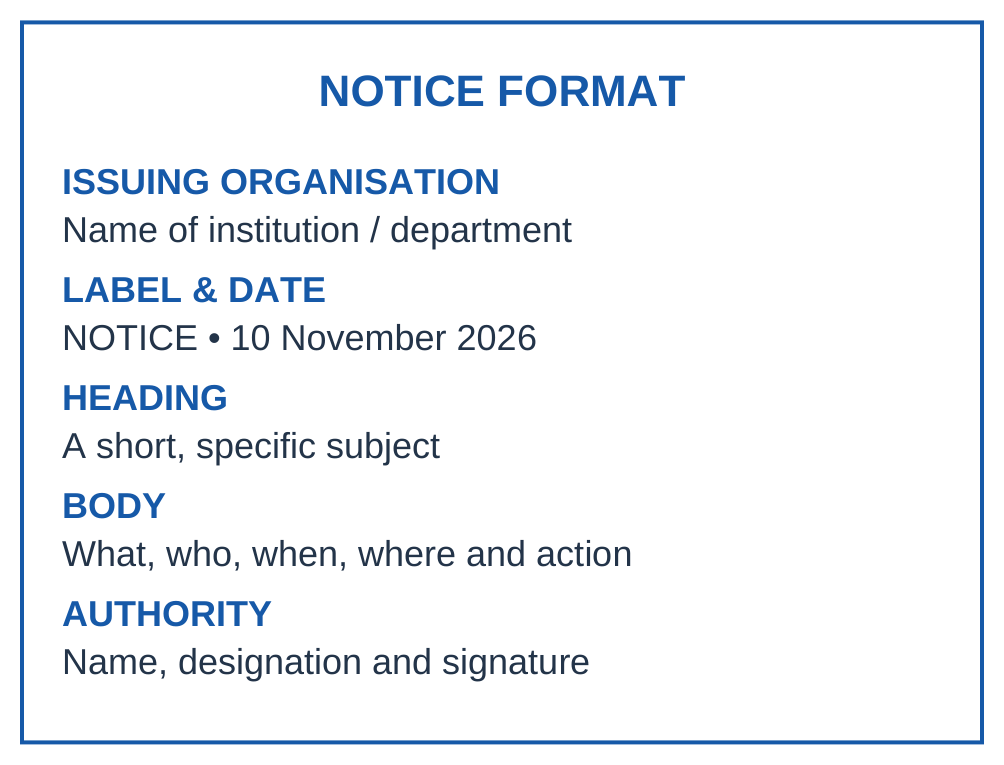
Notice Format
- Issuing organisation.
- Label NOTICE.
- Issue date.
- Specific heading.
- Intended audience.
- Essential details and required action.
- Authorised issuer.
Worked Notice
Fictional classroom example
ABC INSTITUTE OF TECHNOLOGY Department of Applied Sciences
NOTICE
10 November 2026
First-Year Resume Writing Workshop
A resume writing workshop for B.Tech first-year students will be held on 16 November 2026 from 2 to 3:30 p.m. in Seminar Room 2.
Participants should bring a draft resume and a device or notebook for revision. Register through the class representative by 13 November. Seats will be allotted subject to room capacity.
Asha Verma Student Coordination Secretary Issued with the coordinator’s approval
Notice Versus Email
| Notice | |
|---|---|
| Addresses a group collectively | Addresses selected recipients |
| Uses a prominent label and heading | Uses a subject and salutation |
| Usually concise and impersonal | May explain an individual request |
| Issuer establishes authority | Signature identifies the sender |
Distinguish the issue date from the event date. Use actual dates rather than “tomorrow” when the notice may be read later.
Do not add unsupported promises about certificates or placements.
1.8 Agenda: Planning a Meeting
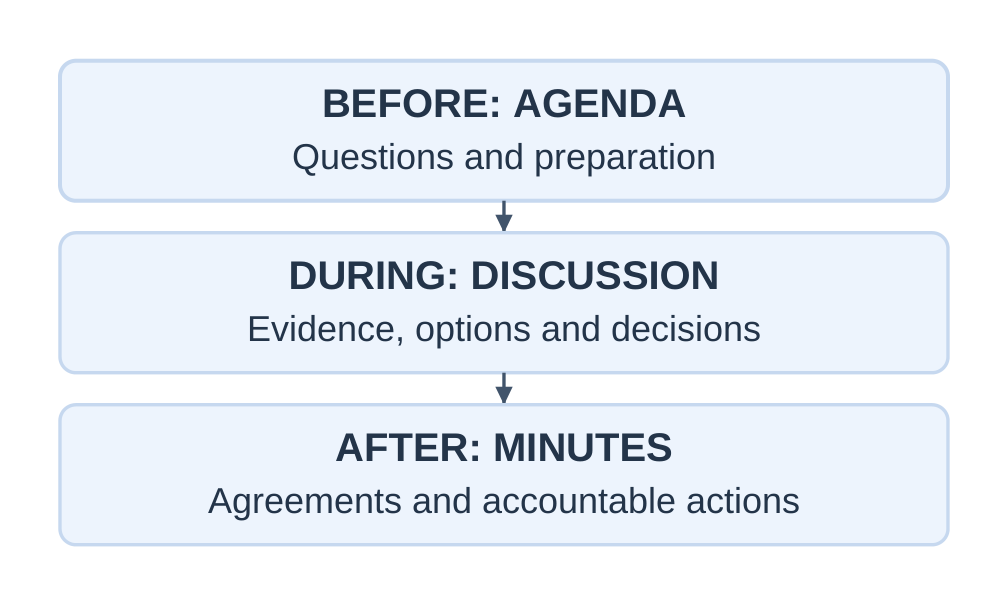
An agenda is an ordered list of matters to be considered at a meeting.
It is circulated beforehand so participants can prepare and the chair can keep discussion focused.
Essential Elements
- Meeting title.
- Date and start time.
- Venue or online access.
- Chair and participants.
- Required preparation.
- Numbered items.
- Item owners and time allowances where useful.
- Expected outcomes.
“Project” is vague. “Select the sensor option after reviewing test results” identifies a useful decision.
Worked Agenda
Fictional meeting
Meeting: Team B Prototype Review Date: 17 November 2026 Time: 2:00–2:30 p.m. Venue: Project Room 1 Chair: Project Supervisor Participants: Team B and laboratory coordinator Preparation: Read the revised test log and cost estimate.
| Time | Item and expected outcome |
|---|---|
| 2:00–2:03 | Confirm purpose and previous actions |
| 2:03–2:10 | Review sensor results and identify gaps |
| 2:10–2:20 | Compare options and choose a prototype |
| 2:20–2:27 | Agree tasks, owners and deadlines |
| 2:27–2:30 | Confirm decisions and next review |
Total: 3 + 7 + 10 + 7 + 3 = 30 minutes.
If discussion overruns, explicitly agree what will be deferred.
An agenda states planned discussion. “The team selected option B” belongs in minutes only after the decision occurs.
1.9 Minutes of Meeting
Minutes are the formal written record of important proceedings, decisions and actions.
They are usually concise summaries rather than a word-for-word transcript.
What to Record
- Meeting title, date, time and venue.
- Chair, attendees and absentees where required.
- Items considered.
- Decisions made.
- Matters deferred.
- Tasks, owners and due dates.
- Approval or correction status.
Objective Language
Use neutral wording:
- “The team agreed…”
- “The decision was deferred pending…”
- “The coordinator will verify…”
Avoid personal judgements about participants.
Worked Minutes
Fictional classroom example
Team B Prototype Review — Minutes
Date: 17 November 2026 Time: 2:00–2:30 p.m. Venue: Project Room 1 Chair: Project Supervisor Present: Asha, Ravi, Meera and laboratory coordinator Recorder: Asha Verma
1. Test review: Two entries lacked units. Meera will verify them against the instrument record.
2. Prototype choice: Option B was selected for the next supervised trial because it met the stated input requirement at a lower estimated cost. Final purchase remains subject to approval.
3. Preparation: The replacement lead must be inspected before testing. No test may begin without clearance.
4. Next review: 20 November, 2 p.m., Project Room 1.
Status: Draft circulated for review; approval pending.
Action Log
| Action | Owner | Due |
|---|---|---|
| Verify two unit entries | Meera | 18 November |
| Seek lead inspection | Ravi | 18 November |
| Revise cost estimate | Asha | 19 November |
Circulate the draft under the agreed process and retain the approved version.
Record later changes transparently rather than silently rewriting the earlier decision.
1.10 Technical Report Writing
A technical report presents technical work, evidence, analysis and conclusions for a defined purpose.
It should answer:
What was done, how was it done, what was found and what does it mean?
Report Structure
| Section | Function |
|---|---|
| Title and identification | Identify work, author and date |
| Summary or abstract | State purpose, method, key result and implication |
| Introduction | Explain background, objective and scope |
| Method | Describe procedure and conditions |
| Results | Present observations and measurements |
| Discussion | Interpret findings and limitations |
| Conclusion | Answer the objective |
| Recommendations | Propose justified actions |
| Appendices | Supply supporting detail when needed |
Longer reports may require a contents page and source list under institutional rules. Avoid adding empty sections.
Summary Versus Introduction
The summary includes the main outcome.
The introduction establishes the background, objective and scope.
Results Versus Interpretation
Result: “The indicator activated in all five trials.”
Interpretation: “The observations support repeatability under the tested conditions.”
Limit: “Performance under other conditions has not been established.”
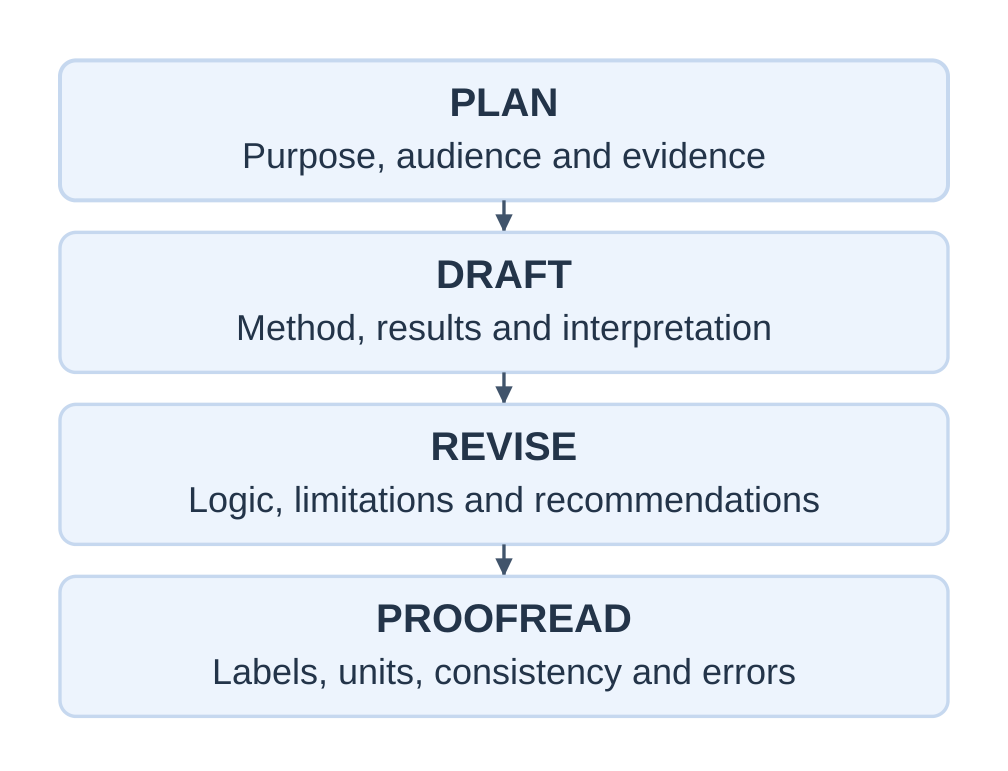
Method and Visuals
Describe important apparatus, settings, sequence and recording methods.
Label quantities and units. Number figures and tables and explain their relevance in the text.
Use specific language rather than promotional claims.
Worked Mini Technical Report
Fictional teaching example using constructed data
Title: Check of a Low-Voltage Indicator Prepared by: Team B Date: 19 November 2026
Summary
In five constructed trials, the indicator activated each time. Recorded response times ranged from 0.7 to 0.9 s, with a mean of 0.8 s.
These observations do not establish reliability in field conditions.
Objective and Scope
Observe activation and response time in five trials using the same bench arrangement.
The exercise does not evaluate durability, environmental effects or safety-critical suitability.
Method
Following the supervisor’s pre-test check, the same signal and supply setting were used in each trial.
The observer used the agreed timing method, and the arrangement was reset between trials. The simplified timings contain observer uncertainty.
Results
| Trial | Activation | Response time (s) |
|---|---|---|
| 1 | Yes | 0.8 |
| 2 | Yes | 0.7 |
| 3 | Yes | 0.9 |
| 4 | Yes | 0.8 |
| 5 | Yes | 0.8 |
Total = 0.8 + 0.7 + 0.9 + 0.8 + 0.8 = 4.0 s
Mean = 4.0 ÷ 5 = 0.8 s
Range = 0.9 − 0.7 = 0.2 s
Discussion
The spread is small within this dataset, but five observations do not establish general reliability.
Manual timing introduces uncertainty. Changing environmental conditions were not investigated.
Conclusion
The indicator activated in all five constructed bench trials, with a mean recorded response time of 0.8 s.
Broader performance remains untested.
Recommendation
For a real follow-up, agree on a more precise timing method, collect additional observations and record relevant conditions with supervisory approval.
Writing rule: A conclusion should be no stronger than the evidence.
1.11 Technical Proposal Writing
A proposal is a reasoned plan requesting approval, resources or support for future work.
It can be internal or external, solicited or submitted proactively.
| Proposal | Technical report |
|---|---|
| Mainly future-oriented | Records completed or ongoing work |
| Requests approval or resources | Presents evidence and findings |
| Uses a plan and estimates | Uses observations where available |
| Explains expected benefits | Explains demonstrated outcomes |
Essential Components
- Problem.
- Objectives.
- Scope.
- Method.
- Schedule.
- Resources.
- Risks and mitigation.
- Deliverables.
- Approval request.
Worked Proposal
Fictional classroom example
Proposal: Digital Test-Log Template Submitted to: Laboratory Coordinator
Problem: Student logs can omit units or test conditions.
Objective: Develop and review one reusable recording template within two weeks.
Scope: One first-year experiment, without changing laboratory procedures or assessment rules.
Method: Agree required fields, draft the template, conduct an approved small volunteer pilot and revise after feedback.
Deliverables: Accessible template, short instructions and feedback summary.
Resources: Existing approved spreadsheet software and supervised review time.
Illustrative printing estimate: 20 sheets × Rs. 2 = Rs. 40, subject to approval.
Risk: Inconsistent units.
Mitigation: Display approved units next to each field.
Approval requested: Permission to prepare the draft and seek volunteer feedback.
| Milestone | Planned time |
|---|---|
| Agree fields | Days 1–2 |
| Draft and review | Days 3–5 |
| Pilot and feedback | Days 6–10 |
| Revise and submit | Days 11–14 |
The cost is a teaching estimate, not a quotation.
“We will check whether omitted fields decrease” is more defensible than “We will eliminate all recording errors.”
1.12 Resume Writing
A resume is a concise, targeted summary of education, skills and relevant experience.
A first-year student can use coursework, projects, volunteering and genuine responsibilities.
Selecting Content
| Section | Suitable content |
|---|---|
| Contact | Name, professional contact details, city and relevant portfolio |
| Education | Degree, institution and accurate dates |
| Projects | Purpose, personal contribution, tools and supported result |
| Skills | Abilities that can be demonstrated |
| Experience or activities | Relevant teamwork, volunteering and responsibilities |
| Achievements | Genuine, accurately described distinctions |
Use clear headings, consistent dates and a readable layout.
Reverse chronological order places recent experience first.
Evidence-Based Bullets
Use:
Action + task + method or context + supported outcome
Weak: “Good at teamwork.”
Improved: “Coordinated tasks for a four-member laboratory team and combined the final test log.”
Weak: “Expert in spreadsheets.”
Improved: “Used formulas to calculate means and check missing entries in a classroom test log.”
Use these claims only when they are true.
Model First-Year Resume
Fictional content model
ASHA VERMA Lucknow, Uttar Pradesh [Professional email] | [Phone] [Relevant portfolio, if available]
Profile
First-year B.Tech student interested in technical documentation and practical project work. Seeking a supervised student project opportunity.
Education
B.Tech, ABC Institute of Technology 2026–present; expected completion 2030
Relevant learning: programming fundamentals and professional communication.
Projects
Low-Voltage Indicator — Classroom Team Project
- Helped assemble the approved circuit under supervision.
- Recorded observations with units and maintained the team log.
- Summarised findings and limitations in a short report.
Digital Log Template — Coursework Exercise
- Designed labelled fields for conditions, measurements and units.
- Revised instructions after peer review.
Skills
- Spreadsheets: basic formulas, averages and labelled tables.
- Programming: introductory C syntax, loops and functions.
- Communication: structured email, meeting notes and short reports.
Activities
Team Documentation Coordinator — Classroom Project
- Maintained the action list and circulated draft minutes.
Languages
Hindi and English; state actual proficiency where relevant.
Resume Checks
- Tailor emphasis to the opportunity.
- Keep underlying facts consistent.
- Do not invent marks, certificates or results.
- Describe your contribution accurately.
- Avoid unnecessary sensitive information.
- Follow the requested file type and size.
- Check selectable text and reading order.
- Verify portfolio access.
1.13 Curriculum Vitae
Curriculum vitae, or CV, commonly refers to a detailed academic record.
In some employment settings, CV simply means a job-application resume. Follow the instructions rather than relying on the label.
| Academic CV | Targeted resume |
|---|---|
| Comprehensive academic record | Selected evidence for a role |
| Length grows with experience | Usually concise |
| May include research and publications | Highlights relevant skills and work |
| Often used for academic applications | Often used for industry applications |
| Updated with achievements | Tailored to each opportunity |
Possible Sections
- Contact details.
- Education.
- Academic interests.
- Projects or research.
- Relevant experience.
- Publications and presentations.
- Teaching or service.
- Awards.
- Skills and languages.
Include sections only when genuine content exists.
First-Year CV Skeleton
[Name] [Contact details]
Education: Degree, institution and dates.
Academic interests: Genuine interests relevant to the application.
Academic projects: Title, course, dates, purpose, method, contribution and output.
Relevant experience or service: Role, organisation, dates and responsibilities.
Skills: Demonstrable abilities.
Awards or presentations: Include only where applicable.
A coursework project is not automatically peer-reviewed research. A project report is not automatically a publication.
Obtain permission before sharing referees’ contact details. Distinguish completed work, work in progress and planned work.
1.14 Cover Letter Writing
A cover letter introduces an application, explains interest and connects selected evidence to the opportunity.
It complements the resume rather than repeating every bullet.
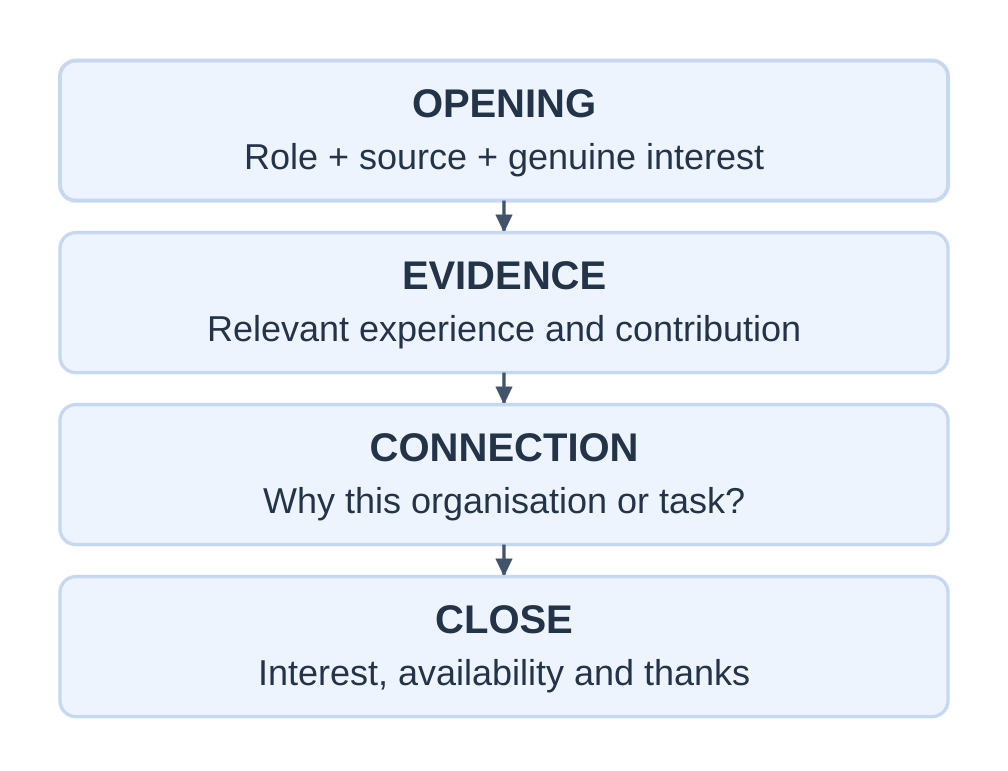
Structure
- Opening: Role, source and genuine interest.
- Evidence: One or two relevant examples.
- Connection: Why the work fits your interests and abilities.
- Close: Attachment, availability, thanks and next conversation.
Worked Cover Letter
Fictional classroom example
Asha Verma [City] | [Email] | [Phone]
20 November 2026
Hiring Team Example Engineering Lab
Subject: Application for Student Documentation Assistant
Dear Hiring Team,
I am applying for the Student Documentation Assistant opportunity described in your campus notice. As a first-year B.Tech student, I am interested in learning how clear records support engineering work.
In a classroom team project, I maintained a test log, recorded measurements with units and prepared a short findings summary. I also circulated draft minutes and tracked assigned actions. These tasks helped me practise accuracy, organisation and timely follow-up.
The opportunity to assist with supervised project records matches my interest in technical communication. I would bring careful attention to detail and a willingness to learn your documentation process.
My resume is attached for consideration. I would welcome the opportunity to discuss my suitability and availability.
Thank you for your time.
Yours sincerely, Asha Verma
Verify the role and organisation names. Avoid generic praise, unsupported expertise and demands for an interview.
1.15 Interview Skills and Mock Practice
An interview is a purposeful conversation in which both sides assess suitability.
The interviewer may consider knowledge, communication, judgement, motivation and evidence. The candidate can clarify responsibilities and expectations.
Common Formats
| Format | Focus |
|---|---|
| One-to-one | Conversation with one interviewer |
| Panel | Questions from several interviewers |
| Technical | Subject knowledge and reasoning |
| Behavioural | Past actions and examples |
| Situational | Proposed response to a hypothetical problem |
| Virtual | Interview through an online platform |
Preparation
- Read the role description.
- Research the organisation.
- Review your own application.
- Prepare truthful examples.
- Practise explaining your project and contribution.
- Check travel or connection arrangements.
- Keep requested documents available.
Introduction Model
“I am Asha Verma, a first-year B.Tech student interested in technical documentation and practical project work. In a classroom team, I maintained the test log and prepared draft minutes. That experience helped me understand the value of clear records and follow-up. I am applying to contribute those habits while learning your documentation process.”
During the Interview
Let the question finish. Clarify ambiguity and answer the question before adding an example.
If you do not know, state the gap and explain how you would investigate it.
Treat support staff and interviewers respectfully. Use natural posture, understandable speech and attentive listening.
STAR Method
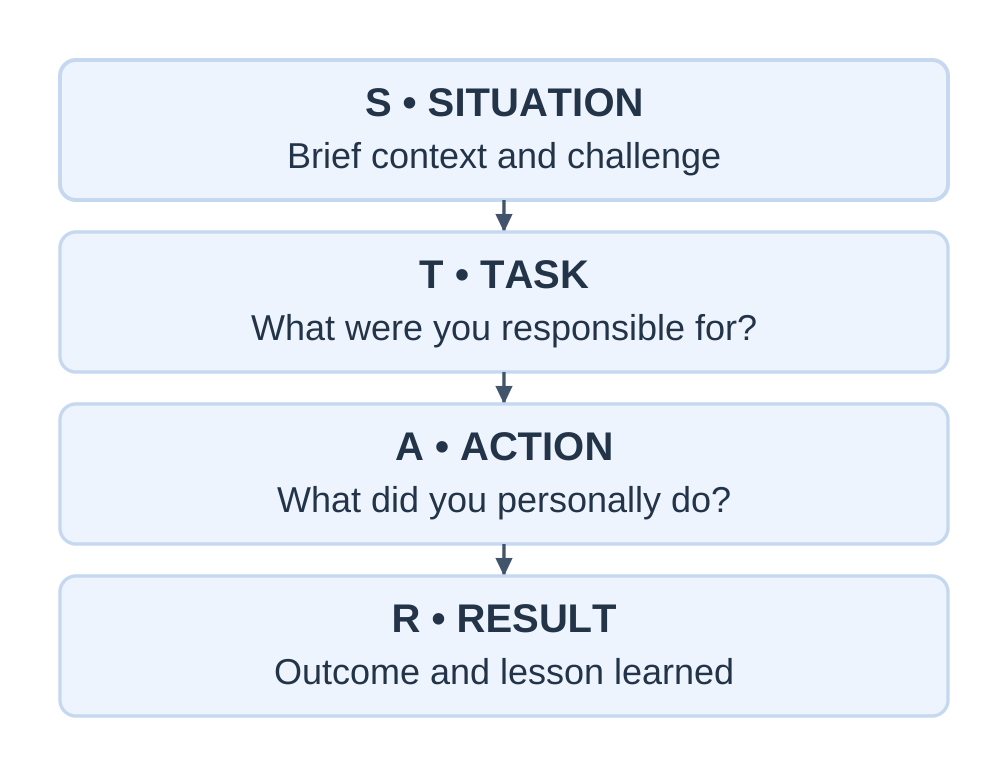
- Situation: What was happening?
- Task: What were you responsible for?
- Action: What did you personally do?
- Result: What happened and what did you learn?
Worked STAR Answer
Question: “Tell me about a time you helped a team complete a difficult task.”
Situation: “Our classroom report had inconsistent section formats a day before the deadline.”
Task: “I was responsible for combining the sections.”
Action: “I shared a common template, listed missing items and agreed a revision time with each member. I checked units and headings before combining the file.”
Result: “We submitted on time. I learned to agree the template at the beginning.”
The candidate’s contribution is distinguished from the team’s achievement.
Behavioural Versus Situational
“Tell me about a time…” asks for a real past example.
“What would you do if…” asks for a proposed response.
Do not present a hypothetical response as an actual achievement.
Ten-Minute Mock Interview
| Time | Activity |
|---|---|
| 0–1 minute | Introduction |
| 1–3 minutes | Project explanation |
| 3–6 minutes | Behavioural and situational questions |
| 6–8 minutes | Role-specific discussion |
| 8–9 minutes | Candidate’s question |
| 9–10 minutes | Feedback and improvement target |
Assess relevance, structure, evidence, clarity and professional conduct.
After an interview, provide promised information accurately and follow the stated decision timeline.
1.16 Networking and Professional Branding
Professional networking means building and maintaining relationships through useful, respectful interaction.
It supports learning, collaboration and trust rather than merely collecting contacts.
Professional branding is the consistent impression created by skills, work, conduct and public communication.
A large follower count does not establish competence.
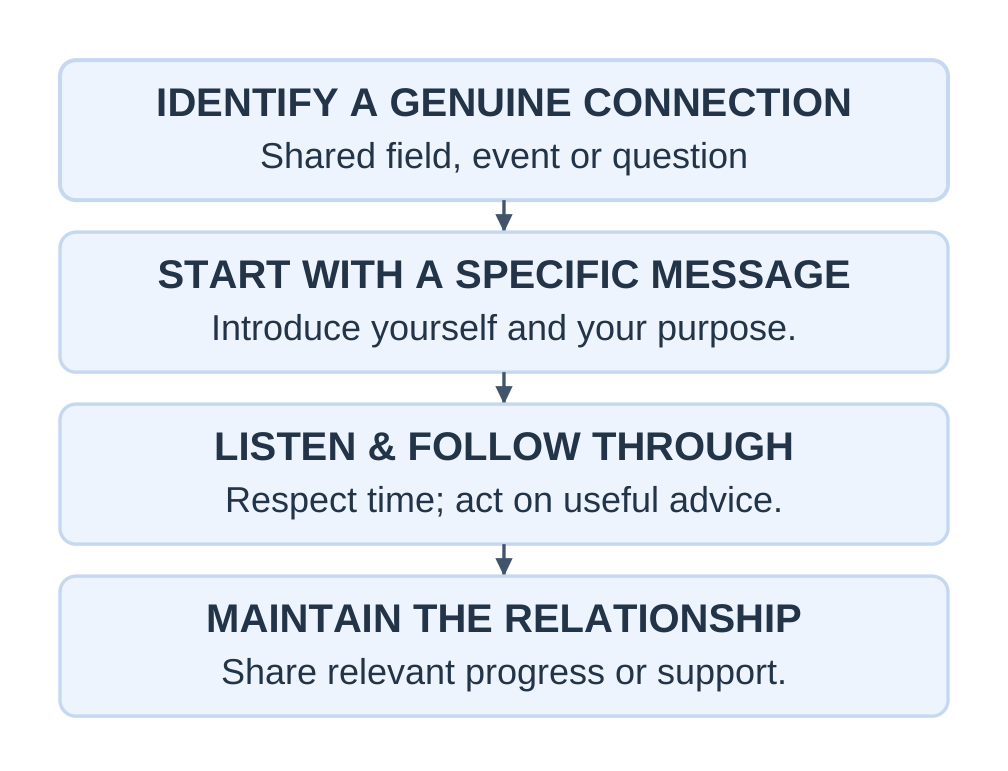
Connection Message
“Hello Ms Rao, I attended your campus session on technical documentation. I am a first-year B.Tech student practising short reports. Your point about recording test conditions was useful. I would be glad to connect and follow your work.”
Use the message only when the stated connection is real.
Avoid repeated unsolicited requests or immediate demands for referrals.
Include an accurate headline, short About section, education, projects and genuine skills.
Headline model:
“First-Year B.Tech Student | Learning C Programming and Technical Documentation”
About model:
“I am developing programming and documentation skills through classroom projects. I enjoy turning observations into clear logs and short reports. I am interested in supervised student project opportunities.”
X
Use X for relevant discussions, event updates and permitted work.
Provide context, verify factual claims and acknowledge contributions. Do not present opinion as established technical fact.
Portfolio and Consistency
A small portfolio can contain a checked report, project explanation or accessible demonstration.
Identify team contributions, remove private information and distinguish classroom simulations from real tests.
Keep claims consistent across your resume, profile and portfolio.
1.17 ATS and Resume Readability
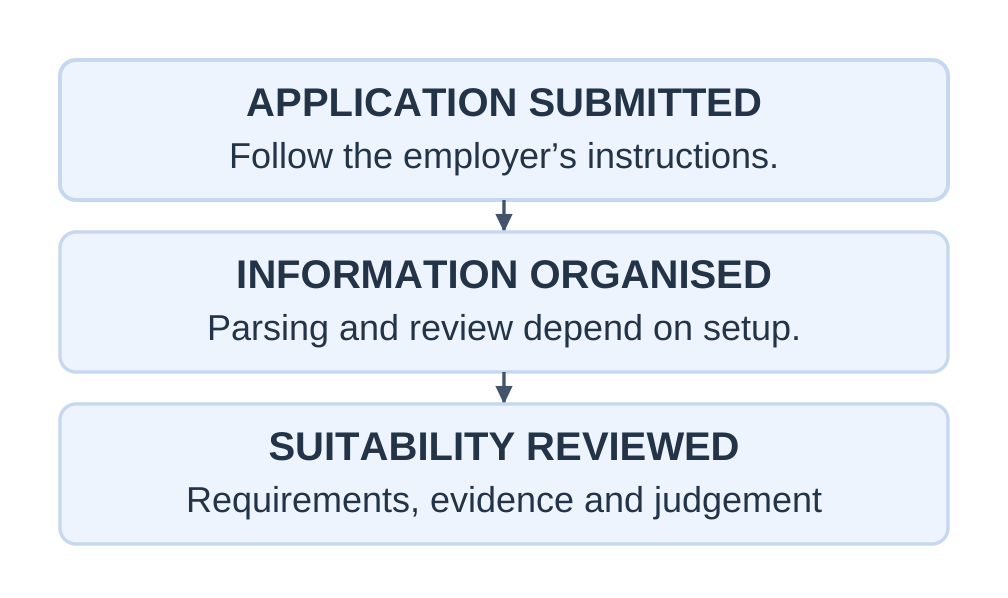
An Applicant Tracking System helps employers manage applications.
Depending on configuration, it can store documents, extract information, support searches and organise review.
Parsing Versus Suitability
Parsing extracts fields such as education, dates and skills.
Matching or screening considers suitability against requirements.
Successful parsing does not automatically mean the applicant is suitable.
What an ATS Score Means
A checker may provide its own formatting or match score.
There is no universal passing score or guaranteed shortlist threshold for all employers.
A score of 80/100 does not establish an 80% interview probability.
Practical Preparation
- Use standard headings.
- Begin with a straightforward layout.
- Keep important contact information in normal document text.
- Follow required format and size.
- Use selectable text where extraction is needed.
- Review populated application fields where possible.
- Use truthful, relevant terminology.
- Proofread for human readers.
Avoid hidden keywords, repeated unsupported terms and decorative skill bars that replace meaningful descriptions.
Tailoring Example
Requirement: Maintain records and prepare summaries.
Weak: “Good communicator.”
Better, if true: “Maintained a labelled test log and prepared a short summary of the team’s classroom results.”
A formatting improvement cannot supply a missing qualification.
1.18 Digital Communication Etiquette
Digital etiquette is respectful, responsible and context-appropriate conduct in email, messaging, shared documents and online platforms.
Online Presence and Digital Footprint
Your online presence is how you appear through profiles, posts and shared work.
Your digital footprint includes traces left by online activity.
Content may circulate beyond its original audience, so include necessary context and check permission before publishing.
Messaging Practice
| Habit to avoid | Better practice |
|---|---|
| Sending “Hi” and delaying the purpose | Greet and explain the request together |
| Sharing a file without context | Identify the file, version and action |
| Publicly blaming a teammate | Raise the issue factually through an appropriate channel |
| Assuming instant replies | Use agreed response expectations |
| Forwarding unnecessarily | Share only with relevant authorised people |
Accessibility
- Use meaningful headings.
- Keep text readable.
- Use descriptive link labels.
- Add useful alternative text.
- Provide text equivalents for essential graphic information.
- Use captions or transcripts where feasible.
Shared Documents
Agree ownership, permissions, naming and revision processes.
Use comments for questions and track changes where appropriate. Summarise major revisions.
Privacy and Security
Check recipients and sharing permissions.
Do not publish passwords, identity details, private contact lists or confidential records.
Verify unusual urgent requests through a known channel.
Accidental Disclosure
If a screenshot exposes private phone numbers, remove or restrict it where possible, inform the responsible people and follow the agreed process.
For future sharing, obtain permission and remove unnecessary private information.
Correct public factual errors clearly so earlier readers understand what changed.
1.19 Virtual Meeting Etiquette
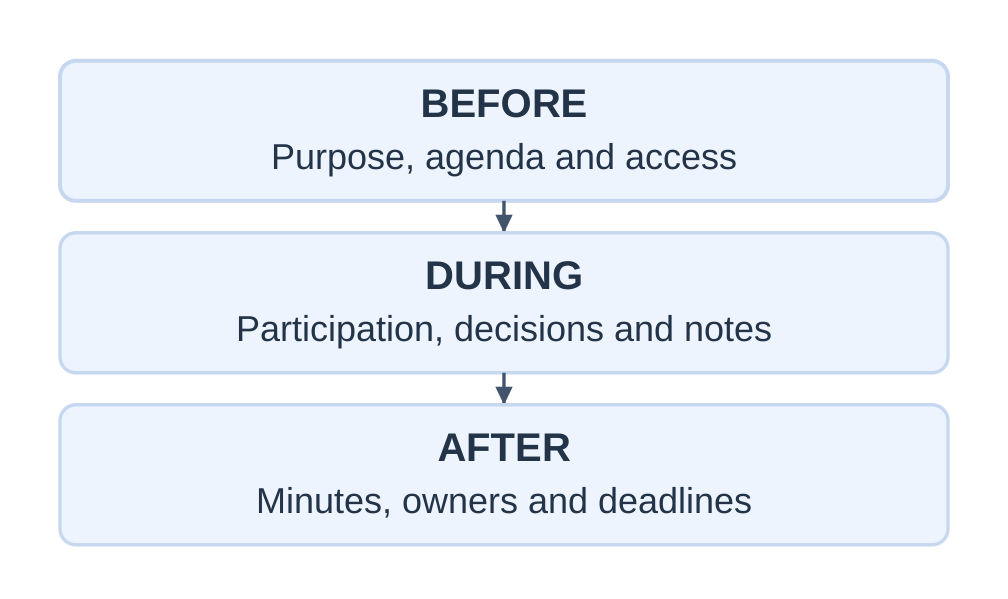
Before the Meeting
- Read the purpose and agenda.
- Confirm time and time zone where relevant.
- Test access and audio.
- Prepare necessary files.
- Use an identifiable professional name.
- Arrange a backup contact route.
During the Meeting
- Listen actively.
- Avoid unrelated multitasking.
- Mute disruptive background noise.
- Follow the speaking process.
- Share only the relevant window.
- Give context before showing material.
Camera expectations depend on purpose, policy, bandwidth and accessibility. Do not assume why someone’s camera is off.
Recording and Confidentiality
Do not assume a meeting may be recorded or its screenshots published.
Obtain required permission and explain the intended use and sharing.
Avoid exposing unrelated notifications, documents or tabs.
Opening Script
“Our goal is to choose the next test option in 20 minutes. Please use the hand-raise feature or say your name before speaking. Meera will record decisions and actions. We are not recording this meeting. Please tell me if the shared table is difficult to read.”
Inclusive Facilitation
Invite contributions without embarrassing participants.
Read important chat questions aloud where needed and explain figures verbally.
Allow time for connection delays.
Connection Failure
Notify the chair through the agreed route, rejoin and ask for the missed decision.
Do not guess an instruction that you did not hear.
Closing and Follow-Up
Confirm each task, owner and deadline. Identify unresolved matters and circulate the appropriate record.
For virtual interviews, prepare requested documents and a backup contact method. Do not use hidden scripts or unapproved assistance.
1.20 Integrated Workplace Case
Situation
A four-member team must demonstrate a supervised low-voltage prototype.
A chat message says:
“Come tomorrow and bring the final thing.”
Two members interpret the instruction differently. A table lacks units, and no one knows who will request laboratory access.
Step 1: Diagnose the Failures
- Missing date, time and venue.
- Ambiguous output.
- Unassigned responsibility.
- Incomplete technical information.
- Silence mistaken for confirmation.
Step 2: Repair the Message
“Team B will meet in Project Room 1 at 2 p.m. on 20 November. Please bring the revised prototype checklist and report PDF. Meera will verify units in Table 1 by noon on 19 November. Ravi will request the supervised laboratory slot. Please confirm your task today.”
Step 3: Select the Documents
| Need | Document |
|---|---|
| Request supervised access | |
| Inform a defined student group | Notice |
| Plan the review | Agenda |
| Record decisions and owners | Minutes |
| Present test evidence | Technical report |
| Request a new pilot activity | Proposal |
Step 4: Apply the Seven Cs
The repaired instruction is specific, logically ordered, actionable and respectful.
Its facts must still be checked against actual arrangements.
Step 5: Conduct and Record the Review
Circulate relevant papers, compare options using shared criteria and record pending approvals.
Do not imply testing can proceed when clearance is missing.
Step 6: Write a Defensible Conclusion
Report the outcomes and limits of the actual trials.
Do not claim universal reliability from five classroom observations.
Model Minutes Entry
“Two table headings lacked units. Meera will verify them against the instrument record by noon on 19 November. Ravi will seek the coordinator’s clearance before scheduling the demonstration. The demonstration remains pending until clearance is confirmed.”
1.21 Syllabus Activities and Application Practice
Activity 1: Resume and Cover Letter
Choose a genuine opportunity or clearly labelled classroom role.
Prepare a one-page resume and targeted cover letter containing:
- Education.
- Two relevant examples.
- Demonstrable skills.
- Consistent facts.
- Accurate dates and roles.
Review relevance, accuracy, clarity, consistency and submission quality.
Activity 2: Email and Meeting Minutes
In a group:
- Draft an email requesting permission for a review.
- Prepare a 15-minute agenda.
- Conduct the meeting.
- Write minutes.
- Include at least two decisions and three actions.
- Assign owners and due dates.
- Distinguish pending matters from approvals.
Activity 3: Mock Interview
Work in groups of three:
- Candidate.
- Interviewer.
- Observer.
Rotate roles and use an introduction, project question and behavioural question.
Give evidence-based feedback on relevance, structure, honesty, listening and clarity.
Classroom Practice Rubric
Score each criterion from 0 to 2:
| Criterion | Maximum |
|---|---|
| Purpose | 2 |
| Completeness | 2 |
| Supporting evidence | 2 |
| Organisation | 2 |
| Professionalism | 2 |
| Total | 10 |
This is a practice framework, not an official university marking scheme.
Application Questions
- Rewrite “All students must come tomorrow” using the necessary details.
- Request an accessible version of an unreadable attachment.
- Draft an 80–100 word workshop notice.
- Improve the agenda item “Discuss test results.”
- Record minutes when approval is deferred.
- Explain why five trials cannot establish performance under every condition.
- Replace “expert communicator” with a truthful evidence-based bullet.
- Give a STAR answer about correcting a mistake.
- Explain why an ATS score cannot guarantee selection.
- Describe a responsible response to accidental sharing of a private document.
Answer Cues
- A complete announcement needs audience, actual date, time, venue, purpose and preparation.
- An attachment request should identify the file and access problem.
- A decision-focused agenda item could be “Review results and decide whether a repeat trial is needed.”
- Deferred approval requires the reason, owner and next review point.
- Accidental disclosure requires appropriate access restriction, notification and follow-up.
1.22 Quick Revision and Examination Practice
Essential Terms
| Term | Recall point |
|---|---|
| Communication | Creating and exchanging meaning in context |
| Encoding | Expressing the message |
| Decoding | Interpreting the message |
| Feedback | Checking understanding through a response |
| Barrier | Interference with receipt or meaning |
| Agenda | Plan of matters to discuss |
| Minutes | Record of proceedings, decisions and actions |
| Technical report | Structured account of work and evidence |
| Proposal | Plan requesting approval or support |
| Resume | Targeted qualifications and evidence |
| Academic CV | Detailed academic record |
| Cover letter | Explanation of interest and fit |
| STAR | Situation, Task, Action, Result |
| ATS | Applicant Tracking System |
Important Comparisons
| Concept | Distinction |
|---|---|
| Agenda and minutes | Planned discussion and actual record |
| Proposal and report | Future plan and recorded work |
| Resume and academic CV | Selected role fit and detailed academic record |
| Clarity and concision | Understandable meaning and removal of unnecessary wording |
| Observation and interpretation | What was recorded and what it suggests |
| Parsing and selection | Extracting fields and assessing suitability |
Short-Answer Questions
- Define professional communication.
- Explain encoding and feedback with an example.
- Name four barriers and their remedies.
- List the seven Cs.
- Distinguish Cc and Bcc.
- State two differences between agenda and minutes.
- What is an ATS?
- What can an ATS score not prove?
Long-Answer and Drafting Questions
- Explain the communication cycle with a labelled diagram.
- Analyse a communication failure and propose remedies.
- Apply the seven Cs to improve an email.
- Draft a notice, agenda and minutes for a project review.
- Prepare a report or proposal from supplied facts.
- Write a first-year resume and targeted cover letter.
- Explain interview preparation, STAR and digital etiquette.
These are practice questions rather than predictions of an official examination.
Answer Structure
For a concept question:
Definition → organised explanation → relevant example → practical implication
For a document task:
Correct format → accurate facts → clear action → professional tone
Follow the question’s marks and word limit.
Final Message Check
Purpose → audience → necessary facts → logical order → requested action → deadline → respectful tone → accuracy → access and permissions
Common Mistakes to Avoid
- Treating delivery as proof of understanding.
- Recording an agenda item as an approved decision.
- Writing minutes as a personal narrative.
- Presenting an estimate as a measurement.
- Making conclusions stronger than the evidence.
- Inventing resume achievements.
- Treating an ATS score as a job offer.
- Sharing private messages without permission.
Frequently Asked Questions
What does Professional Communication Unit 1 cover?
It covers communication principles, the seven Cs, professional correspondence, meetings, reports, proposals, application documents, interviews, networking, ATS and digital etiquette.
Why is feedback important?
Feedback reveals whether the receiver understood the intended meaning and expected action.
How are agenda and minutes different?
An agenda identifies matters for discussion before a meeting. Minutes record what actually happened and the resulting decisions and actions.
What is the main difference between a report and a proposal?
A report explains work and evidence. A proposal requests approval or support for planned work.
Should a first-year student invent experience to strengthen a resume?
No. Use genuine coursework, projects, volunteering and responsibilities and describe personal contributions accurately.
Does an ATS score guarantee an interview?
No. A checker’s score depends on that tool and does not establish the employer’s decision or a probability of selection.
What should happen after a virtual meeting?
Confirm decisions, tasks, owners, deadlines and unresolved matters, then circulate the agreed record through the appropriate channel.