
Programming Languages Unit 5 Notes cover Python Data Structures and Emerging Applications. The unit introduces lists, tuples, dictionaries and sets, followed by text files, CSV processing, NumPy arrays, Matplotlib graphs and a five-reading IoT simulation.
These ACS101 notes for AKTU B.Tech 1st Year, Semester I follow the supplied unit for CSE, EE, ECE, CE, ME, BT, CH, TX and AG streams. Worked examples explain how to choose a container, validate data, calculate summaries, preserve records and interpret plotted results.
Core examples use Python 3. NumPy and Matplotlib examples require those additional packages in the environment executing the script. The sensor demonstration uses synthetic data and needs no connected hardware.
Topics Covered
| Section | Topic | Section | Topic |
|---|---|---|---|
| 5.1 | Choosing a data structure | 5.14 | Text files and with blocks |
| 5.2 | Lists and indexing | 5.15 | Writing student records |
| 5.3 | Adding list items | 5.16 | Reading and displaying records |
| 5.4 | Removing and filtering items | 5.17 | CSV reading and writing |
| 5.5 | Traversal, sorting and copying | 5.18 | CSV field validation |
| 5.6 | Five-student marks tutorial | 5.19 | Introduction to NumPy |
| 5.7 | Tuples and fixed records | 5.20 | NumPy arithmetic versus lists |
| 5.8 | Dictionary keys and values | 5.21 | Matplotlib line plotting |
| 5.9 | Three-student dictionary tutorial | 5.22 | Graph interpretation |
| 5.10 | Word frequency | 5.23 | Simulated IoT readings |
| 5.11 | Sets and unique membership | 5.24 | Saved-data workflow |
| 5.12 | Set relationships | 5.25 | Revision and examination practice |
| 5.13 | Collection selection in practice |
5.1 Choose a Data Structure
A collection organizes several values for retrieval and processing. Choose a representation according to the operations and information the task requires.
| Container | Example | Main access | Key property |
|---|---|---|---|
| List | [70, 80, 90] | Index | Ordered and mutable |
| Tuple | (12.5, 8.0) | Index or unpacking | No element-reference replacement |
| Dictionary | {“Asha”: 86} | Key | Unique keys map to values |
| Set | {2, 4, 6} | Membership | Distinct hashable elements |
Selection Questions
- Does order matter?
- Must duplicate observations be retained?
- Will items be inserted, removed or replaced?
- Is a meaningful identifier better than a numeric position?
- Does the task concern unique membership or set relationships?
Use a list for ordered marks, a tuple for a fixed coordinate, a dictionary for ID-to-mark lookup and a set for unique registration codes.
Dictionaries preserve insertion order but remain key-based. Sets provide no sequence index order. Use sorted on comparable set elements when a predictable display is needed.
Repeated readings are not automatically duplicate errors. Turning [25, 25, 30] into a set loses the fact that 25 was observed twice.
5.2 Lists: Creation and Indexing
A list is an ordered mutable sequence, written using square brackets. It may grow, shrink or contain mixed types.
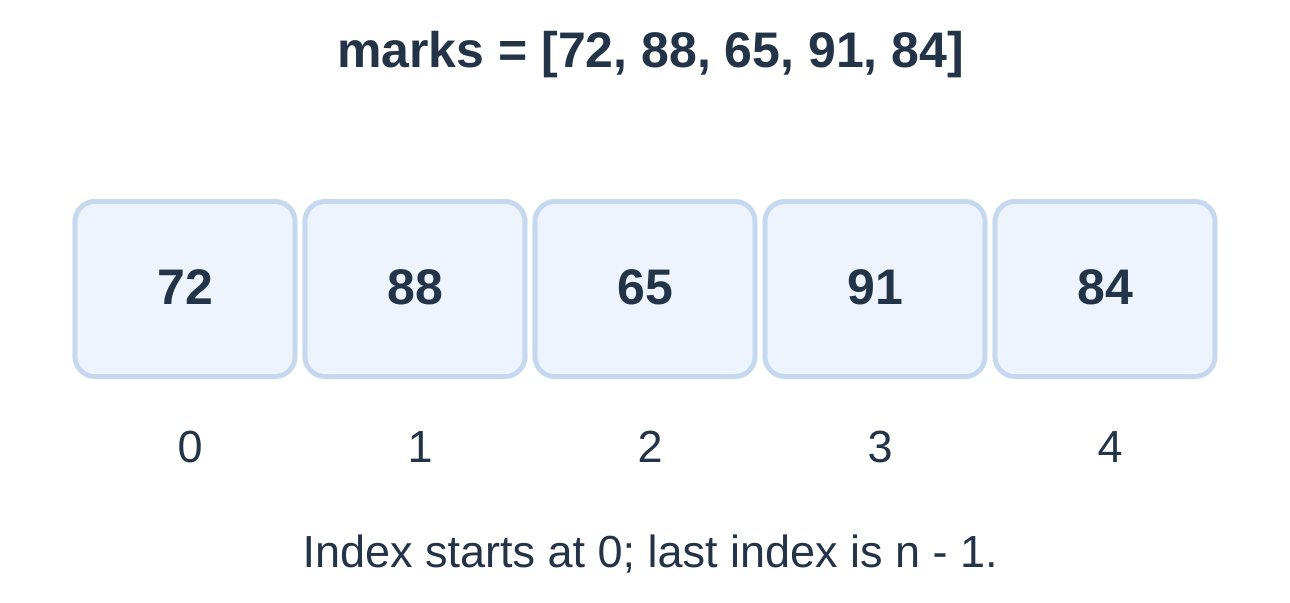
Negative indexes count from the end; -1 selects the last item. An invalid individual index raises IndexError. An empty list has no valid element at 0 or -1.
Slicing
values = [10, 20, 30, 40, 50] print(values[1:4]) print(values[:2]) print(values[3:]) print(values[::-1]) [20, 30, 40] [10, 20] [40, 50] [50, 40, 30, 20, 10]The stop is excluded. A slice creates a new shallow list of selected references. A slice endpoint may extend beyond the length and clip to available items; an individual index must identify an existing item.
Indexing selects a position. Membership such as 88 in marks asks whether an equal value occurs anywhere.
5.3 Adding Items to a List
| Operation | Effect |
|---|---|
| a.append(x) | Add one object at the end |
| a.extend(items) | Add each supplied iterable element |
| a.insert(i, x) | Insert one item before position i |
| a + b | Create a new concatenated list |
| a * 2 | Create a repeated sequence |
Output: [10, 15, 20, 30, 40, 50]
append, extend and insert mutate the list and return None. Do not write a = a.append(30): it replaces the name with None after modifying the list.
Append Versus Extend
a = [1, 2] b = [1, 2] a.append([3, 4]) b.extend([3, 4]) print(a) print(b) print(len(a), len(b)) [1, 2, [3, 4]] [1, 2, 3, 4] 3 4Appending a list treats it as one object. Extending consumes its elements. Similarly, extending with “CSE” adds three characters; appending it adds one string.
5.4 Removing and Replacing Items
| Operation | Behaviour |
|---|---|
| a.remove(x) | Remove first matching value; ValueError if absent |
| a.pop() | Remove and return last item; error if empty |
| a.pop(i) | Remove and return item at i |
| del a[i] | Delete selected position |
| a.clear() | Remove all items from the same list object |
remove acts on value; pop selects position. Removing an item shifts later positions left. Check membership before optional remove and nonemptiness before optional pop.
Filter Without Deleting During Traversal
values = [4, -2, 0, 7, -1] accepted = [] for value in values: if value >= 0: accepted.append(value) print(accepted) print(values)The result is [4, 0, 7], while the source remains unchanged. A separate result list keeps traversal stable and preserves accepted values in original order.
5.5 Traversal, Sorting and Copying
Use direct iteration for values and enumerate when both index and value are needed.
marks = [84, 72, 91] for index, mark in enumerate(marks): print(index, mark) ordered = sorted(marks) print(“Sorted:”, ordered) print(“Original:”, marks)| Task | Operation |
|---|---|
| Number of items | len(a) |
| Membership | x in a |
| Occurrence count | a.count(x) |
| New sorted list | sorted(a) |
| Sort existing list | a.sort() |
| Reverse existing order | a.reverse() |
sort and reverse mutate the list and return None. Reversal does not sort: [3, 1, 2] becomes [2, 1, 3] when reversed, but [1, 2, 3] when sorted.
Alias Versus Shallow Copy
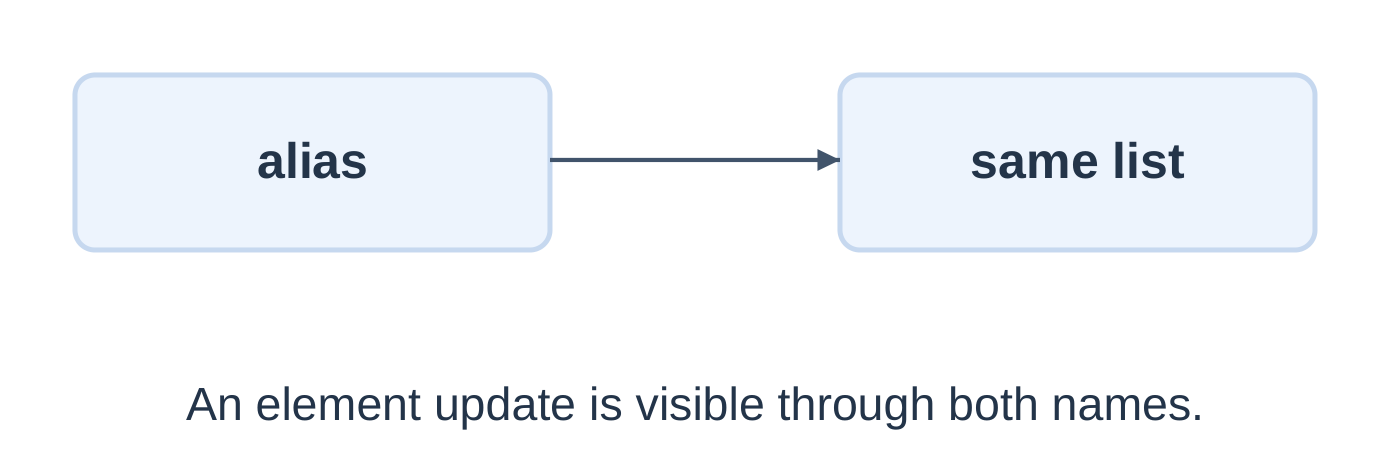
The shallow copy is a separate outer list, but nested mutable objects can remain shared. The independent replacement behaviour here uses flat numeric data.
sum([]) is zero, but min/max of an empty list raise ValueError. Check nonempty input before extrema and mean calculations.
5.6 Tutorial: Five Students’ Marks
Store five accepted integer marks in 0–100, retaining duplicates, then calculate extrema and mean.
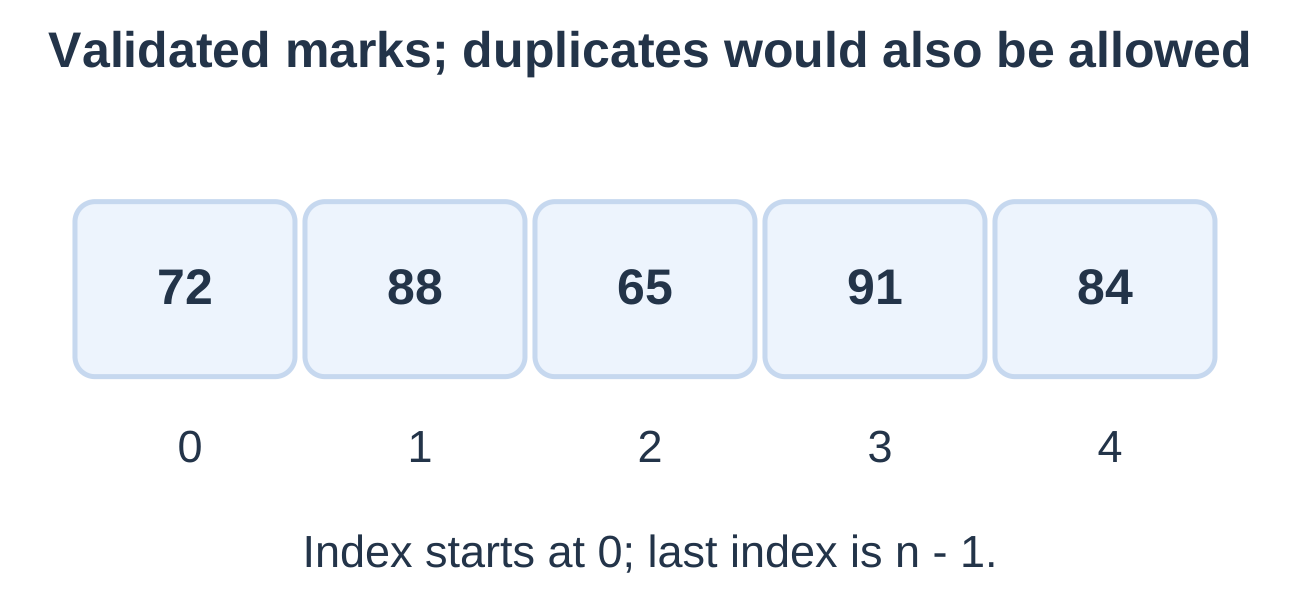
print(“Maximum:”, max(marks)) print(“Minimum:”, min(marks)) average = sum(marks) / len(marks) print(f”Average: {average:.2f}”)
Input lines: 72, 88, 65, 91, 84.
Maximum: 91 Minimum: 65 Average: 80.00Total = 400; count = 5. Invalid input does not consume a list position. The input contract assumes five valid entries eventually arrive; EOF handling is not included.
Five zeros produce all-zero summaries. Five hundreds produce all-100 summaries. A fixed five-iteration loop with continue would not guarantee five accepted entries; the length-controlled while loop does.
For [60, 60, 60, 100, 100], mean is 76.00. Averaging unique values instead gives 80.00 and answers a different question.
5.7 Tuples and Fixed Records
A tuple is an ordered sequence whose own element references cannot be replaced.
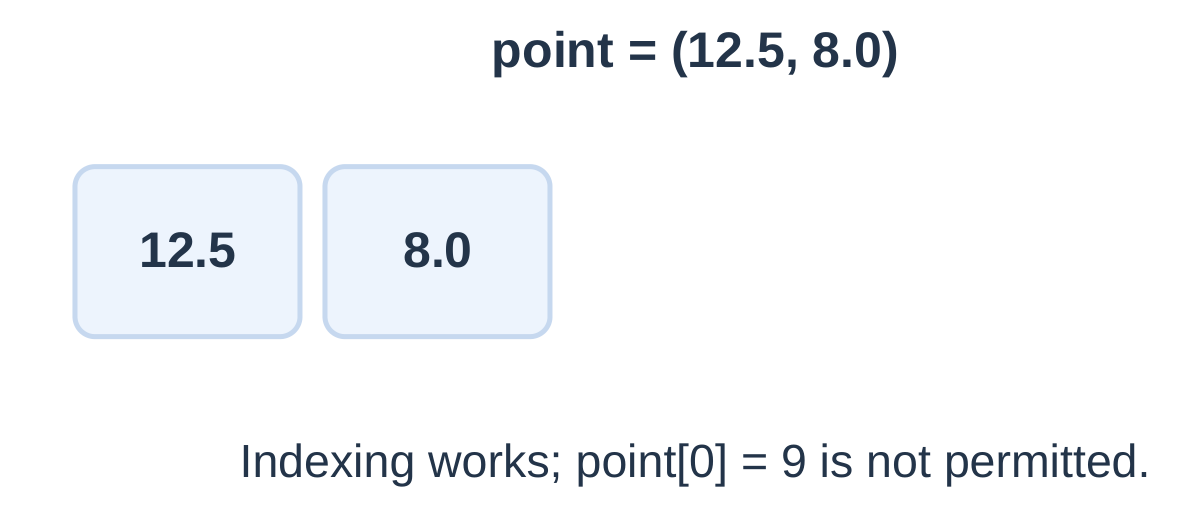
The last output is 1 int: (5,) is a one-element tuple, while (5) is the grouped integer. The empty tuple is ().
Unpacking requires a matching number of ordinary targets. Tuple immutability does not freeze a nested mutable list. Rebinding a name to another tuple is also permitted.
Return a Result Pair
def bounds(values): if not values: return None return min(values), max(values)result = bounds([72, 88, 65, 91, 84]) if result is not None: low, high = result print(“Low:”, low) print(“High:”, high)
Output: Low: 65; High: 91. One tuple object contains the two returned values. Check None before unpacking an empty-data result.
5.8 Dictionary Keys and Values
A dictionary maps unique hashable keys to values. Lookup uses keys, not sequence positions.
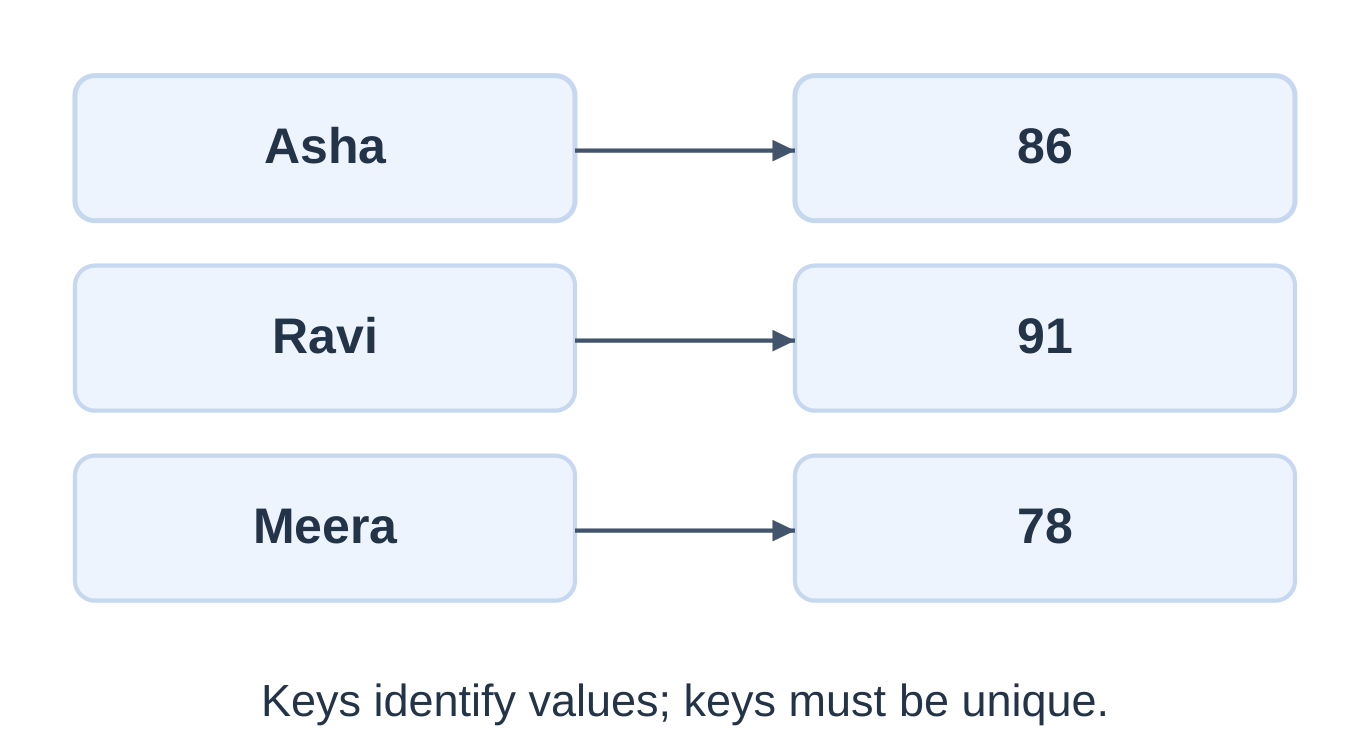
Output: 88, 3 and True.
Updating an existing key replaces its value; it does not create another entry. Different keys may contain equal values. Real student records should use unambiguous IDs when names can repeat.
Missing Keys
| Operation | Behaviour |
|---|---|
| d[k] | Lookup; KeyError if absent |
| d.get(k) | Value, or None if absent |
| d.get(k, fallback) | Value or supplied fallback |
| del d[k] | Delete existing key |
| d.pop(k, fallback) | Remove and return value, or fallback |
| d.clear() | Remove all entries |
get does not insert a missing key. A genuine zero mark differs from absence; check value is None rather than general falseness when None is the marker.
91 in marks tests keys. To test stored marks, use 91 in marks.values().
Lists are unhashable and cannot be dictionary keys. A tuple can be hashable when its elements are hashable.
5.9 Tutorial: Three Student Records
marks = {“Asha”: 86, “Ravi”: 91, “Meera”: 78} for name, mark in marks.items(): print(f”{name}: {mark}”) print(“Students:”, len(marks)) Asha: 86 Ravi: 91 Meera: 78 Students: 3| Iteration form | Items supplied |
|---|---|
| for key in marks | Keys |
| marks.keys() | Keys |
| marks.values() | Values |
| marks.items() | Key/value pairs |
Insertion order is not automatic alphabetical order. Updating a value keeps its key’s position; deleting and reinserting establishes a new insertion position. Avoid changing dictionary size during live-view iteration.
Highest Record and Mean
marks = {“Asha”: 86, “Ravi”: 91, “Meera”: 78} best_name = None best_mark = None for name, mark in marks.items(): if best_mark is None or mark > best_mark: best_name, best_mark = name, mark print(“Best:”, best_name, best_mark) print(f”Mean: {sum(marks.values()) / len(marks):.2f}”)Output: Best: Ravi 91; Mean: 85.00.
The fixed input is nonempty. Strict greater-than retains the first tied best record. If Meera changes to 93, the dictionary still has three entries and mean becomes 90.00.
5.10 Tutorial: Word Frequency
Map each normalized word to an occurrence count. Define tokenization before counting.
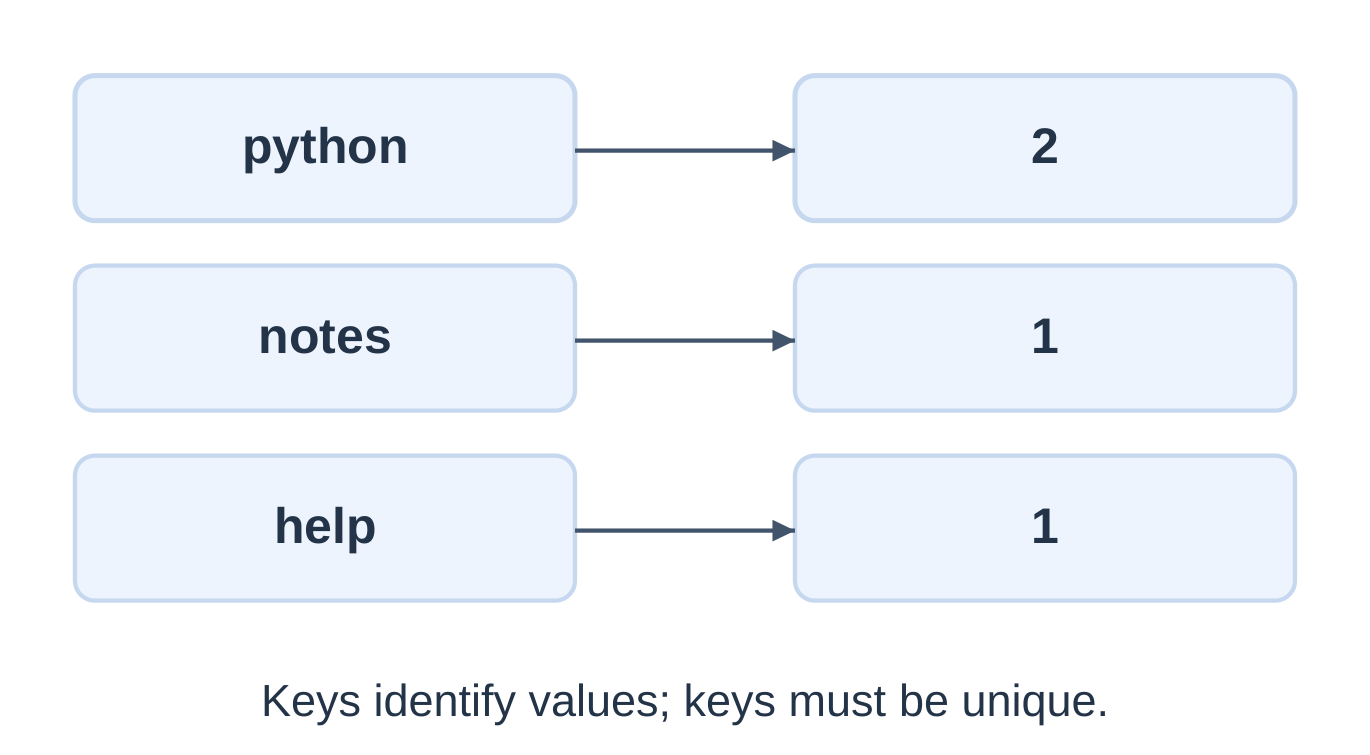
The example lowercases and splits on whitespace. It does not remove punctuation: notes and notes, remain distinct tokens.
| Text | Result under these rules |
|---|---|
| C c C | c: 3 |
| notes notes, | Two distinct tokens |
| a followed by repeated spaces then a | a: 2 |
| Whitespace only | Empty dictionary |
The count values sum to the total token occurrences. Dictionary length counts distinct normalized tokens. The sample has four occurrences and three distinct words.
The same pattern counts repeated course codes or status labels. Changing normalization changes which inputs count as equal.
5.11 Sets and Unique Membership
A set stores distinct hashable elements without sequence indexing.
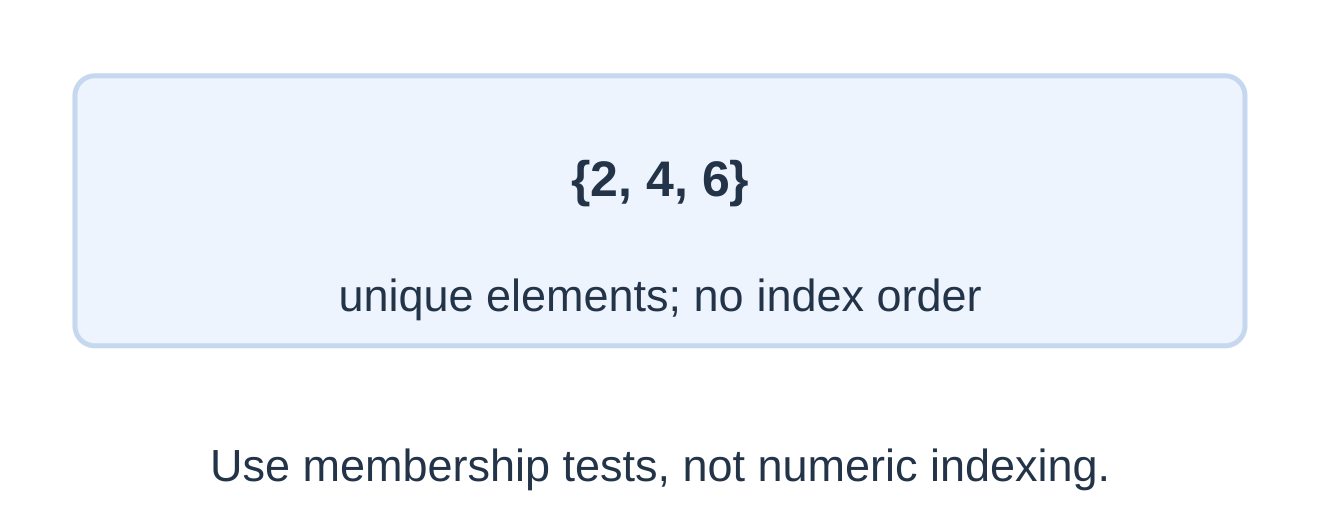
Use set() for an empty set. {} creates an empty dictionary.
| Method | Behaviour |
|---|---|
| add(x) | Add one member |
| update(iterable) | Add iterable members |
| remove(x) | Remove; KeyError if absent |
| discard(x) | Remove if present; no missing-member error |
| pop() | Remove an arbitrary member; error if empty |
| clear() | Remove all members |
Set pop is not “first” or “smallest”. Sort comparable members for predictable display. Lists cannot be set members because they are unhashable.
Do not deduplicate repeated observations when their occurrence counts are needed for a mean.
5.12 Basic Set Relationships
Let a = {1, 2, 3} and b = {3, 4}.
| Operation | Meaning | Result |
|---|---|---|
| Union | In either set | {1, 2, 3, 4} |
| Intersection | In both | {3} |
| a minus b | In a but not b | {1, 2} |
| b minus a | In b but not a | {4} |
| Symmetric difference | In exactly one | {1, 2, 4} |
Both final comparisons are True. Set equality concerns membership, not printed order.
a <= b tests subset including equality; a < b tests a proper subset. The empty set is a subset of every set. Difference is directional, unlike union and intersection.
These nonmutating operators produce new sets. For identical sets, difference and symmetric difference are empty. For disjoint sets, intersection is empty.
5.13 Collection Selection in Practice
| Requirement | Representation |
|---|---|
| Marks in entry order | List |
| Distinct marks | Set |
| Mark occurrence counts | Dictionary: mark to count |
| Fixed lower/upper pair | Tuple |
| Student ID to mark | Dictionary |
For [80, 80, 100], the observation mean is approximately 86.67. Averaging {80, 100} gives 90.00 because deduplication changed the data.
courses = [“CSE”, “EE”, “CSE”, “ME”] frequency = {} for course in courses: frequency[course] = frequency.get(course, 0) + 1 for course in sorted(frequency): print(course, frequency[course]) print(“Unique:”, len(frequency))The counts are CSE 2, EE 1 and ME 1; there are three distinct labels and four occurrences.
A set cannot reconstruct lost multiplicity or ordering. A source list preserves both; a frequency dictionary preserves counts. Explain whether each operation mutates an object or returns a new result.
5.14 Text Files and with Blocks
A text file preserves characters between program runs. open creates a file object; with closes it when its suite exits, including exceptional exits.
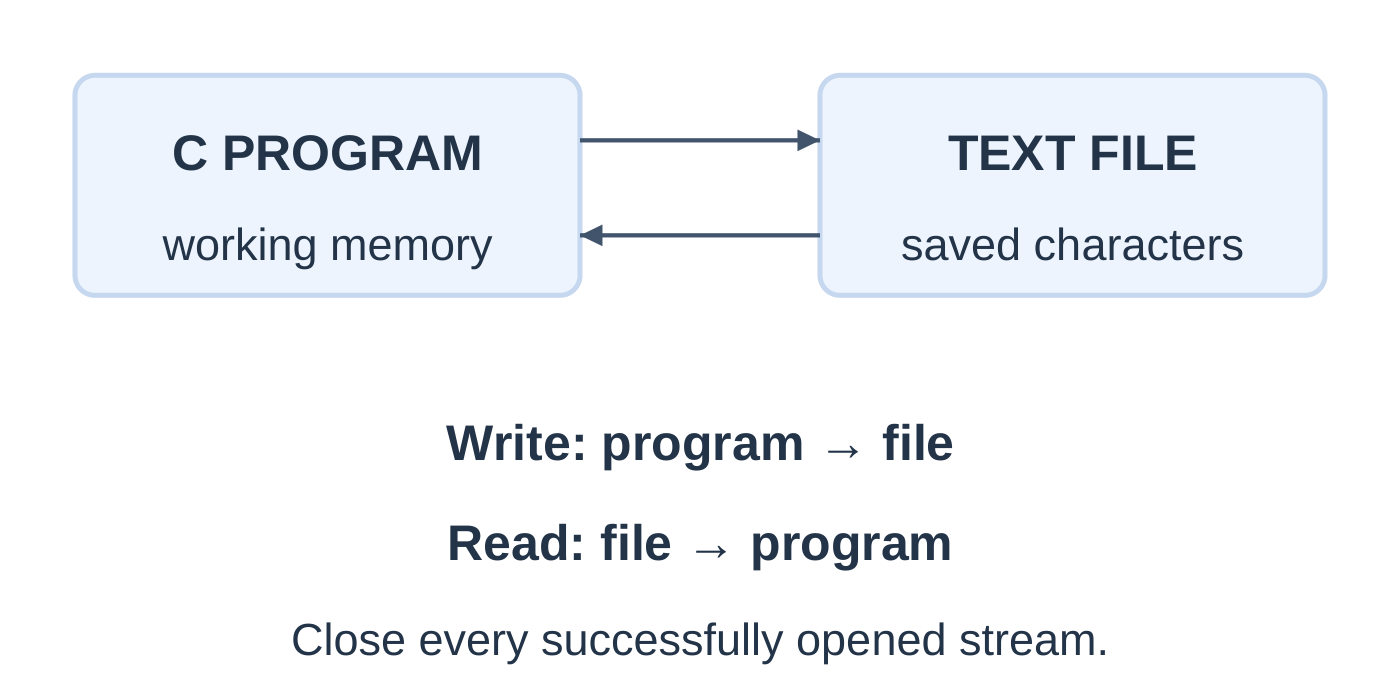
| Mode | Behaviour |
|---|---|
| r | Read existing text; fail if absent |
| w | Create or truncate for writing |
| a | Preserve and append; create if absent |
| x | Create only; fail if already present |
Relative paths are resolved from the current working directory. Opening with w replaces existing content before later writes.
with open(“ng_intro.txt”, “w”, encoding=”utf-8″) as file: file.write(“NotesGallery\n”) with open(“ng_intro.txt”, “r”, encoding=”utf-8″) as file: text = file.read() print(text, end=””)Output: NotesGallery followed by one newline.
| Method | Purpose |
|---|---|
| write(text) | Write a string; no automatic newline |
| read() | Read remaining text |
| readline() | Read one line; empty string at end |
| for line in file | Iterate successive lines |
| file.closed | Whether the file is closed |
Text encoding converts between stored bytes and str objects. read without a size loads remaining content into memory; line iteration is preferable for processing large files incrementally.
After a full read, another read at the unchanged end position returns an empty string. Reopen or reposition to read again.
5.15 Tutorial: Write Student Records
Define a file format before writing. This simple format uses one name, comma and mark per line.
students = {“Asha”: 86, “Ravi”: 91, “Meera”: 78} with open(“ng_students.txt”, “w”, encoding=”utf-8″) as file: for name, mark in students.items(): file.write(f”{name},{mark}\n”) print(“Saved 3 records”)File content:
Asha,86 Ravi,91 Meera,78Names must contain no comma or embedded newline; marks are already validated integers. Use csv.writer for general comma-containing fields.
Append a Record
with open(“ng_append.txt”, “a”, encoding=”utf-8″) as file: file.write(“Ravi,91\n”) print(“Appended”)Repeated runs append repeated records; no duplicate detection occurs. The earlier content needs a separator if a new line is required.
Handle File Errors
try: with open(“ng_checked.txt”, “w”, encoding=”utf-8″) as file: file.write(“Asha,86\n”) except OSError: print(“Could not save file”) else: print(“Saved”)The success message follows completion of the with statement, including closing. Catching OSError does not validate record contents. Inspect saved text as well as console messages.
5.16 Tutorial: Read and Display Records
try: with open(“ng_students.txt”, “r”, encoding=”utf-8″) as file: for line in file: print(line, end=””) except OSError: print(“Could not read file”)For the previous file, output reproduces Asha,86; Ravi,91; Meera,78 on their saved lines.
Using end=”” avoids extra newlines. An empty file produces no record lines. A final line without a newline is still returned.
Count Nonblank Lines
count = 0 with open(“ng_students.txt”, “r”, encoding=”utf-8″) as file: for line in file: if line.strip(): count += 1 print(“Nonblank lines:”, count)This counts formatting, not validated student records. Malformed nonblank text still counts.
rstrip(“\n”) removes trailing newline characters; strip removes whitespace more broadly. Preserve meaningful spaces when needed.
A readline result of “\n” is a blank line. A result of “” indicates no more text. Confusing them can stop a reader prematurely.
5.17 Reading and Writing a Small CSV
CSV represents rows and fields, usually comma-delimited. Quoted fields can contain commas or newlines. Use the csv module rather than plain comma splitting.
import csvwith open(“ng_marks.csv”, newline=””, encoding=”utf-8″) as file: for row in csv.reader(file): print(row)
For the file:
name,mark Asha,86 Ravi,91Output is:
[‘name’, ‘mark’] [‘Asha’, ’86’] [‘Ravi’, ’91’]Every field is text until converted. The header is included unless explicitly consumed.
Write Matching CSV
import csvwith open(“ng_created.csv”, “w”, newline=””, encoding=”utf-8″) as file: writer = csv.writer(file) writer.writerow([“name”, “mark”]) writer.writerow([“Asha, K”, 86]) print(“CSV saved”)
The writer supplies quoting. The record “Asha, K”,86 contains two fields, not three. A naive split would misinterpret it.
Use newline=”” to let the csv module manage newline handling. Verify row lengths before unpacking. A blank CSV row can produce an empty list.
5.18 Convert and Validate CSV Fields
Check the exact header, field count, numeric conversion, range and nonempty data before calculating a mean.
import csvtry: values = [] with open(“ng_marks.csv”, newline=””, encoding=”utf-8″) as file: rows = csv.reader(file) header = next(rows, None) if header != [“name”, “mark”]: raise ValueError(“Bad header”) for row in rows: if not row: continue if len(row) != 2: raise ValueError(“Bad row”) mark = int(row[1]) if not 0 <= mark <= 100: raise ValueError(“Range”) values.append(mark) if values: mean = sum(values) / len(values) print(f”Mean: {mean:.2f}”) else: print(“No records”) except OSError: print(“File unavailable”) except ValueError: print(“Invalid CSV data”)
For Asha 86 and Ravi 91, total is 177, count is two and output is Mean: 88.50.
| Situation | Behaviour |
|---|---|
| Correct header, no records | No records |
| Completely empty file | Invalid CSV data |
| Mark is absent or out of range | Invalid CSV data |
| Blank row | Skip |
| Missing file | File unavailable |
This is a small-file tutorial assuming well-formed CSV text in the stated dialect. It validates marks and row shape, not every possible name, encoding or malformed-CSV recovery case.
5.19 Introduction to NumPy
NumPy provides numerical arrays and operations. An ndarray has a common element dtype and supports elementwise processing.
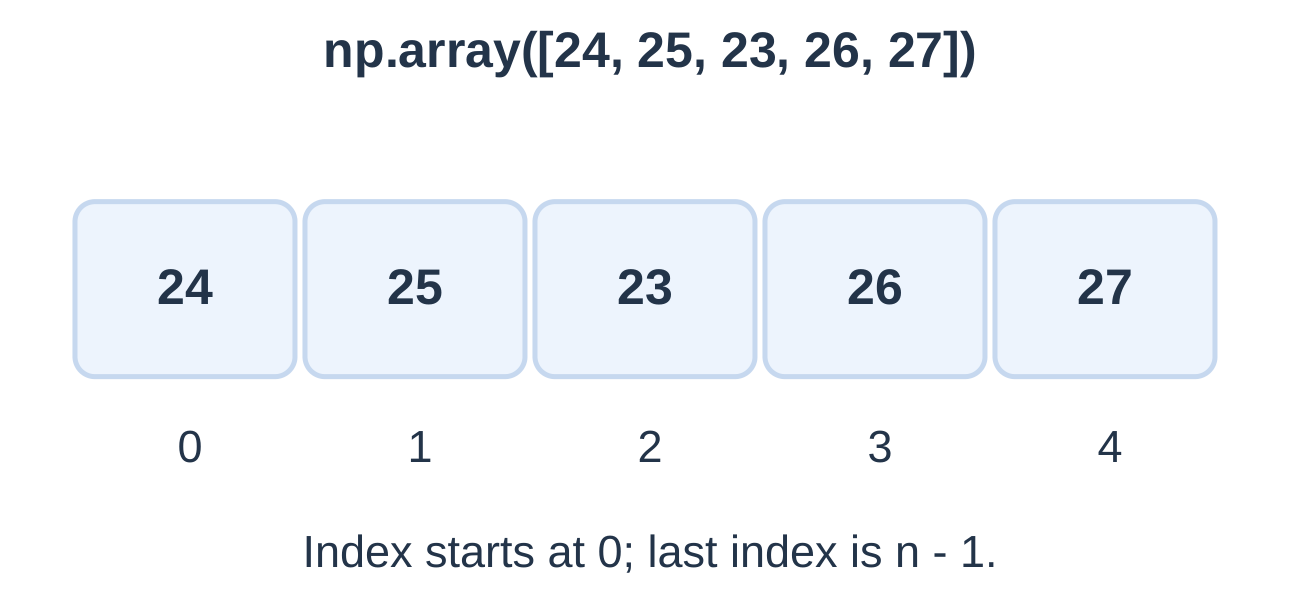
Adding two creates a new result; it does not modify readings unless an assignment or in-place operation is used.
| Property | Meaning |
|---|---|
| a.ndim | Number of axes |
| a.shape | Arrangement as a tuple |
| a.size | Total element count |
| a.dtype | Element representation type |
| a[0] | First element |
| np.mean(a) | Mean |
A shape of (3,) means one axis with three elements, not a matrix. Shape and dtype are different properties.
NumPy integer dtypes can have fixed-width overflow limits, unlike ordinary Python int objects. Use suitable types and small valid values in these examples. Check for data before requesting a meaningful mean.
5.20 NumPy Arithmetic Versus Lists
Same-shaped numeric arrays perform arithmetic element by element.
import numpy as npa = np.array([1, 2, 3]) b = np.array([10, 20, 30]) print(a + b) print(a * b) print(a * 2) print(a)
[11 22 33] [10 40 90] [2 4 6] [1 2 3]Multiplication here is elementwise, not matrix multiplication. Matching indexes should represent compatible observations.
| Operation | List | NumPy array |
|---|---|---|
| Multiply by 2 | Repeat sequence | Scale each value |
| Add compatible sequence | Concatenate lists | Add matching numbers |
| Add numeric scalar | Not list concatenation | Add scalar to each element |
Temperature Conversion
import numpy as npcelsius = np.array([0.0, 25.0, 100.0]) fahrenheit = celsius * 9 / 5 + 32 print(fahrenheit)
The corresponding values are 32, 77 and 212 Fahrenheit. Array syntax does not validate units or scientific meaning automatically.
5.21 Matplotlib: A Simple Line Plot
Matplotlib creates plots. The pyplot interface can plot ordinary Python lists; NumPy is not required for every graph.
import matplotlib.pyplot as plt x = [1, 2, 3, 4, 5] y = [72, 88, 65, 91, 84] plt.plot(x, y, marker=”o”) plt.show()The output is a figure, not console text. The x/y sequences must contain corresponding observations.
Label and Save a Plot
import matplotlib.pyplot as pltx = [1, 2, 3, 4, 5] y = [72, 88, 65, 91, 84] plt.plot(x, y, marker=”o”) plt.xlabel(“Student index”) plt.ylabel(“Marks”) plt.title(“Five students”) plt.ylim(0, 100) plt.grid(True, alpha=0.3) plt.tight_layout() plt.savefig(“ng_marks_plot.png”, dpi=150) plt.close()
Save before closing. show suits interactive display; savefig suits a reproducible image output.
Before plotting, check equal sequence lengths, corresponding numeric observations, meaningful order, labels and units. A line follows the supplied order; it does not establish causation or create extra observations.
5.22 Read and Explain the Graph
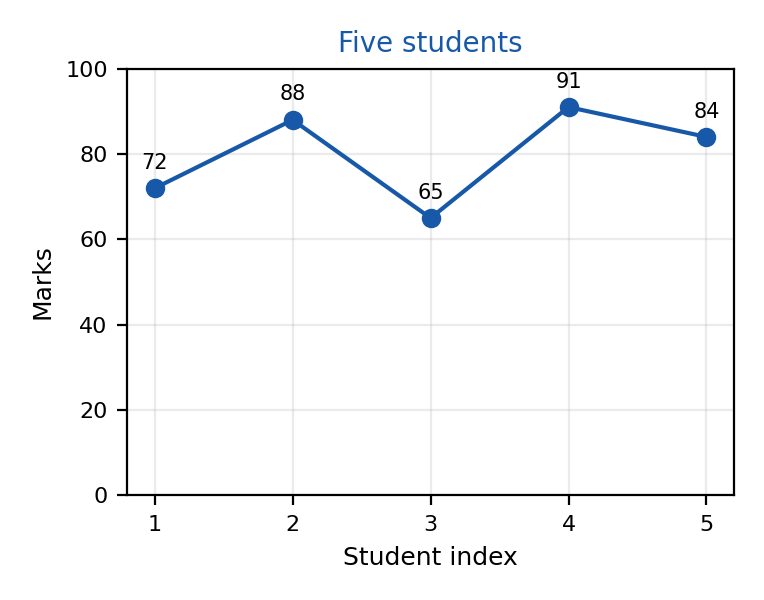
| Point | Coordinates | Meaning |
|---|---|---|
| First | (1, 72) | Student 1 has 72 |
| Lowest | (3, 65) | Student 3 has 65 |
| Highest | (4, 91) | Student 4 has 91 |
| Last | (5, 84) | Student 5 has 84 |
The difference between students 3 and 4 is 26 marks. This compares two students; it does not measure one student’s improvement over time.
The illustrated mark axis spans 0–100. Axis scale affects visual impressions, so read ticks before judging change. Connected segments do not measure unobserved intermediate marks.
Plot a Known Formula
import matplotlib.pyplot as pltx = [0, 1, 2, 3] y = [] for value in x: y.append(2 * value + 1) plt.plot(x, y, marker=”o”) plt.xlabel(“x”) plt.ylabel(“2x + 1”) plt.savefig(“ng_formula.png”, dpi=150) plt.close()
Check the points (0,1), (1,3), (2,5), (3,7). A straight-looking plot with wrong coordinates remains incorrect.
5.23 Mini-Demo: Simulated IoT Readings
An IoT-style workflow acquires data, stores it, computes summaries and displays observations. This demonstration uses five synthetic temperatures, not a connected sensor.
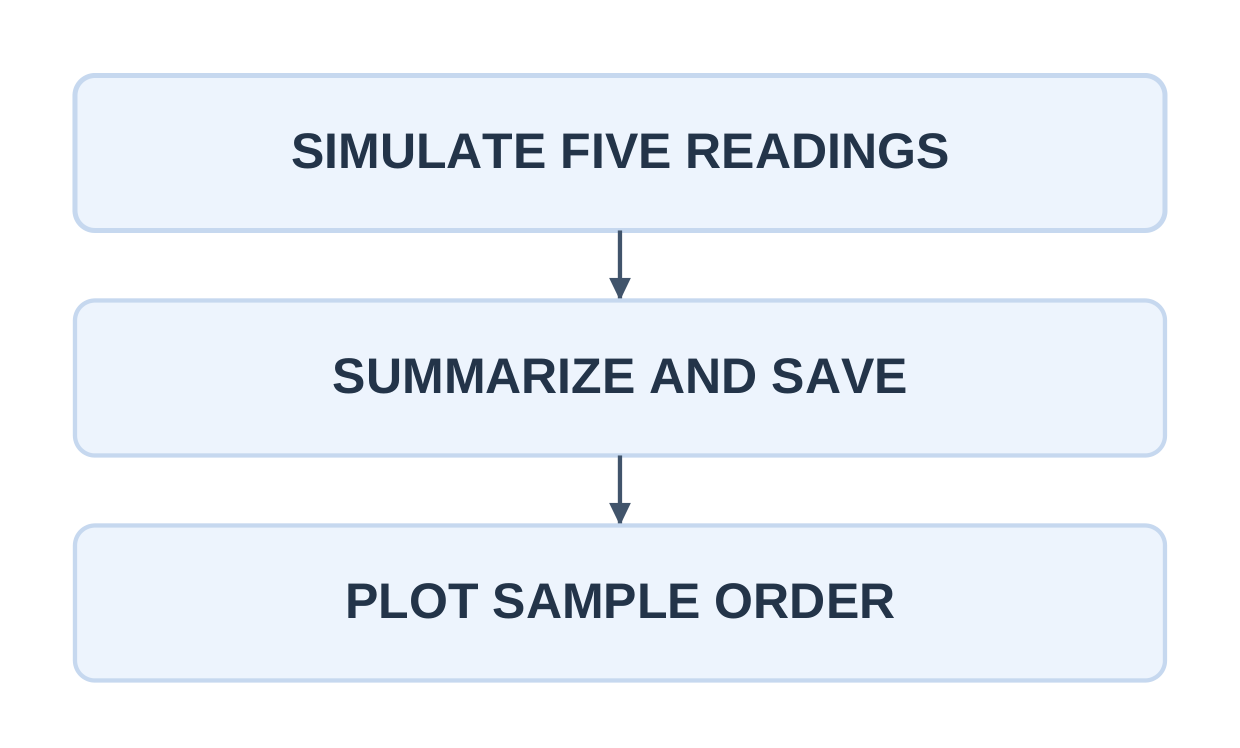
| Sample | Offset from 25°C | Temperature |
|---|---|---|
| 1 | -0.5 | 24.5°C |
| 2 | 0.0 | 25.0°C |
| 3 | 0.8 | 25.8°C |
| 4 | 0.3 | 25.3°C |
| 5 | -0.2 | 24.8°C |
offsets = [-0.5, 0.0, 0.8, 0.3, -0.2] temperatures = np.array(offsets) + 25 samples = [1, 2, 3, 4, 5] print(f”Mean: {temperatures.mean():.2f} C”)
with open(“ng_sensor.csv”, “w”, newline=””, encoding=”utf-8″) as file: writer = csv.writer(file) writer.writerow([“sample”, “temp_c”]) for i, value in zip(samples, temperatures): writer.writerow([i, f”{value:.1f}”])
plt.plot(samples, temperatures, marker=”o”) plt.xlabel(“Sample index”) plt.ylabel(“Temperature (C)”) plt.title(“Simulated readings”) plt.grid(True, alpha=0.3) plt.tight_layout() plt.savefig(“ng_sensor_plot.png”, dpi=150) plt.close()
Console output: Mean: 25.08 C.
The numeric total is 125.4 across five readings; dividing by five gives 25.08°C. Minimum is 24.5°C, maximum is 25.8°C and range is 1.3°C.
Sample index is acquisition order, not measured seconds. No network, calibration, physical alarm or live sensor is implemented. Real acquisition would replace the generation stage.
Ordinary zip stops at the shorter sequence; ensure lengths agree if every observation must be retained. Fixed offsets make outputs repeatable without assuming random numbers model a real sensor.
5.24 Trace the Saved-Data Workflow
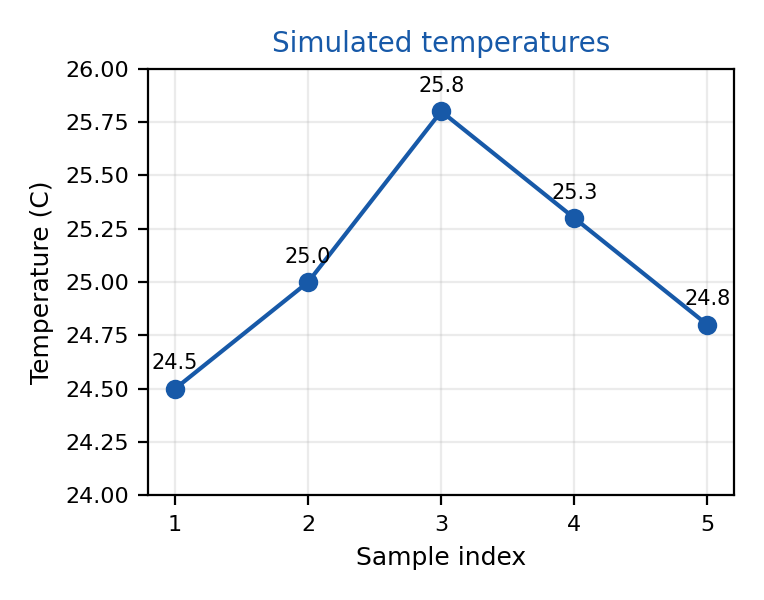
The demonstration saves a CSV and a graph. Keeping the CSV lets another run recompute summaries from stored values.
Read and Summarize Stored Temperatures
import csv import mathvalues = [] with open(“ng_sensor.csv”, newline=””, encoding=”utf-8″) as file: rows = csv.reader(file) header = next(rows, None) if header != [“sample”, “temp_c”]: raise ValueError(“Bad header”) for row in rows: if len(row) != 2: raise ValueError(“Bad row”) value = float(row[1]) if not math.isfinite(value): raise ValueError(“Nonfinite”) values.append(value)
if not values: raise ValueError(“No readings”) print(“Count:”, len(values)) print(f”Low: {min(values):.1f} C”) print(f”High: {max(values):.1f} C”) print(f”Mean: {sum(values) / len(values):.2f} C”)
Count: 5 Low: 24.5 C High: 25.8 C Mean: 25.08 CThis reader validates the header, row width, finite temperatures and nonempty data. It treats sample IDs as labels; it does not validate their sequence, uniqueness or exact 1–5 membership.
The temperature plot uses a narrow nonzero axis range to reveal small variations. Read its tick labels; the graphic makes no claim about a measured physical process.
The saved values have one decimal place, matching the source examples. Rounding higher-precision future data before saving could change a recomputed mean. Specify whether stored data is raw or rounded.
5.25 Quick Revision and Examination Practice
Essential Rules
- Lists are ordered, mutable and retain duplicates.
- Tuples preserve ordered references without element replacement.
- Dictionaries use unique hashable keys and preserve insertion order.
- Sets contain unique hashable members without sequence indexing.
- Append adds one object; extend adds iterable elements.
- Assignment can create an alias; copy makes a new shallow container.
- In-place list sorting returns None.
- Empty input needs handling before min, max or mean.
- With closes a file on leaving the suite.
- CSV readers supply strings; numeric conversion is deliberate.
- NumPy multiplication is elementwise in these examples; list multiplication repeats.
- A graph needs matching x/y observations, meaningful labels and verified points.
- Simulated readings are not live hardware measurements.
Short-Answer Questions
- Compare list, tuple, dictionary and set.
- Why is {} not an empty set?
- Explain append versus extend with a nested-list example.
- Distinguish aliasing from shallow copying.
- How does get handle a missing key?
- Why can duplicate removal change an average?
- Explain the token rules in the word-frequency example.
- Why use newline=”” with CSV files?
- Compare list repetition with NumPy scaling.
- What must be checked before plotting x and y?
- Why is sample index not automatically elapsed time?
Long-Answer Questions
- Compare all four collections with access, mutation and duplicate rules.
- Write a validated five-mark summary and explain rejected-input retries.
- Write a dictionary word-frequency program and trace its counts.
- Explain union, intersection, difference and subset with examples.
- Write and read student text records, stating the format contract.
- Explain CSV parsing, header checks and numeric field validation.
- Demonstrate a NumPy array, mean and basic arithmetic.
- Create a labelled Matplotlib line graph and interpret its points.
- Trace the simulated IoT workflow through generation, CSV storage and plotting.
Solved Answer Checks
| Question | Answer |
|---|---|
| [1,2] after append([3,4]): length | 3 |
| b = a; then b[0] = 9 | Shared list a also changes |
| d = {“x”:1}; d[“x”] = 5: length and value | 1 and 5 |
| Intersection of {1,2} and {2,3} | {2} |
| {1,2} minus {2,3} | {1} |
| CSV field “86” after int conversion | Integer 86 |
| NumPy [1,2,3] multiplied by 2 | Values 2,4,6 |
| Python list [1,2,3] multiplied by 2 | [1,2,3,1,2,3] |
| Mean of marks 72,88,65,91,84 | 80.00 |
| Mean of five simulated temperatures | 25.08°C |
| Highest simulated sample | Sample 3, 25.8°C |
Frequently Asked Questions
What does Programming Languages Unit 5 cover?
It covers basic Python collections, text files, CSV processing, introductory NumPy and Matplotlib, and a small simulated sensor-data workflow.
Which collection should store repeated marks?
Use a list when every observation must retain its place and contribution. A set removes repeated equal values.
Does append return the updated list?
No. It mutates the existing list and returns None.
Does csv.reader convert numbers automatically?
No. Fields are strings. Convert and validate numeric fields before arithmetic.
Is NumPy array multiplication the same as list multiplication?
No. Multiplying a numeric NumPy array by a scalar scales its values; multiplying a list by an integer repeats the sequence.
Does the IoT example read a real sensor?
No. It creates five deterministic synthetic temperatures to demonstrate processing, saving and plotting.
How should the final workflow be checked?
Compare the numeric readings, CSV rows, printed mean and plotted points. All should describe the same data under the stated precision and identifier rules.