
Course Code: BP101T
Unit II Overview
Course: BP101T – Basics of Python Programming for Pharmaceutical Sciences.
Unit II: Control Structures and Functions.
A program becomes useful when it can choose an action, repeat a calculation and organise instructions into reusable functions. This unit develops those three abilities from simple laboratory examples.
Topics Covered – Syllabus Coverage
| Required topic | Coverage |
|---|---|
| if, if-else, if-elif-else and nested conditions | Sections 2.1-2.4 |
| for and while loops | Sections 2.5-2.8 |
| break and continue | Sections 2.9-2.10 |
| Define/call functions; arguments; return values | Sections 2.11-2.15 |
| Modular pharmaceutical programs; dose arithmetic and BMI | Sections 2.16-2.20 |
Learning outcomes
Trace decisions and loops; write a terminating loop; design a function with explicit inputs and outputs; check units and boundary values; explain a modular calculation.
Prerequisites
- Understand variables, numeric types, strings, Boolean expressions and input()/print() from Unit I.
- Recognise = as assignment and == as comparison. Use parentheses to make conditions clear.
- Use the selected Python environment consistently. Save scripts before running; run notebook cells in order.
Scientific context
The pharmaceutical examples use fictitious measurements and identifiers. A rule invented for a programming exercise is not an assay specification. Dose calculations demonstrate arithmetic with a supplied regimen; the program does not choose a drug, dose or treatment.
Study approach
Read the rule, trace one example by hand, run the code, compare the result and then test an edge case. An output is meaningful only when it agrees with the intended rule.
2.1 Selection, Boolean conditions and indentation
Selection means choosing instructions according to a condition. A condition is tested when execution reaches the decision. In the examples, comparison operators produce True or False.
| Operator | Meaning | Example |
|---|---|---|
| == / != | Equal / not equal | sample_id == “A01” |
| > / < | Greater / less | count > 0 |
| >= / <= | Include equality | volume_ml > 0 |
| and | Both conditions true | mass_mg >= 0 and volume_ml > 0 |
| or | At least one true | flag == “A” or flag == “B” |
| not | Reverse truth | not valid |
A compound statement ends its header with a colon. Its body is indented. Four spaces per level are conventional. All instructions belonging to the same block align vertically. Mixing tabs and spaces may produce an indentation error.
count = 4 if count > 0: print(“Records available”) print(“Check complete”)Output
Records available Check completeTrace the block
- The first print belongs to if because it is indented. It executes only when count > 0.
- The second print is outside the block and executes after the decision, regardless of that condition.
Memory trick
Colon opens the block; indentation shows its boundary. Align related lines, then return to the earlier indentation when the block ends.
Truth and scientific data
Zero, an empty string and an empty collection are false in a truth test. Non-empty strings are true even when their text is “False”. For measurements, an explicit comparison such as volume_ml > 0 is clearer than relying on truthiness.
print(bool(0)) print(bool(“False”)) print(3 < 5 and 5 <= 5)Output
False True True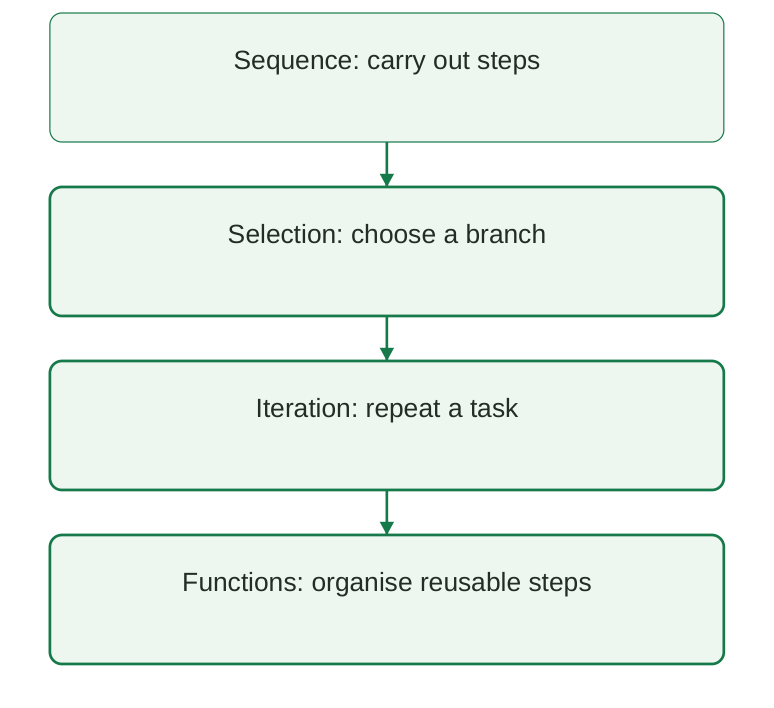
Diagram labels: Sequence carries out steps; selection chooses a branch; iteration repeats a task; functions organise reusable steps.
Diagram explanation: These are complementary ideas. A function may contain decisions and loops. The diagram is a learning order, not a compulsory execution sequence.
2.2 The simple if statement
An if statement runs its body only when its condition is true. When the condition is false, the body is skipped. There is no alternative action unless one is explicitly provided.
assay_percent = 97.0 if assay_percent < 98.0: print(“Flag for exercise review”) print(“Record retained”)Output
Flag for exercise review Record retainedThe 98.0 boundary is a made-up teaching rule. It must not be used as a pharmaceutical acceptance limit. A real specification must come from the validated method and applicable standard.
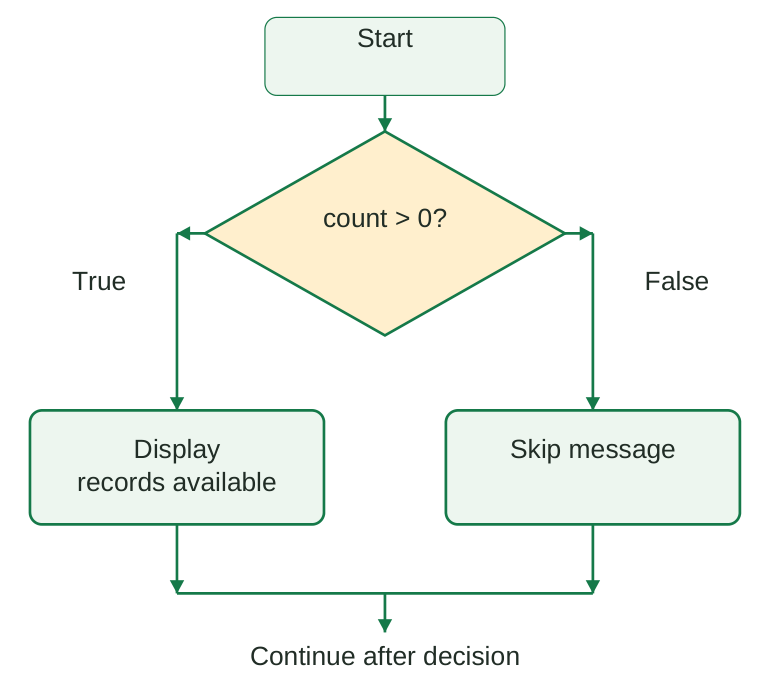
Diagram labels: Start → test count > 0. The True path displays records available; the False path skips the message. Both continue after the decision.
Diagram explanation: True executes the message; False bypasses it. Both paths rejoin after the if block. Only the condition is tested; the flowchart does not read input.
Stepwise construction
- Step 1: state the condition in words: display a message only when records exist.
- Step 2: translate it into count > 0 and finish the header with a colon.
- Step 3: indent the desired action. Keep later unconditional actions outside the block.
- Step 4: test count = 4 and count = 0. Confirm that the message appears only in the first case.
Two independent if statements
value = 5 if value > 0: print(“Positive”) if value < 10: print(“Below ten”)Output
Positive Below tenBoth messages appear because each condition is tested independently. Independent if statements are appropriate when more than one rule may legitimately apply.
2.3 if-else and if-elif-else
if-else chooses one of two mutually exclusive paths. If the condition is true, Python executes the if body; otherwise it executes the else body. else has no condition of its own.
volume_ml = 0.0 if volume_ml > 0: print(“Calculate concentration”) else: print(“Positive volume required”)Output
Positive volume requiredTesting a denominator before division prevents an arithmetic error. Positive volume alone does not establish that an input is scientifically plausible; a separate rule is needed for each requirement.
More than two alternatives
elif means else if. In a single chain, Python checks conditions from top to bottom and runs the first matching branch. It then skips the remaining branches. An optional final else handles the unmatched case.
count = 0 if count < 0: print(“Invalid count”) elif count == 0: print(“No records”) else: print(“Records available”)Output
No records| Form | Can multiple bodies run? | Best use |
|---|---|---|
| Separate if statements | Yes | Independent flags |
| if-else | Exactly one of two | Two alternatives |
| if-elif-else | First match only | Exclusive categories |
Order matters
value = 12 if value > 10: print(“Above ten”) elif value > 5: print(“Above five”) else: print(“Five or below”)Output
Above tenThe second condition is also mathematically true but its branch does not run because the first condition already matched. Put the most specific overlapping condition first or design non-overlapping intervals.
Exam distinction
else is a fallback. elif introduces another test. Writing else volume_ml > 0 is invalid Python syntax.
2.4 Nested conditions and boundary testing
A nested condition is a decision inside another decision. The inner condition is reached only when the surrounding branch executes. This is useful when a second check depends on the result of a first check.
mass_mg = 250.0 volume_ml = 50.0 if volume_ml > 0: if mass_mg >= 0: print(mass_mg / volume_ml) else: print(“Invalid mass”) else: print(“Invalid volume”)Output
5.0Here a positive volume opens the first branch. A non-negative mass then permits division. The outer else aligns with the outer if; the inner else aligns with the inner if. Misalignment changes the meaning.
Equivalent combined condition
mass_mg = 250.0 volume_ml = 50.0 if volume_ml > 0 and mass_mg >= 0: print(“Inputs meet arithmetic rules”) else: print(“At least one invalid input”)Output
Inputs meet arithmetic rulesThe combined form is shorter but gives a less specific error message. Nested conditions are useful when distinct messages or dependent actions are needed. Avoid deep nesting when a clear guard clause can simplify a function.
Boundary-value checks
| Test | Example | Expected branch |
|---|---|---|
| Just below boundary | value = 9.99; rule >= 10 | False |
| Exactly on boundary | value = 10; rule >= 10 | True |
| Just above boundary | value = 10.01; rule >= 10 | True |
| Zero denominator | volume_ml = 0 | Reject before division |
| Invalid sign | mass_mg = -1 | Reject negative mass |
A program should be checked at the boundaries where its behaviour changes. Test data must include the expected branch, not merely a number to type. For floating-point scientific measurements, distinguish instrument uncertainty from exact mathematical comparisons.
Common error
if x == 1 or 2 does not mean x equals 1 or 2. Use x == 1 or x == 2, or x in (1, 2).
2.5 for loops and iteration
A loop repeats a block. A Python for loop obtains successive items from an iterable and binds each item to the loop variable. It is suitable when a collection or a definite sequence supplies the work.
sample_ids = [“A01”, “A02”, “A03”] for sample_id in sample_ids: print(sample_id)Output
A01 A02 A03The list has three items, so the loop body runs three times. The name sample_id refers to a different item during each iteration. The list itself is not altered by this loop.
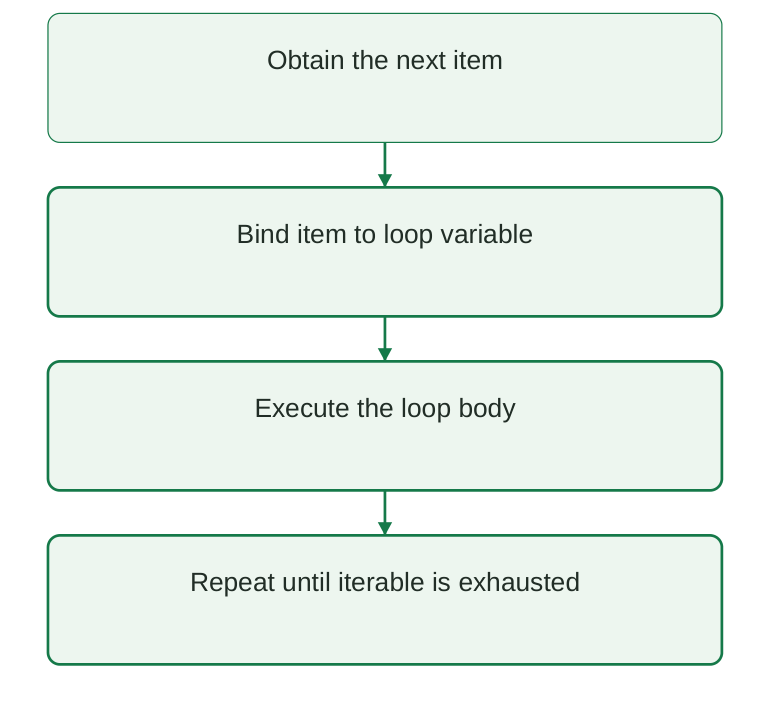
Diagram labels: Obtain the next item → bind the item to the loop variable → execute the body → repeat until the iterable is exhausted.
Diagram explanation: After each body execution, the loop requests another item. Exhaustion ends the loop. The last box summarises the repetition; it is not an extra Python statement.
Processing measurement values
masses_mg = [100.0, 200.0, 300.0] for mass_mg in masses_mg: concentration = mass_mg / 50.0 print(f”{concentration:.1f} mg/mL”)Output
2.0 mg/mL 4.0 mg/mL 6.0 mg/mLThe denominator is the same fictitious final volume for all three values. Each iteration uses one mass and prints one concentration. Real calculations require a correctly matched volume for each measurement.
Looping over text
for letter in “ADR”: print(letter)Output
A D R- A string provides characters; a list provides its elements. for is not limited to numeric counting.
- Do not remove items from the same list while iterating over it in a beginner program; create a filtered result or iterate over a copy.
Memory trick
for follows items. Read for item in collection as “take each item from the collection”.
2.6 range, counters and loop traces
range() supplies a sequence of integers. Its stop boundary is excluded. range(stop) begins at zero; range(start, stop) begins at start; range(start, stop, step) also specifies the increment.
| Expression | Values produced | Meaning |
|---|---|---|
| range(4) | 0, 1, 2, 3 | Four values |
| range(1, 5) | 1, 2, 3, 4 | Start at one |
| range(0, 7, 2) | 0, 2, 4, 6 | Step by two |
| range(3, 0, -1) | 3, 2, 1 | Count downward |
| range(2, 2) | No values | Empty range |
Output
Replicate 1 Replicate 2 Replicate 3range(1, 4) produces three replicate labels. range(1, 3) would produce only two. This off-by-one error is common when translating a human count into a stop-exclusive sequence.
Counter versus accumulator
total_mg = 0 count = 0 for mass_mg in [10, 20, 30]: total_mg += mass_mg count += 1 print(total_mg, count)Output
60 3| Iteration | mass_mg | total_mg after update | count |
|---|---|---|---|
| 1 | 10 | 10 | 1 |
| 2 | 20 | 30 | 2 |
| 3 | 30 | 60 | 3 |
A counter tracks how many events occurred. An accumulator combines values, usually by addition. Initialise both before the loop; placing total_mg = 0 inside the body discards earlier contributions.
Numbered records
for number, label in enumerate( [“A01”, “A02”], start=1 ): print(number, label)Output
1 A01 2 A02enumerate() supplies both a counter and an item. It avoids unnecessary indexing when only a display number and the item are required.
2.7 while loops and safe termination
A while loop repeats while its condition remains true. The condition is checked before every iteration. If it is false initially, the loop body never executes.
replicate = 1 while replicate <= 3: print(f”Reading {replicate}”) replicate += 1 print(“Finished”)Output
Reading 1 Reading 2 Reading 3 Finished| Stage | replicate | replicate <= 3 |
|---|---|---|
| Before first body | 1 | True |
| Before second body | 2 | True |
| Before third body | 3 | True |
| Before next test | 4 | False: loop stops |
A terminating counter-controlled loop needs an initial value, a condition and an update. Omitting the update leaves replicate equal to 1 forever. Choose an update that eventually makes the condition false.
for versus while
| Feature | for | while |
|---|---|---|
| Source of repetition | Items from an iterable | Repeated truth test |
| Best beginner use | Process each known record | Repeat until state changes |
| Progress update | Iterator advances automatically | Usually managed in body |
| Zero iterations | Empty iterable | False initial condition |
Condition-controlled repetition
remaining = 5 while remaining > 0: taken = min(2, remaining) remaining -= taken print(remaining)Output
3 1 0This example divides a fictitious stock count into groups of at most two. min() prevents the count from becoming negative. The stopping rule is about remaining items rather than a predetermined number of passes.
Memory trick
while needs “start, test, change”. Trace all three before running.
If an accidental infinite loop occurs in a terminal, interrupt it with Ctrl+C. In a notebook, use Interrupt Kernel. Then correct the stopping logic before running again.
2.8 Nested loops and batch-replicate organisation
A nested loop places one loop inside another. For each outer-loop item, the inner loop starts and processes all of its items. This is useful for repeated measurements within several batches.
for batch in [“A”, “B”]: for replicate in range(1, 3): print(batch, replicate)Output
A 1 A 2 B 1 B 2There are two batch labels and two replicate numbers. The body therefore runs 2 × 2 = 4 times. Its order is A1, A2, B1, B2 because all inner iterations finish before the outer loop advances.
| Outer item | Inner items | Printed combinations |
|---|---|---|
| A | 1 then 2 | A 1; A 2 |
| B | 1 then 2 | B 1; B 2 |
Trace before execution
- Step 1: list the outer items in their execution order.
- Step 2: for each outer item, list every inner item.
- Step 3: write the body output for each pair.
- Step 4: count the output lines and compare with the product of the sequence lengths.
Indentation and completion
for batch in [“A”, “B”]: for replicate in range(1, 3): print( “Measurement”, batch, replicate ) print(“Batch complete”, batch)Output
Measurement A 1 Measurement A 2 Batch complete A Measurement B 1 Measurement B 2 Batch complete BThe batch-complete message aligns with the inner for header, so it belongs to the outer body and runs once per batch. Moving it inward would print it after every replicate. Moving it fully outward would print it once after all batches.
Exam point
A break inside the inner loop stops that inner loop only. It does not automatically stop the outer loop.
2.9 break: ending a loop early
break exits the innermost enclosing loop immediately. Instructions remaining in that loop body are skipped. Execution resumes after the loop. It is useful when a required item has been found.
records = [“A01”, “A02”, “A03”] found = False for record in records: if record == “A02”: found = True print(“Found”, record) break print(“Search result:”, found)Output
Found A02 Search result: TrueA01 is examined first. A02 matches and triggers break. A03 is never examined. found preserves whether the search succeeded after the loop has ended.
No match
found = False for record in [“A01”, “A03”]: if record == “A02”: found = True break print(found)Output
FalseWithout a match, the loop finishes normally and found stays False. Avoid assuming that a searched record must exist. An empty iterable also leaves found unchanged.
Loop else: additional concept
for record in [“A01”, “A03”]: if record == “A02”: print(“Found”) break else: print(“No matching record”)Output
No matching recordA loop else runs when the loop completes without a break. It is different from the else attached to an if. Keep the indentation clear: this else aligns with for.
| Exit route | Meaning | Loop else |
|---|---|---|
| Iterable exhausted | Normal completion | Runs |
| while condition becomes false | Normal completion | Runs |
| break | Early loop exit | Skipped |
| return from function | Function exits | Skipped |
Memory trick
break = leave the loop. It is not a command to terminate the whole Python program.
2.10 continue, pass and practical filtering
continue skips the remainder of the current iteration and proceeds to the next iteration. Unlike break, it does not end the loop. It is useful for ignoring records that do not meet an exercise rule.
values = [12.0, -1.0, 18.0] for value in values: if value < 0: print(“Skipped invalid value”) continue print(“Kept”, value)Output
Kept 12.0 Skipped invalid value Kept 18.0The negative value is explicitly flagged and omitted. In real datasets, negative numbers are not automatically errors: a signed change from baseline can be negative. The validity rule must depend on the variable being measured.
| Keyword | Effect | After it executes |
|---|---|---|
| break | Leave innermost loop | Go after loop |
| continue | Skip remainder of this pass | Get next item / retest while |
| pass | Do nothing | Carry on with next statement |
Output
1 2pass is a placeholder statement. It does not skip the later print, so both values are printed. Use it only when a syntactic block is required but no action is intended.
Danger in a while loop
If continue appears before the counter update, a while loop may repeatedly test the same state. Update the state on every path or place the update before the skip. A for loop obtains the next item automatically.
n = 0 while n < 4: n += 1 if n == 2: continue print(n)Output
1 3 4Practice with a checkable answer
For the values 3, -2, 5, skip negative values and count retained observations. The answer is two retained observations and a retained sum of eight. A count must increase only when an observation is retained.
2.11 Defining and calling functions
A function is a named reusable block. A definition begins with def, gives the function name and parameter list in parentheses, and ends with a colon. The body is indented. Defining the function does not execute its body.
def show_heading(): print(“Laboratory summary”)show_heading() show_heading()
Output
Laboratory summary Laboratory summaryThe function is defined once and called twice. Parentheses perform the call. Writing show_heading without parentheses refers to the function object rather than running it.
Functions with inputs
def greet_sample(sample_id): print(“Sample:”, sample_id)greet_sample(“A01”)
Output
Sample: A01| Term | Meaning | Example |
|---|---|---|
| Function name | Reusable operation | greet_sample |
| Parameter | Name in the definition | sample_id |
| Argument | Value supplied in a call | “A01” |
| Body | Statements executed on call | print(…) |
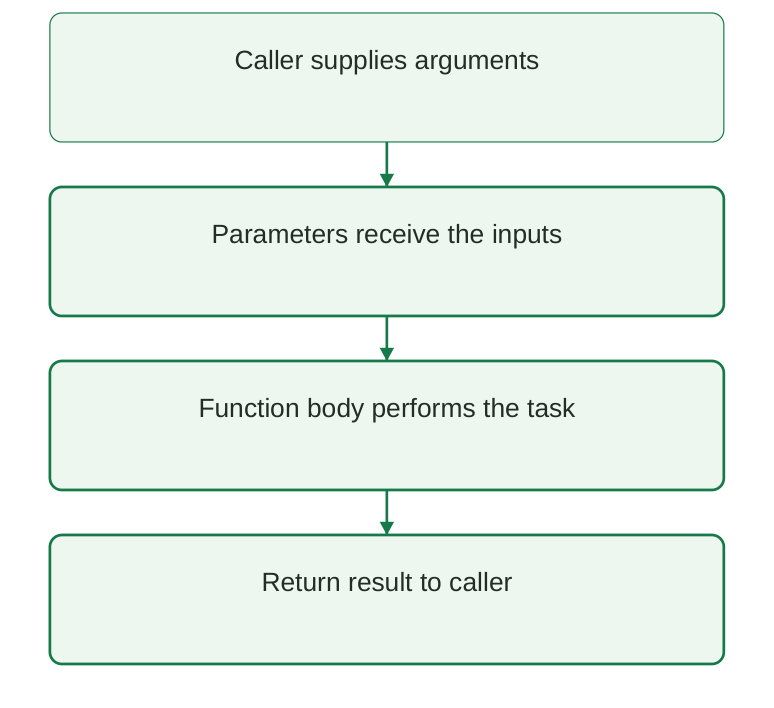
Diagram labels: The caller supplies arguments; parameters receive inputs; the body performs the task; a result and control return to the caller.
Diagram explanation: A function may produce a return value, print a message or do both. Without an explicit return value, the call produces None. Control returns to the caller when the function finishes.
A clear function contract
- State what each input represents and its units.
- State which values are allowed and which are rejected.
- State the output and its units. Keep calculation separate from display when reuse is needed.
Memory trick
Define first; call to execute. Parameters belong to the definition; arguments belong to the call.
2.12 Arguments: positional, keyword and defaults
A positional argument is matched by its position. A keyword argument names the corresponding parameter. Keywords are useful when several measurements have similar numeric types but different meanings.
def concentration(mass_mg, volume_ml): return mass_mg / volume_mlprint(concentration(250, 50)) print( concentration(volume_ml=50, mass_mg=250) )
Output
5.0 5.0Both calls return 5.0. Swapping positional values to concentration(50, 250) would return 0.2, which may execute without an error but represents the wrong calculation. Named arguments reduce this risk.
Default parameters
def label_sample( sample_id, prefix=”Sample” ): return f”{prefix}: {sample_id}”print(label_sample(“A01”)) print(label_sample(“A01″, prefix=”Batch”))
Output
Sample: A01 Batch: A01A default is used when that argument is omitted. Required parameters normally precede parameters with defaults. Avoid mutable list or dictionary defaults; a default object is created at definition time and can be shared across calls.
Errors to recognise
| Call problem | What happens | Correction |
|---|---|---|
| Missing required argument | TypeError | Supply the required value |
| Too many positional arguments | TypeError | Match the signature |
| Same parameter supplied twice | TypeError | Use position or keyword once |
| Unknown keyword | TypeError | Use exact parameter name |
A call may combine positional arguments followed by keyword arguments. A positional argument cannot follow an ordinary keyword argument. Python is case sensitive, so mass_mg and Mass_mg are different names.
Exam point
A default argument is not automatically a clinically appropriate default. Required measurements and a supplied dosing regimen should remain explicit.
2.13 return values versus printed output
return sends a value to the caller and ends the current function call. print() displays text. These operations have different purposes: a displayed result cannot automatically be reused as a returned number.
def square(value): return value**2result = square(4) print(result) print(result + 1)
Output
16 17The returned integer is stored in result and used in another calculation. Separating the computation from the display makes the function easier to test and use in another program.
A printing-only function
def display_square(value): print(value**2)result = display_square(4) print(result)
Output
16 Nonedisplay_square prints 16, but it has no explicit return, so its call returns None. Adding 1 to that return value would raise TypeError.
Early return
def status(count): if count < 0: return “Invalid” if count == 0: return “Empty” return “Available”print(status(3))
Output
AvailableOnce return executes, later statements in the function are not reached during that call. Guard clauses can reject inappropriate values early and reduce deeply nested code.
More than one result
def summary(values): return len(values), sum(values)count, total = summary([10, 20, 30]) print(count, total)
Output
3 60The two results are packaged as a tuple and unpacked into two names. Their order must be documented. This extends the basic return concept; tuples are covered in detail in Unit III.
Memory trick
print is for the reader; return is for the calling program.
2.14 Local variables, scope and documentation
Scope describes where a name can be accessed. Parameters and names assigned inside a function normally belong to that function call. Such local variables help keep independent calculations separate.
mass_mg = 999def calculate(): mass_mg = 250 return mass_mg / 50
print(calculate()) print(mass_mg)
Output
5.0 999The local mass_mg inside calculate is different from the module-level mass_mg. The function does not alter the outer value. Passing inputs as arguments is clearer than making a calculation depend on hidden global measurements.
Docstrings
def bmi(weight_kg, height_m): “””Return BMI in kg/m^2 for valid inputs.””” return weight_kg / height_m**2print(f”{bmi(72, 1.8):.2f}”)
Output
22.22A docstring is a string at the start of a function body that documents its purpose. State units, input requirements and the return value. A comment can explain why a step is needed; it should not merely repeat the code.
Readable function design
- Choose a verb or an operation name: calculate_bmi, clean_identifier or summarise_readings.
- Give unit-aware names: height_m, volume_ml and mass_mg. A variable called dose alone leaves its units ambiguous.
- Keep one main responsibility per function. Do not mix file reading, calculation and chart styling into one long beginner function.
- Return numeric results without premature rounding; format them for display at the reporting step.
| Design choice | Better practice |
|---|---|
| Hidden measurement globals | Pass measurements as parameters |
| Mixed calculation and output | Return value; print in caller |
| Unclear names | State quantity and units |
| Repeated formula | Use one tested function |
Exam point
A local name normally cannot be read from outside its function. Scope is a naming rule, not a guarantee that mutable objects passed to a function cannot change.
2.15 Validation and function testing
Validation checks whether an input meets the rules needed by a calculation. A formula may be syntactically correct and still receive invalid units or values. Check the domain before executing arithmetic.
def concentration(mass_mg, volume_ml): if mass_mg < 0: raise ValueError( “Mass cannot be negative” ) if volume_ml <= 0: raise ValueError( “Volume must be positive” ) return mass_mg / volume_mlprint(concentration(250, 50))
Output
5.0raise ValueError signals that a value is unacceptable for the function. It is an error-reporting mechanism, not a clinical judgement. More robust programs also reject non-finite values such as NaN and infinity.
Minimal checks
import mathdef valid_positive(value): return ( math.isfinite(value) and value > 0 )
print(valid_positive(1.8)) print(valid_positive(float(“nan”)))
Output
True False| Case | Input | Expected result |
|---|---|---|
| Normal calculation | 250 mg / 50 mL | 5 mg/mL |
| Zero mass | 0 mg / 50 mL | 0 mg/mL |
| Zero volume | 250 mg / 0 mL | Reject |
| Negative mass | -1 mg / 50 mL | Reject |
| Non-finite measurement | NaN or infinity | Reject in robust version |
Stepwise testing
- Step 1: calculate a known answer manually and compare it with the function result.
- Step 2: test the edge of the allowed range, such as zero mass.
- Step 3: supply an invalid input and confirm that it is rejected.
- Step 4: rerun the valid case after any edit. A correction to one path must not silently alter another.
Floating-point values are approximate. For non-exact expected results, compare within an appropriate tolerance rather than requiring identical decimal digits. The tolerance must match the purpose of the check.
Memory trick
Normal, boundary, invalid: three essential test groups.
2.16 Modular programming and a reusable calculation file
Modular programming divides a program into understandable pieces. A function groups one operation. A module groups related functions in a Python file. The calling script imports those functions instead of copying their source.
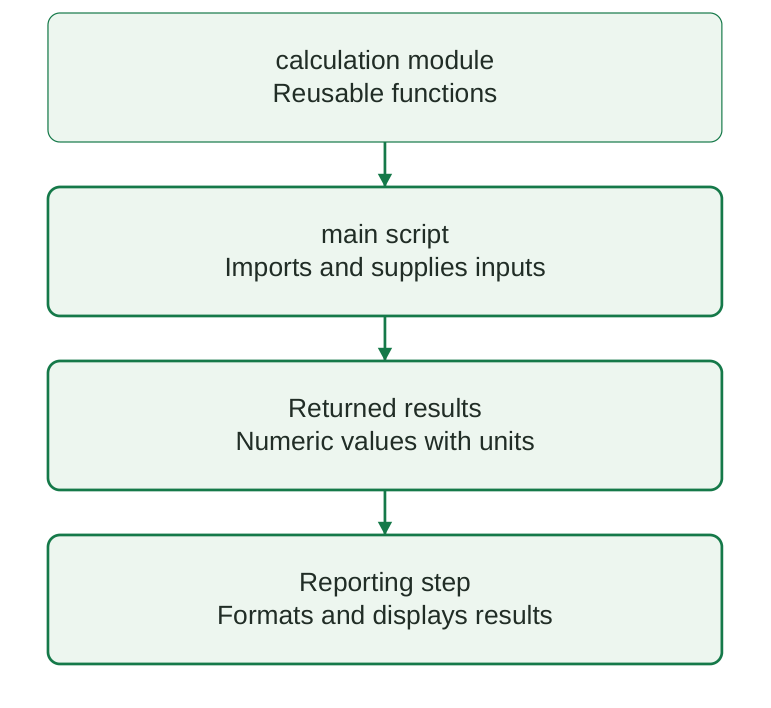
Diagram labels: A calculation module holds reusable functions; the main script imports them and supplies inputs; returned results are used by the reporting step to format and display values with units.
Diagram explanation: The calculation file contains reusable logic. The main file controls a particular run. The arrows describe dependencies and result use, not a claim that importing a file always runs a complete application.
Create two files – step by step
- Step 1: create calculations.py in the practice folder. Enter the function below and save it.
File: calculations.py
def concentration(mass_mg, volume_ml): if mass_mg < 0 or volume_ml <= 0: raise ValueError( “Invalid measurement” ) return mass_mg / volume_ml- Step 2: create main.py in the same folder. Enter the import and call.
File: main.py
from calculations import concentrationvalue = concentration(250, 50) print(f”{value:.2f} mg/mL”)
- Step 3: open a terminal in that folder and run python main.py using the verified interpreter command. Expected output: 5.00 mg/mL.
- Step 4: change only the supplied measurements in main.py, save and rerun. Keep the shared formula in calculations.py.
Common module errors
| Problem | Reason | Correction |
|---|---|---|
| ModuleNotFoundError | File not on import path | Keep both files in the run folder |
| Old output after edit | File unsaved / stale notebook import | Save; restart and rerun if needed |
| Unexpected import behaviour | Executable code at module top level | Keep reusable definitions separate |
| Name conflict | File named math.py or csv.py | Choose a project-specific name |
The terminal commands belong in the terminal, not in a Python source file. The filename in an import omits .py. Names such as calculations and main are examples; consistent organisation is the important idea.
2.17 Dose arithmetic: supplied regimen and unit checks
The syllabus includes dose calculation. In this unit it is taught as arithmetic using an explicitly supplied regimen. A calculation program must not invent a prescribing rule. Drug choice, maximum dose, organ-function adjustment and appropriateness require authorised clinical guidance.
Dimensional reasoning
| Supplied quantity | Units | Arithmetic result |
|---|---|---|
| Per-administration regimen × body mass | mg/kg per administration × kg | mg per administration |
| Daily regimen × body mass | mg/kg/day × kg | mg/day |
| Daily amount / administrations per day | mg/day ÷ administrations/day | mg per administration |
| Required amount / liquid concentration | mg ÷ mg/mL | mL |
mg/kg per administration and mg/kg/day mean different things. Dividing the first by the number of daily administrations would wrongly reduce a per-administration amount. Document which regimen convention is supplied before multiplying.
Illustrative arithmetic only
def amount_mg( weight_kg, supplied_mg_per_kg ): if ( weight_kg <= 0 or supplied_mg_per_kg <= 0 ): raise ValueError( “Positive inputs required” ) return weight_kg * supplied_mg_per_kgprint(amount_mg(40, 2.5))
Output
100.0The values 40 kg and 2.5 mg/kg are fictitious and do not correspond to a named drug. Their product is 100 mg for the supplied dosing convention. This example does not establish a usable treatment regimen.
Algorithm
- Step 1: obtain the authorised regimen and identify whether it is per administration or per day.
- Step 2: confirm body-mass units and reject zero, negative or non-finite input.
- Step 3: multiply using the stated unit convention. Apply any authorised limits separately.
- Step 4: if a liquid-volume calculation is required, use the verified product concentration in mg/mL.
- Step 5: independently check the arithmetic, units, formulation and reporting precision.
Critical distinction
Correct multiplication does not prove that a regimen is safe, indicated or appropriate for a patient.
2.18 Daily amount and liquid-volume calculation
When a supplied regimen is expressed as mg/kg/day, first calculate the daily amount. Only then divide by the specified number of administrations per day. The program should identify both quantities explicitly.
def daily_amount(weight_kg, mg_per_kg_day): if weight_kg <= 0 or mg_per_kg_day <= 0: raise ValueError( “Positive values required” ) return weight_kg * mg_per_kg_daydef per_administration( daily_mg, count_per_day ): if count_per_day <= 0: raise ValueError( “Count must be positive” ) return daily_mg / count_per_day
daily_mg = daily_amount(40, 5) each_mg = per_administration(daily_mg, 2) print(daily_mg, each_mg)
Output
200 100.0This fictitious example produces 200 mg/day and 100 mg per administration under the supplied two-administrations-per-day convention. The calculation does not recommend that schedule.
From amount to volume
def liquid_volume( amount_mg, strength_mg_ml ): if amount_mg < 0 or strength_mg_ml <= 0: raise ValueError( “Invalid amount or strength” ) return amount_mg / strength_mg_mlprint(liquid_volume(100, 20))
Output
5.0100 mg divided by 20 mg/mL produces 5 mL. If a label gives 100 mg per 5 mL, convert that to 20 mg/mL before calling the function. Confusing mg/5 mL with mg/mL creates a five-fold arithmetic error.
| Label expression | mg/mL conversion | Arithmetic check |
|---|---|---|
| 100 mg / 5 mL | 100 / 5 = 20 | 100 mg / 20 = 5 mL |
| 50 mg / 10 mL | 50 / 10 = 5 | 25 mg / 5 = 5 mL |
Avoid silent assumptions
- Name the strength variable strength_mg_ml; record the formulation concentration actually supplied.
- Do not round intermediate values unnecessarily. Apply the appropriate final reporting precision only after verification.
- A numerical result still requires an authorised regimen and an independent clinical check before real use.
2.19 BMI calculation: formula, units and interpretation
Body mass index (BMI) is body mass in kilograms divided by the square of height in metres. It is a screening measure, not a diagnosis or a direct measurement of body fat.
Formula
BMI = weight_kg / (height_m × height_m).
The resulting unit is kg/m². Convert centimetres to metres before squaring.
def calculate_bmi(weight_kg, height_m): if weight_kg <= 0 or height_m <= 0: raise ValueError( “Positive measurements required” ) return weight_kg / (height_m**2)value = calculate_bmi(72, 1.8) print(f”BMI: {value:.2f} kg/m^2″)
Output
BMI: 22.22 kg/m^2Manual verification
| Step | Calculation |
|---|---|
| Height squared | 1.8 × 1.8 = 3.24 m² |
| Divide mass by squared height | 72 / 3.24 = 22.222… kg/m² |
| Display to two decimal places | 22.22 kg/m² |
Passing 180 as height_m gives a drastically incorrect value because centimetres were used where metres were expected. Units in variable names help expose this mistake.
height_cm = 180 height_m = height_cm / 100 print(height_m)Output
1.8Interpretation and limits
- For adults aged 20 years and older, commonly used CDC categories are below 18.5, 18.5 to below 25, 25 to below 30, and 30 or above.
- Children and adolescents use age- and sex-specific assessment rather than these adult cut-offs.
- BMI alone cannot distinguish muscle from fat or describe an individual’s full health status. Clinical interpretation considers additional measurements and context.
- This program demonstrates the formula and classification boundaries; it does not give weight-management treatment advice.
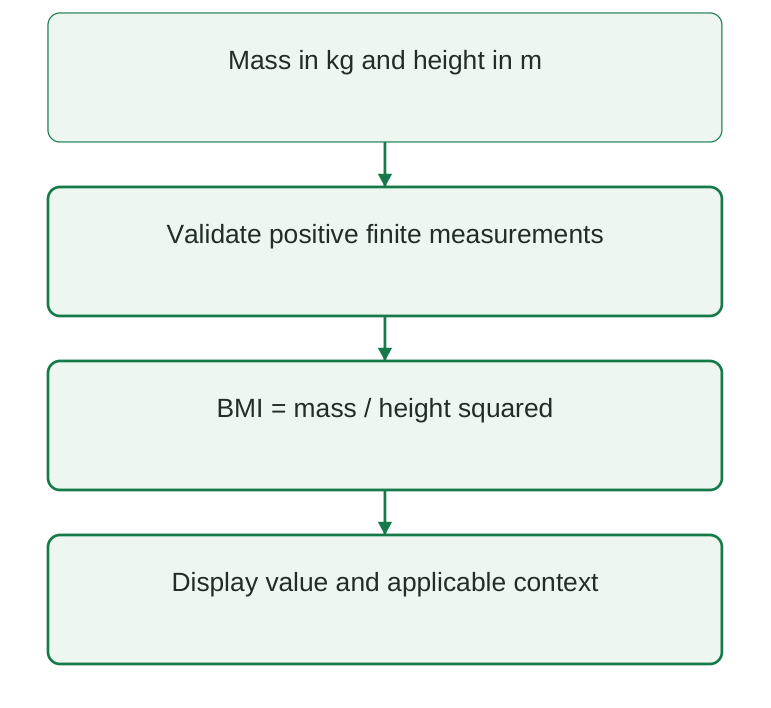
Diagram labels: Begin with mass in kg and height in m; validate positive finite measurements; calculate mass divided by height squared; display the value and applicable context.
Diagram explanation: Height must be squared after conversion to metres. The final report preserves the unit and avoids treating the number as a diagnosis.
2.20 A modular BMI report with adult categories
A useful modular program separates three responsibilities: calculate a number, assign an applicable category, and format a report. The category function accepts an already calculated BMI; it should not secretly read measurements.
import mathdef calculate_bmi(weight_kg, height_m): if not all( math.isfinite(x) and x > 0 for x in (weight_kg, height_m) ): raise ValueError( “Invalid measurement” ) return weight_kg / height_m**2
def adult_category(value): if value < 18.5: return “Underweight” elif value < 25: return “Healthy weight” elif value < 30: return “Overweight” return “Obesity”
value = calculate_bmi(72, 1.8) print(f”BMI: {value:.2f} kg/m^2″) print(adult_category(value))
Output
BMI: 22.22 kg/m^2 Healthy weightall(…) verifies both measurements. math.isfinite rejects NaN and infinity. The category chain includes exact boundaries by checking the upper limits in increasing order. It assumes a valid positive BMI and the stated adult age context.
Boundary table
| BMI value | Returned adult category |
|---|---|
| 18.49 | Underweight |
| 18.50 | Healthy weight |
| 24.99 | Healthy weight |
| 25.00 | Overweight |
| 29.99 | Overweight |
| 30.00 | Obesity |
Classify the full computed value, not an already rounded display string. A value of 24.999 might display as 25.00 after rounding while remaining below 25 for the category rule. Explain rounding clearly in reports when a value is close to a boundary.
Run the application – step by step
- Step 1: save the complete example as bmi_report.py.
- Step 2: run python bmi_report.py with the verified interpreter.
- Step 3: compare the printed number with the hand calculation.
- Step 4: test the classification function at 18.5, 25 and 30.
- Step 5: confirm that invalid measurement inputs produce a ValueError rather than a misleading result.
2.21 Integrated practice: processing several records
The following example combines iteration, validation, a function and labelled output. Each record supplies a sample identifier, mass and final volume. A simple continue skips an invalid volume so the remaining records can still be processed.
def concentration(mass_mg, volume_ml): return mass_mg / volume_mlrecords = [ (“A01”, 250.0, 50.0), (“A02”, 100.0, 0.0), (“A03”, 180.0, 30.0), ] kept = 0 for sample, mass, volume in records: if volume <= 0 or mass < 0: print(sample, “invalid measurement”) continue value = concentration(mass, volume) print(f”{sample}: {value:.2f} mg/mL”) kept += 1 print(“Valid records:”, kept)
Output
A01: 5.00 mg/mL A02 invalid measurement A03: 6.00 mg/mL Valid records: 2Trace each record
| Record | Decision | Outcome |
|---|---|---|
| A01 | 50 mL > 0; mass non-negative | Calculate 5 mg/mL |
| A02 | Volume is zero | Flag and skip |
| A03 | 30 mL > 0; mass non-negative | Calculate 6 mg/mL |
The loop unpacks one tuple per pass. This notation is introduced here only to supply a compact example; Unit III develops tuples and structured records. For externally supplied data, numeric types and finite values must also be checked.
Why the design is modular
- The concentration function contains the arithmetic and can be tested independently.
- The loop handles record selection and tracks how many records were accepted.
- The output clearly associates a result with its sample and unit.
Extension exercise
Add record A04 with 120 mg in 40 mL. Expected concentration: 3.00 mg/mL; accepted count: three. Then introduce a negative mass and explain why it is rejected for this variable.
Faculty discussion
Ask whether an invalid observation should be skipped, halt processing or be sent for correction. The answer depends on the data protocol; a skip should always remain visible in the audit trail.
2.22 Quick revision and error correction
| Concept | Recall rule |
|---|---|
| if | Run body when condition is true |
| if-else | Choose one of two paths |
| elif chain | First matching branch wins |
| Nested if | Inner test depends on outer path |
| for | Process successive iterable items |
| range | Stop value is excluded |
| while | Repeat while condition is true |
| break | Exit innermost loop |
| continue | Skip remainder of current iteration |
| Function | Define once; call for execution |
| Parameter / argument | Definition name / supplied value |
| return / print | Send result / display text |
| BMI | kg divided by metres squared |
| Dose arithmetic | Respect per-day versus per-administration units |
Predict the result
| Expression or action | Correct answer |
|---|---|
| list(range(1, 4)) | [1, 2, 3] |
| if 5 > 0 followed by elif 5 < 10 | Only first branch |
| break in inner nested loop | Inner loop exits |
| Function ends without return | Returns None |
| BMI: 80 kg and 2 m | 20 kg/m² |
| 100 mg divided by 20 mg/mL | 5 mL |
Repair these mistakes
- Missing colon: add : after the if, for, while or def header.
- Wrong indentation: align statements belonging to one block; align else with its matching if.
- Infinite while: ensure every relevant path changes the state toward termination.
- Unexpected None: return the computed value instead of only printing it.
- Wrong category at a threshold: check >= versus > and the order of branches.
- Wrong clinical arithmetic: confirm quantity, unit and regimen convention before changing code.
One-minute memory aid
Choose with if; repeat with loops; reuse with functions. Validate inputs, calculate with units and report the result clearly.
2.23 Possible examination questions
Short-answer questions
- Define selection and iteration.
- Distinguish if-else from an if-elif-else chain.
- Why is indentation significant in Python?
- Explain nested conditions with an example.
- What does range(1, 5) produce?
- Distinguish break, continue and pass.
- Distinguish parameters and arguments.
- Explain return versus print.
- What is a local variable?
- State the metric BMI formula and its units.
Long-answer questions
- Explain conditional statements with syntax, branch traces and examples.
- Compare for and while loops; discuss termination and off-by-one errors.
- Explain function definition, calls, argument passing and return values.
- Develop a modular BMI calculation and verify its classification boundaries.
- Explain dimensional checks in supplied-regimen dose arithmetic.
- Write an algorithm and program for multiple laboratory records with invalid-input handling.
Programming problems
- Print replicate labels 1 to 5 using both for and while. Explain the stop rule in each.
- Find A03 in a list of sample identifiers and stop on the first match.
- Skip negative masses, retain zero mass and count accepted observations.
- Write a function returning concentration from mass_mg and volume_ml; reject an invalid denominator.
- Write three separate functions for a daily amount, a per-administration amount and a liquid volume.
Expected reasoning in an answer
State the problem, list inputs and units, write the algorithm, draw a correctly labelled flowchart where useful, provide readable code, show a checked output and discuss a boundary or invalid input. Explain why the result follows; a copied program without a trace is incomplete.