Course Code: BP101T
Unit III Overview
Course: BP101T.
Unit III: Data Structures and File Handling.
Pharmaceutical datasets contain related values, identifiers and repeated measurements. Data structures organise these values in memory; file handling stores and retrieves them. This unit moves from individual variables to complete small datasets.
Topics Covered – Syllabus Coverage
| Required topic | Coverage |
|---|---|
| Lists, tuples and dictionaries | Sections 3.1-3.6 |
| Indexing, slicing, collection operations and strings | Sections 3.2-3.8 |
| NumPy array creation and arithmetic | Sections 3.9-3.13 |
| Reading and writing CSV | Sections 3.14-3.17 |
| Structured healthcare datasets | Sections 3.18-3.19 |
| Importing and manipulating a small dataset | Sections 3.20-3.21 |
Learning outcomes
Choose a suitable structure; index and slice safely; create and inspect an array; compute elementwise results; read and write a CSV file; convert field types; validate records before summarising.
Working context
- All sample identifiers and measurements in these notes are fictitious. No patient-identifying records are required.
- Preserve units in field names and document what a missing value means.
- CSV stores tabular text; it does not automatically preserve Python types or units.
- NumPy is a third-party package. It must be available in the selected Python environment before import.
Prerequisites
Revise loops and functions from Unit II. A for loop processes records; a function isolates a cleaning or calculation rule. Keep raw data separate from derived results and retain a visible reason for any omitted record.
3.1 Choosing lists, tuples and dictionaries
A data structure groups related values. A list stores an ordered sequence that can be changed. A tuple stores an ordered sequence whose element bindings cannot be replaced. A dictionary maps unique keys to values.
| Feature | List | Tuple | Dictionary |
|---|---|---|---|
| Literal notation | [1, 2] | (1, 2) | {“a”: 1} |
| Access | Position | Position | Key |
| Mutable container | Yes | No | Yes |
| Typical use | Repeated readings | Fixed record layout | Named record fields |
Output
5.0 A01 A01The choice depends on meaning, not just syntax. A list is useful for a changing set of measurements. A tuple can represent a fixed-order record. A dictionary makes field meaning explicit through its keys.
Ordering and duplicates
- Lists and tuples preserve element order and allow duplicate values.
- Dictionaries preserve insertion order in modern Python. This does not make them position-indexed sequences.
- A dictionary cannot store two separate entries with the same key; assigning that key again replaces its value.
Output
6.0Memory trick
List = changeable sequence; tuple = fixed sequence; dictionary = named lookup.
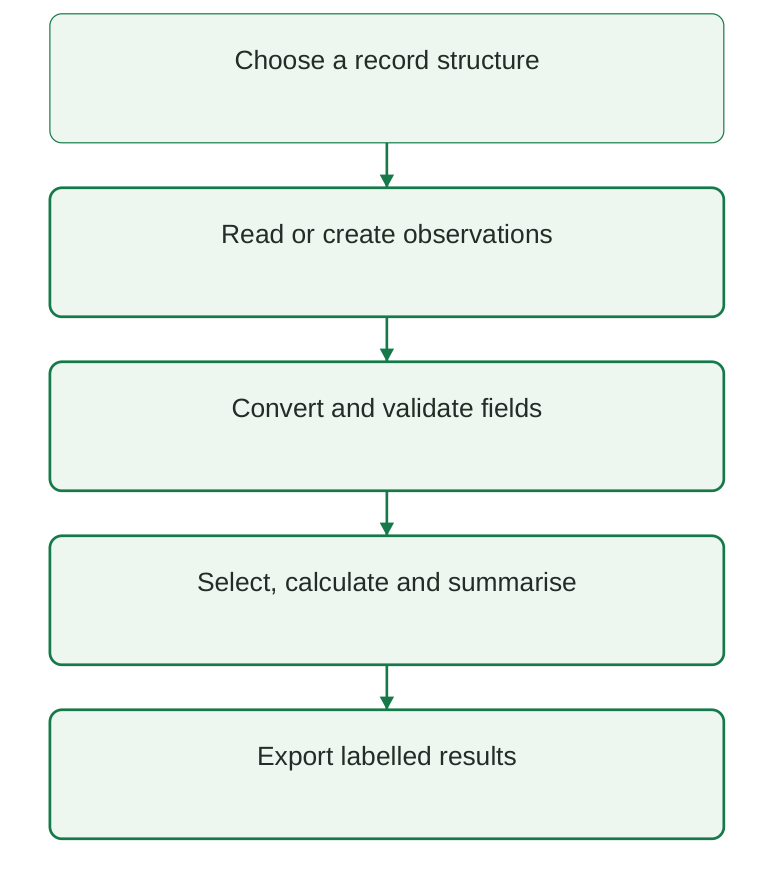
Diagram labels: Choose a record structure; read or create observations; convert and validate fields; select, calculate and summarise; export labelled results.
Diagram explanation: A numerical summary comes after structural and value checks. Export should preserve identifiers and units so that results remain interpretable.
3.2 List creation, indexing and bounds
A list is created with square brackets or list(). Python permits mixed element types, but a scientific measurement list is clearer when its members represent one quantity in a consistent unit.
values = [10.0, 20.0, 30.0, 40.0] print(len(values)) print(values[0]) print(values[-1])Output
4 10.0 40.0Indexing begins at zero. For four items, valid non-negative indices are 0 to 3. Negative indices count from the end: -1 is the last item and -4 is the first. An index outside the available positions raises IndexError.
| Position | 0 | 1 | 2 | 3 |
|---|---|---|---|---|
| Value | 10 | 20 | 30 | 40 |
| Negative index | -4 | -3 | -2 | -1 |
Updating an element
values = [10, 20, 30] values[1] = 25 print(values)Output
[10, 25, 30]Assignment changes the list’s element at index 1. It does not insert an additional element. This distinction matters when a dataset is meant to retain one value per sample.
Safe access procedure
- Step 1: inspect len(values) before assuming a requested position exists.
- Step 2: translate the human position to a zero-based index: the third item is index 2.
- Step 3: use a negative index when access relative to the end is intended.
- Step 4: decide how an empty list should be handled; values[-1] is invalid for an empty list.
Output
No observationsExam point
Length is the number of items; the largest positive index is length minus one.
3.3 List slicing and independent copies
Slicing selects a sequence of positions using values[start:stop:step]. The start is included and the stop is excluded. Omitted boundaries select from the beginning or to the end.
values = [10, 20, 30, 40, 50] print(values[1:4]) print(values[:2]) print(values[::2]) print(values[::-1])Output
[20, 30, 40] [10, 20] [10, 30, 50] [50, 40, 30, 20, 10]| Slice | Selected positions | Meaning |
|---|---|---|
| [1:4] | 1, 2, 3 | Middle three |
| [:2] | 0, 1 | First two |
| [::2] | 0, 2, 4 | Every second item |
| [::-1] | Last to first | Reverse sequence |
A list slice creates a new list. A very large slice boundary is clipped to the available range rather than raising IndexError. A step of zero is invalid.
Alias versus copy
original = [10, 20] alias = original copy = original.copy() alias[0] = 99 print(original) print(copy)Output
[99, 20] [10, 20]alias and original refer to the same list object. Changing through either name affects that list. copy is a separate shallow list, so assigning its numeric elements is independent. With nested mutable elements, a shallow copy still shares those inner objects.
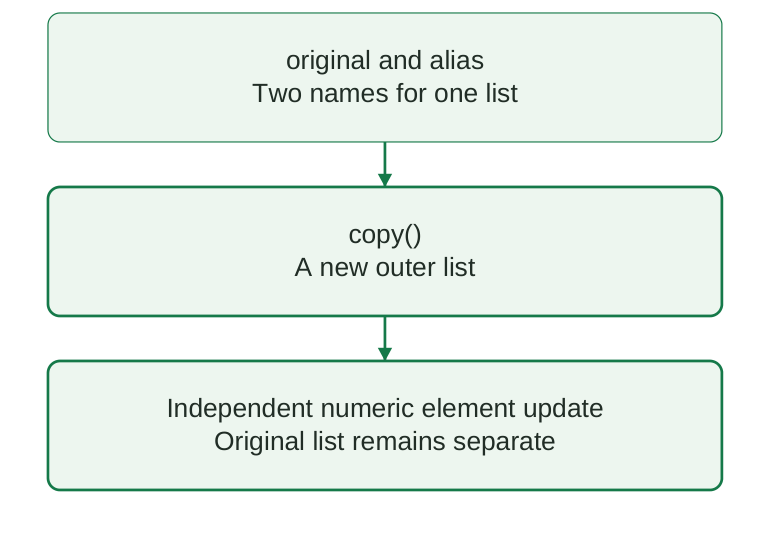
Diagram labels: Original and alias are two names for one list. copy() creates a new outer list; independent numeric element updates leave the original list separate.
Diagram explanation: The diagram contrasts shared naming with a shallow container copy. It does not imply that nested lists are deeply copied.
Memory trick
Slice stop stays outside. Assignment shares; copy creates a new outer container.
3.4 List operations and common methods
List methods support growth, insertion, deletion and ordering. Some modify a list in place and return None. Others return a useful value such as a removed item.
| Method | Effect | Important detail |
|---|---|---|
| append(x) | Add one item at end | A list argument becomes one nested item |
| extend(items) | Add each supplied item | Multiple elements are added |
| insert(i, x) | Insert at position | Later positions shift |
| remove(x) | Remove first matching value | ValueError if absent |
| pop(i) | Remove and return item | Default is last position |
| sort() | Order in place | Returns None |
| reverse() | Reverse in place | Returns None |
| clear() | Remove all items | List object remains |
Output
[10, 20, 30, 40] 50After append and extend there are five items. pop() removes 50. sort() orders the remaining list. Writing values = values.sort() would replace the variable with None, losing its reference to the sorted list.
Membership and summaries
values = [10, 20, 30] print(20 in values) print(sum(values), min(values), max(values)) print(values.count(20))Output
True 60 10 30 1sum(), min() and max() work on suitable elements. min() and max() require a non-empty iterable unless a default is supplied. Mixed strings and numbers cannot generally be treated as one numeric measurement sequence.
List concatenation is not numeric addition
print([1, 2] + [3, 4]) print([1, 2] * 2)Output
[1, 2, 3, 4] [1, 2, 1, 2]The + operation concatenates lists; * repeats them. NumPy arrays use elementwise numerical arithmetic instead, which is introduced later in this unit.
3.5 Tuples, packing and unpacking
A tuple is an ordered immutable container. “Immutable” means an element binding cannot be replaced; it does not mean a mutable list stored inside the tuple becomes immutable.
record = (“A01”, 250.0, 50.0) sample_id, mass_mg, volume_ml = record print(sample_id) print(mass_mg / volume_ml)Output
A01 5.0The three names unpack the three tuple elements in order. The number of target names must match the number of elements unless an explicitly starred target is used. A wrong order may silently give a scientifically wrong result.
| Expression | Meaning |
|---|---|
| (“A01”, 5.0) | Two-element tuple |
| (“A01”,) | One-element tuple |
| (“A01”) | A string, not a tuple |
| tuple([1, 2]) | Convert an iterable to a tuple |
Output
tuple 1Tuple indexing and slicing
record = (“A01”, 250, 50) print(record[0]) print(record[1:])Output
A01 (250, 50)Tuples use the same zero-based indexing and stop-exclusive slicing principles as lists. Attempting record[1] = 300 raises TypeError. A new tuple can be constructed when a revised record is needed.
Choosing tuple or dictionary
- Choose a tuple when the field order is short, stable and clearly documented.
- Choose a dictionary when meaningful field names improve readability or the schema may vary.
- Do not treat tuple immutability as a complete data-quality policy; an incorrect value can still be placed in a tuple.
Memory trick
The comma makes the one-item tuple. Parentheses alone may simply group an expression.
3.6 Dictionaries and named pharmaceutical records
A dictionary maps keys to values. Keys must be hashable; strings and numbers are common examples. Values may be any suitable Python objects. Named fields reduce dependence on remembering a positional record layout.
sample = { “sample_id”: “A01”, “mass_mg”: 250.0, “volume_ml”: 50.0, } print(sample[“sample_id”]) print( sample[“mass_mg”] / sample[“volume_ml”] )Output
A01 5.0Direct access versus get
sample = {“id”: “A01”} print(sample.get(“note”, “Not recorded”)) print(“note” in sample)Output
Not recorded Falsesample[“note”] would raise KeyError when the key is absent. get() can supply a default. A default must not convert a missing clinical measurement into a fabricated observation.
Update and delete
sample = {“id”: “A01”, “value”: 5.0} sample[“value”] = 6.0 sample[“unit”] = “mg/mL” del sample[“value”] print(sample)Output
{‘id’: ‘A01’, ‘unit’: ‘mg/mL’}| Operation | Meaning |
|---|---|
| d.keys() | View keys |
| d.values() | View values |
| d.items() | View key-value pairs |
| key in d | Test key membership |
| d.update(other) | Add or replace entries |
Dictionary membership tests keys, not values. Overwriting a key is useful for an intentional update but can hide duplicate input identifiers. Check duplicates before building a lookup if repeated identifiers require investigation.
Exam distinction
A dictionary key is a label, not a list position. d[0] asks for key 0 rather than the first inserted item.
3.7 Collection iteration, filtering and summaries
A list of dictionaries provides a simple tabular structure: each dictionary is one record, and each key names a field. A for loop can select records and calculate derived values.
records = [ {“id”: “A01”, “value”: 5.0}, {“id”: “A02”, “value”: 7.0}, ] for row in records: print(row[“id”], row[“value”])Output
A01 5.0 A02 7.0Dictionary iteration
sample = {“id”: “A01”, “unit”: “mg/mL”} for key, value in sample.items(): print(key, value)Output
id A01 unit mg/mLIteration over a dictionary directly produces keys. items() produces key-value pairs for unpacking. The order reflects insertion order, but an analytical result should not rely on accidental input ordering.
Select without modifying the source
values = [5.0, -1.0, 7.0] valid = [] for value in values: if value >= 0: valid.append(value) print(valid) print(sum(valid) / len(valid))Output
[5.0, 7.0] 6.0The source list remains unchanged. The denominator counts retained measurements, not all original values. In a general program, guard against an empty retained list before dividing.
Comprehension: compact equivalent
values = [5.0, -1.0, 7.0] valid = [x for x in values if x >= 0] print(valid)Output
[5.0, 7.0]A list comprehension expresses a transformation and optional filter. Use it only when the logic is short enough to read clearly. A normal loop is preferable when records require multiple validation messages or an audit trail.
Faculty point
Filtering changes the analysed population. Report the retained and excluded counts and the reason for exclusion.
3.8 String manipulation in dataset fields
Text processing is often needed before identifiers and categories can be compared. Use a declared rule for trimming spaces and standardising case. Do not remove meaningful punctuation or leading zeros without understanding the data schema.
raw = ” a01 ” clean = raw.strip().upper() print(f”[{clean}]”) print(“A01,A02,A03”.split(“,”)) print(“-“.join([“BATCH”, “07”]))Output
[A01] [‘A01’, ‘A02’, ‘A03’] BATCH-07| Operation | Useful purpose | Caution |
|---|---|---|
| strip() | Remove surrounding whitespace | Does not remove internal spaces |
| upper() / lower() | Consistent category convention | Case may be meaningful |
| split() | Separate a simple delimiter string | Not a safe CSV parser |
| join() | Combine text parts | Items must be strings |
| replace() | Apply a declared substitution | Can merge distinct identifiers |
Preserve identifier semantics
sample_id = “0017” print(sample_id) print(int(sample_id))Output
0017 17An identifier may contain only digits but still be text. Converting it to int loses leading zeros. Measurements and identifiers need different type rules.
Missing versus blank versus zero
- An empty string may represent missing text, an omitted answer or an intentionally blank field. Decide from the schema.
- The string “0” is a recorded textual value. Numeric zero can be a genuine measurement.
- The string “NA” may be a missing marker or a legitimate code; document its intended meaning before replacing it.
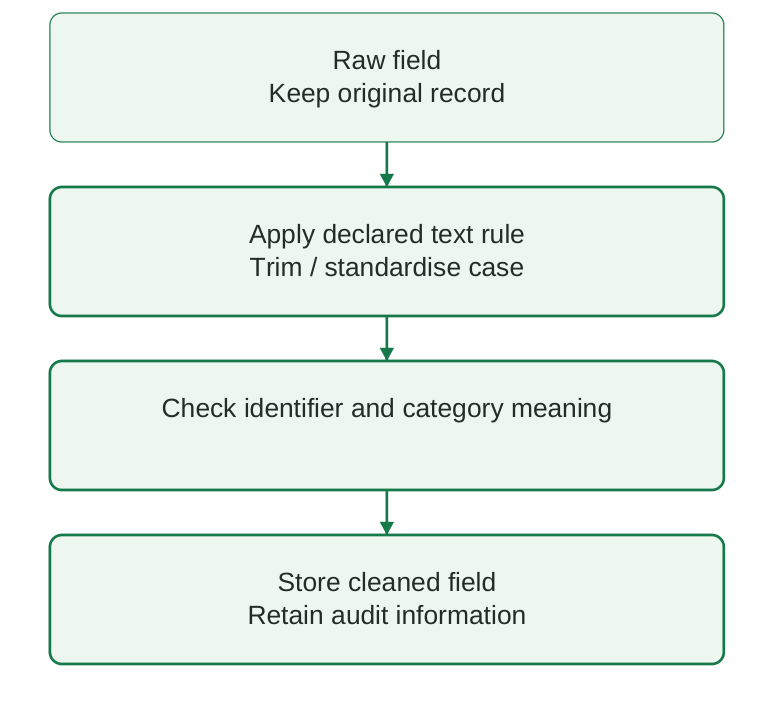
Diagram labels: Keep the original raw field; apply a declared trimming or case rule; check identifier and category meaning; store the cleaned field with audit information.
Diagram explanation: Cleaning should improve consistency without inventing data or changing an identifier’s meaning. Preserve raw input so an unexpected transformation can be traced.
3.9 NumPy: purpose, installation and array creation
NumPy provides the ndarray for numerical data. An array has a shape and a dtype. It supports efficient elementwise operations, particularly when many measurements must undergo the same calculation.
Official installation guide: Install NumPy.
Set up – step by step
- Step 1: open a terminal for the selected Python environment.
- Step 2: run python -m pip install numpy. Use the environment’s interpreter path if several environments exist.
- Step 3: start Python or select the corresponding notebook kernel.
- Step 4: run import numpy as np, then print(np.version) to verify availability.
Output
[ 5. 10. 15.] fnp is a conventional alias. dtype=float requests a floating-point array. The printed spacing may depend on NumPy formatting settings, but the three values remain 5.0, 10.0 and 15.0.
| Constructor | Example | Result idea |
|---|---|---|
| np.array | np.array([1, 2, 3]) | Array from supplied values |
| np.zeros | np.zeros(3) | Three zeros |
| np.ones | np.ones(3) | Three ones |
| np.arange | np.arange(0, 6, 2) | 0, 2, 4 |
| np.linspace | np.linspace(0, 1, 3) | 0, 0.5, 1 |
Output
[0 2 4] [0. 0.5 1. ]Memory trick
arange specifies a step; linspace specifies a number of samples. linspace includes the endpoint by default.
3.10 Array dimensions, shape, size and dtype
An array’s ndim is its number of axes. shape gives the length along each axis. size is the total number of elements. dtype states the element representation.
import numpy as np measurements = np.array( [ [1.0, 2.0, 3.0], [4.0, 5.0, 6.0], ] ) print(measurements.ndim) print(measurements.shape) print(measurements.size)Output
2 (2, 3) 6This two-dimensional array has two rows and three columns. A possible teaching interpretation is two batches with three replicates each. That interpretation comes from the schema, not from shape alone.
| Property | Value | Meaning |
|---|---|---|
| ndim | 2 | Two axes |
| shape | (2, 3) | Two rows; three columns |
| size | 6 | Six numeric elements |
| dtype | Floating point | Numeric representation |
Homogeneous representation
A NumPy array normally uses one dtype for all elements. Mixing numbers and strings may coerce values to a string dtype, preventing intended arithmetic. Object arrays exist but do not provide the same straightforward numeric behaviour.
import numpy as np a = np.array([1, 2, 3], dtype=float) print(a.dtype.kind) print(a + 0.5)Output
f [1.5 2.5 3.5]Reshaping
import numpy as np a = np.arange(6) b = a.reshape(2, 3) print(b)Output
[[0 1 2] [3 4 5]]A reshape must preserve the total number of elements. Six elements fit a 2-by-3 shape; they cannot fill a 2-by-4 shape. Whether the result shares memory depends on the operation and layout.
Exam point
shape describes structure. It does not identify patients, units or variable names. Those require accompanying metadata.
3.11 NumPy indexing, slicing and copies
One-dimensional array indexing resembles list indexing. In a two-dimensional array, use array[row, column]. Slices select ranges along one or more axes.
import numpy as np a = np.array([[1, 2, 3], [4, 5, 6]]) print(a[0, 1]) print(a[:, 1]) print(a[1, :])Output
2 [2 5] [4 5 6]The first expression selects row 0, column 1. The second selects column 1 from all rows. The third selects all columns of row 1. A colon means “all positions along this axis” when its boundaries are omitted.
| Selection | Meaning |
|---|---|
| a[0, 1] | One element |
| a[:, 1] | Second column |
| a[1, :] | Second row |
| a[:1, :] | First row retained as a 2-D slice |
Important difference from list slicing
import numpy as np a = np.array([10, 20, 30]) view = a[1:] view[0] = 99 print(a) copy = a[1:].copy() copy[0] = 77 print(a)Output
[10 99 30] [10 99 30]Basic NumPy slicing normally produces a view sharing the original array’s data. Changing the view may change the original. Use .copy() when an independent result is required. Advanced indexing, including Boolean indexing, returns a copy.
Boolean selection
import numpy as np a = np.array([5, -1, 7]) mask = a >= 0 print(mask) print(a[mask])Output
[ True False True] [5 7]Memory trick
List slice: new list. Basic array slice: usually a shared view. Know which one is being edited.
3.12 Elementwise arithmetic and broadcasting
NumPy arithmetic acts on corresponding elements. A scalar is broadcast over an array so that one factor can be applied to many measurements. This differs from list concatenation and repetition.
import numpy as np a = np.array([1, 2, 3]) b = np.array([10, 20, 30]) print(a + b) print(a * 2) print(a**2)Output
[11 22 33] [2 4 6] [1 4 9]| Operation | Python list | NumPy array |
|---|---|---|
| + | Concatenate sequences | Add corresponding values |
| * scalar | Repeat sequence | Multiply each value |
| / scalar | Not supported for lists | Divide each value |
Vectorised concentration calculation
import numpy as np mass_mg = np.array([250.0, 180.0, 120.0]) volume_ml = np.array([50.0, 30.0, 40.0]) concentration = mass_mg / volume_ml print(concentration)Output
[5. 6. 3.]Each mass must correspond to the volume at the same array position. Vectorisation does not verify record alignment or measurement units. A reordered array can produce plausible but incorrect ratios.
Broadcasting rule
Shapes are compared from their trailing dimensions. A pair of dimensions is compatible when their lengths are equal or one of them is 1. Incompatible shapes raise a broadcasting error.
import numpy as np a = np.array([[1, 2, 3], [4, 5, 6]]) offset = np.array([10, 20, 30]) print(a + offset)Output
[[11 22 33] [14 25 36]]The three-element offset is applied across both rows. This is appropriate only if each column genuinely requires its corresponding offset.
Critical distinction
- performs elementwise multiplication. @ performs matrix multiplication for suitable arrays. They answer different mathematical questions.
3.13 Array summaries, axes and missing values
Array summaries combine numeric elements. np.sum(), np.mean(), np.min() and np.max() are common introductory tools. A specified axis determines which dimension is reduced.
import numpy as np a = np.array( [[1.0, 2.0, 3.0], [4.0, 5.0, 6.0]] ) print(a.sum()) print(a.mean(axis=0)) print(a.mean(axis=1))Output
21.0 [2.5 3.5 4.5] [2. 5.]| Summary | Result shape | Interpretation |
|---|---|---|
| No axis | Scalar | Combine all elements |
| axis=0 | One value per column | Reduce rows |
| axis=1 | One value per row | Reduce columns |
For a batch-by-replicate matrix, axis=1 gives one mean per batch. axis=0 gives one mean per replicate position across batches. Choose the axis from the schema, not from a memorised phrase alone.
Non-finite and missing values
import numpy as np a = np.array([1.0, np.nan, 3.0]) print(np.mean(a)) print(np.nanmean(a)) print(np.isfinite(a))Output
nan 2.0 [ True False True]NaN represents a non-number marker often used for missing floating-point data. Ordinary mean propagates it; nanmean omits NaN. Omission changes the denominator and must be explained. If all observations are missing, no valid mean is available.
Standard deviation
import numpy as np a = np.array([1.0, 2.0, 3.0]) print(f”{a.std(ddof=1):.2f}”)Output
1.00NumPy std defaults to ddof=0. ddof=1 uses a denominator of n-1 for the usual sample standard deviation. Pandas Series.std has a different default, so specify the convention when comparing tools.
Exam point
NaN is not zero. Filling missing measurements with zero usually changes their scientific meaning.
3.14 File concepts, paths and safe opening
A file stores information outside the current Python session. A path identifies its location. A relative path is interpreted from the current working directory; an absolute path includes the full location.
| Mode | Purpose | Existing file behaviour |
|---|---|---|
| r | Read text | Must exist |
| w | Write text | Truncates existing contents |
| a | Append text | Preserves existing contents |
| x | Create new file | Fails if already present |
Use a with statement to open a file. It closes the file when the block finishes, including when an exception occurs. Specify a text encoding such as UTF-8 instead of relying on an operating-system default.
from pathlib import Path path = Path(“practice.txt”) with path.open(“w”, encoding=”utf-8″) as f: f.write(“Sample A01\n”) with path.open(“r”, encoding=”utf-8″) as f: print(f.read().strip()) path.unlink()Output
Sample A01Set up the practice folder
- Step 1: create a folder for the unit’s scripts and sample files.
- Step 2: open that folder in the IDE. Confirm the terminal’s working directory.
- Step 3: keep source data separate from output files; do not reuse the source filename for a cleaned export.
- Step 4: use pathlib.Path to build paths. On Windows, a raw string can prevent unintended backslash escape sequences.
The printed path separator depends on the operating system. FileNotFoundError usually means the filename, location or working directory is wrong, rather than that the CSV data itself is invalid.
Important
Mode w can overwrite data. Check the output path and preserve the raw source before writing.
3.15 CSV structure and correct parsing
CSV means comma-separated values. It represents rows and fields as text. A header row commonly names the columns. Quoting allows fields to contain commas or line breaks, so plain split(“,”) is not a complete CSV parser.
A small structured example
| sample_id | mass_mg | volume_ml |
|---|---|---|
| A01 | 250 | 50 |
| A02 | 180 | 30 |
| A03 | 120 | 40 |
Each row is one sample. Units are encoded in the column names. The identifier is text; the measurements will be converted to numbers after reading. A CSV itself does not enforce that schema.
import csv import io text = ‘id,note\nA01,”repeat, confirmed”\n’ rows = list(csv.reader(io.StringIO(text))) print(rows[1])Output
[‘A01’, ‘repeat, confirmed’]The comma inside the quoted note belongs to the field rather than indicating a new column. csv.reader handles this correctly.
Header and delimiter checks
- Check whether the file has a header and whether its names match the expected schema.
- Confirm the delimiter: comma, semicolon and tab-separated files are different formats.
- Inspect decimal conventions. A comma may be a delimiter or a decimal separator depending on the source.
- Confirm encoding and preserve quoted text; never discard it simply to make splitting easier.
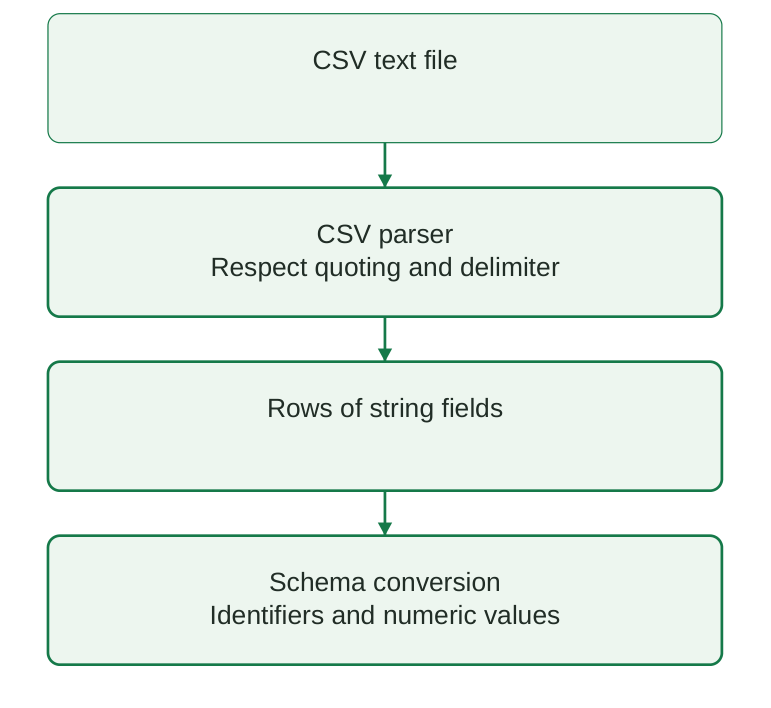
Diagram labels: CSV text passes through a parser that respects quoting and delimiters. Rows initially contain string fields; schema conversion produces the intended identifiers and numeric values.
Diagram explanation: Parsing finds field boundaries. Type conversion gives the values their intended meaning. Passing the first stage does not guarantee valid numeric measurements.
Memory trick
CSV knows separators; the schema knows meaning.
3.16 Reading CSV with reader and DictReader
csv.reader returns each row as a list of strings. csv.DictReader uses the header to return dictionaries. Named access is usually easier to explain for small pharmaceutical tables.
import csv, io text = “sample_id,mass_mg,volume_ml\nA01,250,50\n” reader = csv.DictReader(io.StringIO(text)) for row in reader: sample_id = row[“sample_id”] mass_mg = float(row[“mass_mg”]) volume_ml = float(row[“volume_ml”]) print(sample_id, mass_mg / volume_ml)Output
A01 5.0Reading a real file – step by step
- Step 1: save samples.csv in the practice folder with the header and three rows shown earlier.
- Step 2: import csv and open the file with newline=”” and encoding=”utf-8″.
- Step 3: create a DictReader and inspect its fieldnames before using the records.
- Step 4: convert measurement strings with float(); preserve sample_id as text.
- Step 5: validate the values before calculating. Print a labelled result.
Expected header: sample_id, mass_mg, volume_ml. Expected identifiers: A01, A02, A03.
File-opening code requires the named file to exist; the earlier in-memory example demonstrates the same parsing logic without that prerequisite.
| Issue | Likely error | Action |
|---|---|---|
| Missing file | FileNotFoundError | Check path |
| Wrong header | KeyError | Inspect names |
| Non-numeric field | ValueError | Flag conversion failure |
| Zero volume | Division error if unchecked | Validate before arithmetic |
Exam point
A numeric-looking CSV field is still a string when read by the standard csv module unless an explicit conversion is applied.
3.17 Writing CSV and exporting derived results
csv.writer writes sequences of fields. csv.DictWriter writes dictionaries using a specified field order. Both handle quoting correctly. On file opening, newline=”” prevents unintended newline handling by the text layer.
import csv, io buffer = io.StringIO(newline=””) writer = csv.DictWriter( buffer, fieldnames=[ “id”, “concentration_mg_ml”, ], lineterminator=”\n”, ) writer.writeheader() writer.writerow( { “id”: “A01”, “concentration_mg_ml”: 5.0, } ) print(buffer.getvalue().strip())Output
id,concentration_mg_ml A01,5.0Export to a file
import csv rows = [ { “sample_id”: “A01”, “concentration_mg_ml”: 5.0, }, { “sample_id”: “A02”, “concentration_mg_ml”: 6.0, }, ] with open( “results.csv”, “w”, newline=””, encoding=”utf-8″, ) as f: writer = csv.DictWriter( f, fieldnames=[ “sample_id”, “concentration_mg_ml”, ], ) writer.writeheader() writer.writerows(rows)The output filename differs from the raw input filename. The derived concentration field identifies its unit. Formatting a value as “5.00 mg/mL” turns the whole cell into text; storing 5.0 in a unit-labelled numeric column is better for later analysis.
Export procedure
- Step 1: define output column names and their intended order.
- Step 2: write the header once, then write the result rows.
- Step 3: reopen the CSV with the parser and check row count and field names.
- Step 4: manually compare at least one exported result with its source calculation.
- Step 5: keep the original source and document any excluded records.
Common error
A spreadsheet may display long identifiers or dates differently after opening a CSV. Verify the underlying text and schema rather than trusting the displayed formatting alone.
3.18 Conversion errors, missing fields and validation
Reading a file successfully does not prove its contents are analysable. Validate required fields, types, identifier uniqueness, finite numbers, units and permissible ranges before calculation.
import math rows = [ { “id”: “A01”, “mass”: “250”, “volume”: “50”, }, { “id”: “A02”, “mass”: “NA”, “volume”: “30”, }, ] for row in rows: try: mass = float(row[“mass”]) volume = float(row[“volume”]) except ValueError: print( row[“id”], “conversion failed” ) continue valid = ( math.isfinite(mass) and math.isfinite(volume) and mass >= 0 and volume > 0 ) if not valid: print( row[“id”], “invalid measurement” ) continue print(row[“id”], mass / volume)Output
A01 5.0 A02 conversion failedtry/except handles an anticipated conversion failure so that it can be reported explicitly. The except here handles ValueError only. A missing key would require schema checks or separate KeyError handling.
Validation checklist
| Check | Why it matters |
|---|---|
| Required columns exist | Prevents using a wrong file schema |
| Identifiers preserved | Keeps results linked to source records |
| Numeric conversion succeeds | Prevents arithmetic on text |
| Values are finite | Rejects NaN and infinity for this calculation |
| Volume is positive | Prevents zero or impossible denominator |
| Mass is non-negative | Matches this variable’s domain |
| Duplicate IDs reviewed | Avoids silent double counting |
A missing observation should remain missing unless a justified method supplies a replacement. Record the reason for exclusion. Retaining a raw copy enables later correction and reanalysis.
Scientific distinction
A plausibility range is variable-specific. Negative mass is invalid here; a negative change in concentration may be meaningful in a different dataset.
3.19 Understanding structured healthcare datasets
A structured dataset organises records into consistently named fields. Its schema describes column names, types, units, permissible values and the meaning of one row.
| Field | Type | Meaning |
|---|---|---|
| sample_id | Text | Unique sample identifier |
| batch_id | Text | Manufacturing or teaching batch |
| time_h | Numeric | Time since stated reference event |
| concentration_mg_l | Numeric | Measured concentration |
| status | Category | Documented review state |
A data dictionary explains the schema. A table is not automatically self-explanatory: time may mean collection time, elapsed time or processing time. A concentration unit may differ across files.
One row: define its observational unit
- In a sample dataset, one row may be one laboratory sample.
- In a repeated-measures dataset, several rows may belong to one participant at different times.
- In an adverse-event dataset, one report may contain more than one drug or event. A report count is not automatically a unique-person count.
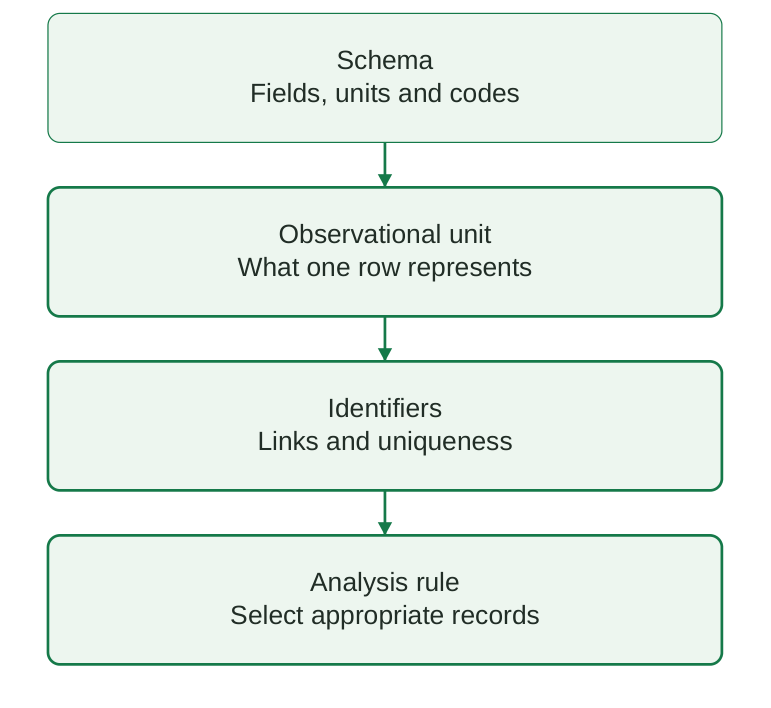
Diagram labels: Describe the schema’s fields, units and codes; identify what one row represents; check identifier links and uniqueness; apply an appropriate record-selection rule.
Diagram explanation: The same table shape can represent very different study designs. Interpretation requires metadata and an explicit denominator, not merely a convenient file.
Good data practice
Use fictitious or properly de-identified data for classroom exercises. Do not place direct patient identifiers into practice exports. Keep raw values, document corrections, state missing-value codes and separate measured variables from derived variables.
Memory trick
Name, type, unit, meaning: describe every important field with these four elements.
3.20 Accessing records and calculating derived fields
Data access includes selecting a field, selecting a record, filtering records and deriving a new value. Clear named fields reduce the risk of selecting the wrong measurement.
records = [ { “id”: “A01”, “mass_mg”: 250.0, “volume_ml”: 50.0, }, { “id”: “A02”, “mass_mg”: 180.0, “volume_ml”: 30.0, }, ] results = [] for row in records: value = ( row[“mass_mg”] / row[“volume_ml”] ) results.append( { “id”: row[“id”], “concentration_mg_ml”: value, } ) for row in results: print( row[“id”], row[“concentration_mg_ml”], )Output
A01 5.0 A02 6.0The derived results are new dictionaries. The original mass and volume records remain available. In a general program, apply the validation checks from the earlier section before division.
Filter by an identifier
records = [ {“id”: “A01”, “value”: 5}, {“id”: “A02”, “value”: 6}, ] selected = [ r for r in records if r[“id”] == “A02” ] print(selected)Output
[{‘id’: ‘A02’, ‘value’: 6}]Selection may return zero, one or several rows. Do not automatically assume there is exactly one match unless the schema enforces unique identifiers.
Sorting records
records = [ {“id”: “A01”, “value”: 5}, {“id”: “A02”, “value”: 6}, ] ordered = sorted( records, key=lambda r: r[“value”] ) print([r[“id”] for r in ordered])Output
[‘A01’, ‘A02’]The short lambda supplies a sorting key. It does not alter the original list. Sorting a measurement sequence also requires keeping its identifiers and other fields attached to the same record.
Common error
Sorting mass and volume arrays independently breaks record alignment and gives incorrect concentrations.
3.21 Worked CSV import and analysis workflow
This complete miniature example imports CSV text, validates each record, calculates a derived concentration and reports the accepted-record mean. StringIO stands in for a file so the example can run without a separate download.
import csv, io, math text = ( “id,mass_mg,volume_ml\n” “A01,250,50\n” “A02,180,30\n” “A03,120,40\n” ) results = [] for row in csv.DictReader( io.StringIO(text) ): mass = float(row[“mass_mg”]) volume = float(row[“volume_ml”]) if not ( math.isfinite(mass) and math.isfinite(volume) and mass >= 0 and volume > 0 ): raise ValueError( “Invalid teaching dataset” ) value = mass / volume results.append(value) print(row[“id”], f”{value:.2f} mg/mL”) print( f”Mean: {sum(results)/len(results):.2f} mg/mL” )Output
A01 5.00 mg/mL A02 6.00 mg/mL A03 3.00 mg/mL Mean: 4.67 mg/mLHand verification
| Record | Calculation | Concentration |
|---|---|---|
| A01 | 250 / 50 | 5 mg/mL |
| A02 | 180 / 30 | 6 mg/mL |
| A03 | 120 / 40 | 3 mg/mL |
| Mean | (5 + 6 + 3) / 3 | 4.666… mg/mL |
The mean is an arithmetic mean of three separately calculated concentrations. It is not generally equal to total mass divided by total volume; those expressions weight observations differently.
Run with a real file
- Step 1: save the same CSV text as samples.csv.
- Step 2: replace the StringIO source with a with-open block using newline=”” and UTF-8.
- Step 3: run the saved script from the containing folder.
- Step 4: compare all three ratios and the mean with the manual table.
- Step 5: test a missing numeric field and confirm that the program reports or rejects it.
3.22 NumPy analysis of imported measurements
After CSV conversion and validation, compatible measurement columns can become NumPy arrays. This separates file parsing from vectorised arithmetic.
import numpy as np ids = [“A01”, “A02”, “A03”] mass_mg = np.array([250.0, 180.0, 120.0]) volume_ml = np.array([50.0, 30.0, 40.0]) if not np.all(volume_ml > 0): raise ValueError(“Non-positive volume”) values = mass_mg / volume_ml print(values) print(f”Mean: {values.mean():.2f}”) print( f”Sample SD: {values.std(ddof=1):.2f}” )Output
[5. 6. 3.] Mean: 4.67 Sample SD: 1.53The sample standard deviation is approximately 1.5275 mg/mL. It describes variability among the three fictitious observations; it does not represent instrument uncertainty or a validated method precision estimate.
Maintain identity through selection
import numpy as np ids = np.array([“A01”, “A02”, “A03”]) values = np.array([5.0, 6.0, 3.0]) mask = values >= 5 print(ids[mask]) print(values[mask])Output
[‘A01’ ‘A02’] [5. 6.]The same mask is applied to the identifiers and values, preserving their pairing. A mask of a different length cannot be used safely. Sorting or filtering only one column destroys alignment.
Study exercise
Add A04 with 80 mg in 20 mL. Its concentration is 4 mg/mL. The four-record mean becomes 4.5 mg/mL. Apply the same declared validity checks before including it.
Faculty discussion
Ask students why averaging individual ratios differs from dividing combined mass by combined volume. The first gives each sample equal weight; the second weights by volume. Both require a stated scientific purpose.
3.23 Quick revision
| Concept | Recall |
|---|---|
| List | Ordered, mutable container |
| Tuple | Ordered, immutable element bindings |
| Dictionary | Unique keys mapped to values |
| Index | Zero-based; -1 selects last |
| Slice | Start included, stop excluded |
| List copy | Separate outer container |
| Basic NumPy slice | Usually shares memory |
| Array shape | Length along each axis |
| Elementwise arithmetic | Corresponding values operate together |
| axis=0 / axis=1 | Reduce rows / reduce columns in 2-D |
| CSV | Text rows with quoting rules |
| DictReader | Header-based string dictionaries |
| Schema | Names, types, units and meaning |
| NaN | Not an observed zero |
Output checks
| Expression | Result |
|---|---|
| [10, 20, 30][1:] | [20, 30] |
| (5,) type | tuple |
| np.array([1, 2]) * 2 | [2, 4] |
| [1, 2] * 2 | [1, 2, 1, 2] |
| CSV field “0017” | Preserve as identifier text |
| Mean of 5, 6 and 3 | 4.666… |
Frequent errors
- IndexError: requested list or tuple position is outside bounds.
- KeyError: the required dictionary field is absent or misspelled.
- ValueError: numeric conversion or an operation’s required shape is invalid.
- FileNotFoundError: check path, filename and working directory.
- Wrong result without exception: check units, identifier alignment and filtering denominator.
Memory aid
Structure first, meaning second, arithmetic third, interpretation last.
3.24 Possible examination questions
Short answers
- Compare lists, tuples and dictionaries.
- Explain positive and negative indexing.
- State the meaning of start:stop:step.
- Distinguish append from extend.
- Why is (5,) a tuple but (5) is not?
- Explain direct dictionary lookup versus get().
- Define ndarray, shape, ndim and dtype.
- Distinguish a NumPy view from a copy.
- Why is split(“,”) insufficient for general CSV?
- What information belongs in a data dictionary?
Long answers
- Explain list operations with examples and a trace.
- Develop a named-record structure for laboratory samples.
- Explain NumPy creation, indexing, arithmetic and summaries.
- Explain CSV reading and writing with type conversion and validation.
- Develop a complete import, calculation and export workflow for a small pharmaceutical dataset.
Programming exercises
- Create three sample records; access the second, update one field and preserve the original identifier.
- Read a CSV of masses and volumes; reject invalid rows and calculate concentration with labelled units.
- Convert accepted measurements to arrays and show elementwise results and a sample standard deviation.
- Export derived values with a header and verify the output by reopening it.
Worked-answer requirements
Define the row meaning and schema; state paths, types and units; explain conversion and validation; show source code and checked results; keep identifiers aligned; document omitted records and preserve raw data.