
Programming Languages Unit 3 Notes cover Advanced Programming Concepts (C): one-dimensional arrays, strings, introductory pointers, structures and file handling. The unit moves from individual values to collections, text, records and data saved between program runs.
These ACS101 notes for AKTU B.Tech 1st Year, Semester I follow the supplied unit for CSE, EE, ECE, CE, ME, BT, CH, TX and AG streams. Worked programs, trace tables and diagrams explain storage, traversal, string termination, addresses, records and file operations.
Topics Covered
| Section | Topic | Section | Topic |
|---|---|---|---|
| 3.1 | One-dimensional arrays | 3.15 | String reversal |
| 3.2 | Indexes and traversal | 3.16 | Palindrome strings |
| 3.3 | Array input and output | 3.17 | Concatenation and line limits |
| 3.4 | Maximum and minimum | 3.18 | Addresses and pointer variables |
| 3.5 | Sum and average | 3.19 | Basic indirection |
| 3.6 | Linear search | 3.20 | Structure definition and members |
| 3.7 | Reverse traversal and copying | 3.21 | Updating and copying records |
| 3.8 | C strings and storage | 3.22 | Arrays of structures |
| 3.9 | Bounded line input | 3.23 | File handling fundamentals |
| 3.10 | String output and traversal | 3.24 | Writing text files |
| 3.11 | strlen | 3.25 | Reading text files |
| 3.12 | strcpy | 3.26 | Character input and EOF |
| 3.13 | strcmp | 3.27 | Appending and formatted records |
| 3.14 | Vowel counting | 3.28 | Revision and examination practice |
3.1 One-Dimensional Arrays
An array contains consecutive elements of one type. An integer index selects an individual element. A one-dimensional array represents a list, such as marks or sensor readings.
int marks[5]; double readings[4]; char letters[6];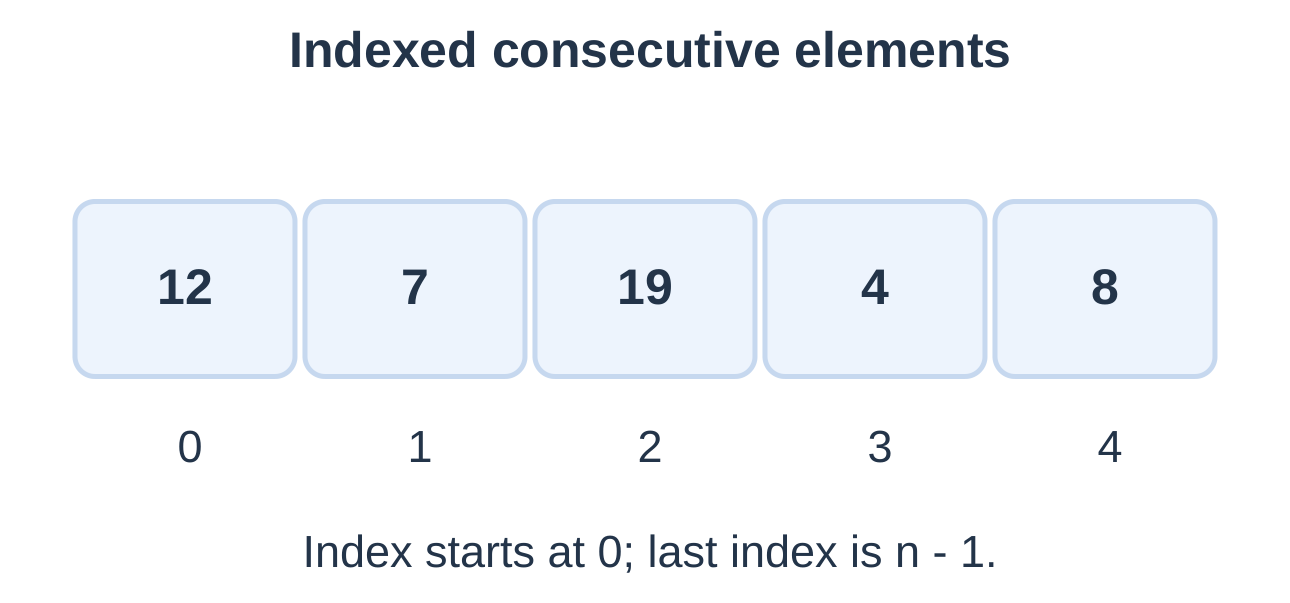
In int marks[5], int is the element type, marks is the name and 5 is the capacity. marks[2] selects the third element.
Initialization
int a[5] = {12, 7, 19, 4, 8}; int b[5] = {3, 6}; // Remaining elements are zero. int zeros[5] = {0}; // All five elements are zero. int values[] = {2, 4, 6}; // Three elements inferred.| Declaration | Effect |
|---|---|
| int a[4] = {0}; | Four zero-initialized elements |
| int a[] = {1, 2}; | Capacity inferred as two |
| Uninitialized automatic int a[4]; | Values cannot be assumed initialized |
| int a[2] = {1, 2, 3}; | Too many initializer elements |
Braces initialize an array at declaration. Later, update individual elements using a[i] = value;. Ordinary whole-array assignment is not supported.
3.2 Indexes and Traversal
For capacity N, valid indexes are 0 through N − 1. The last element of a five-element array is a[4], not a[5]. Out-of-bounds access has undefined behaviour.
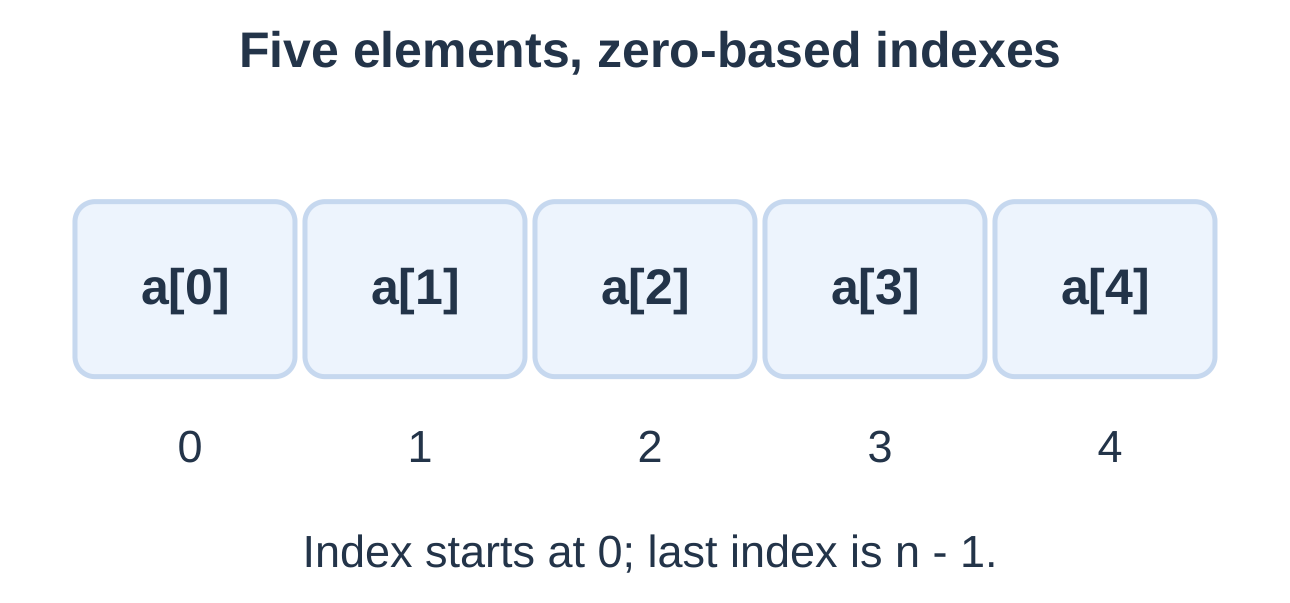
Traversal visits elements in a defined order. Before iteration i, indexes 0 through i − 1 have already been processed.
Capacity Versus Active Count
- Capacity: Number of reserved slots.
- Active count: Number currently used.
- Last active index: n − 1, when n is positive.
A 20-slot array may hold six active readings. Process only those six. Check the count before indexing; maximum and average additionally require nonempty input.
Counting an Actual Array
int a[] = {4, 8, 12, 16}; size_t n = sizeof a / sizeof a[0];Here n is 4. This formula applies to the actual array object, not a pointer variable or an adjusted array parameter. Byte count and element count are different quantities.
3.3 Array Input and Output
Read the count, validate capacity, then read each active element with checked conversions.
#include <stdio.h>int main(void) { int a[10], n; if (scanf(“%d”, &n) != 1 || n < 1 || n > 10) { puts(“Invalid count”); return 1; }
for (int i = 0; i < n; ++i) { if (scanf("%d", &a[i]) != 1) { puts("Invalid value"); return 1; } } for (int i = 0; i < n; ++i) printf("%d%s", a[i], i == n – 1 ? "\n" : " "); return 0;}
Input: 3 8 -2 5
Output: 8 -2 5
&a[i] supplies the address of the selected integer destination. Two loops separate filling the list from consuming it.
- n = 1 visits index 0.
- n = 10 ends at index 9.
- n = 0 or 11 is rejected before element input.
- Failed element conversion stops processing.
These scanf examples assume numeric tokens representable in their destination types. Conversion-count checks do not provide arbitrary-size numeric parsing.
3.4 Maximum and Minimum
For nonempty input, initialize maximum and minimum from the first actual element. Then compare each remaining element.
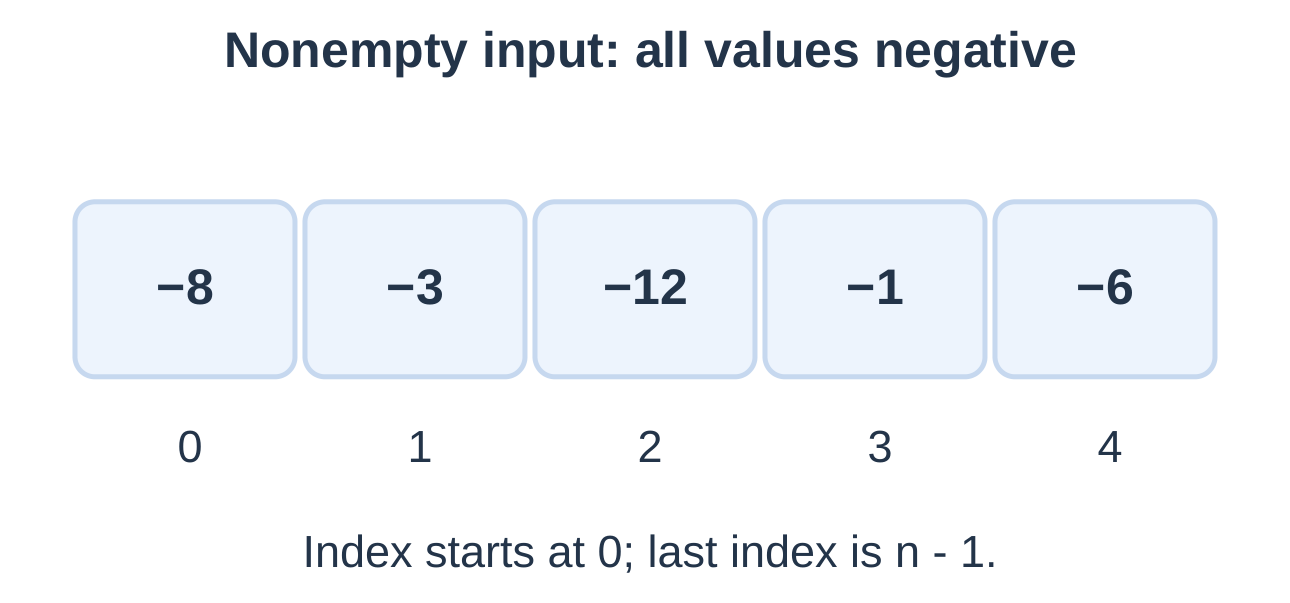
int main(void) { int a[] = {-8, -3, -12, -1, -6}; int maximum = a[0], minimum = a[0];
for (int i = 1; i < 5; ++i) { if (a[i] > maximum) maximum = a[i]; if (a[i] < minimum) minimum = a[i]; } printf("Max = %d\nMin = %d\n", maximum, minimum); return 0;}
Output: Maximum = -1; minimum = -12.
| Processed value | Maximum | Minimum |
|---|---|---|
| -8, initialization | -8 | -8 |
| -3 | -3 | -8 |
| -12 | -3 | -12 |
| -1 | -1 | -12 |
| -6 | -1 | -12 |
Starting maximum at zero fails for all-negative data. Starting minimum at zero fails for all-positive data.
For n elements, the remaining traversal makes n − 1 visits. To retain the first maximum index, replace the candidate only on strict greater-than; greater-than-or-equal retains the last tie.
3.5 Sum and Average
Initialize the accumulator to zero and add every active element.
Average = Sum / Number of values, for a nonempty list.
#include <stdio.h>int main(void) { int marks[] = {70, 81, 66, 92, 76}; long sum = 0;
for (int i = 0; i < 5; ++i) { if (marks[i] < 0 || marks[i] > 100) return 1; sum += marks[i]; } double average = (double)sum / 5; printf("Sum = %ld\nAverage = %.2f\n", sum, average); return 0;}
Output: Sum = 385; Average = 77.00.
The bound of five marks in 0–100 keeps this total small. Wider types do not make arbitrary sums overflow-proof.
For {70, 71, 73}, sum is 214 and the mean displays as 71.33. Cast before division: (double)sum / n. Casting (sum / n) afterward cannot recover a lost fraction.
For decimal measurements, use a double accumulator. Maximum, minimum and sum can share one traversal with appropriate initialization.
3.6 Linear Search
Linear search checks elements until a target is found or the active range ends. It works on unsorted data.
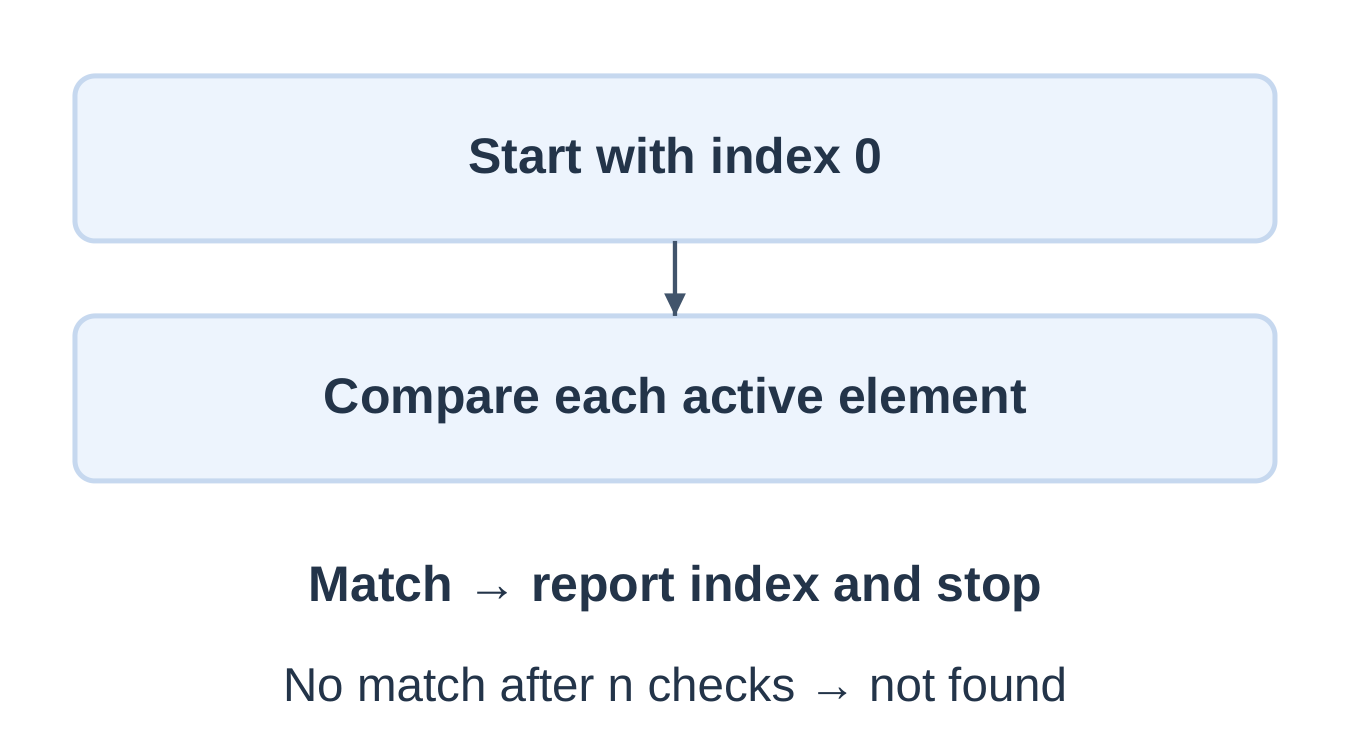
int main(void) { int a[] = {4, 9, 2, 9, 7}; int target, found = -1; if (scanf(“%d”, &target) != 1) return 1;
for (int i = 0; i < 5; ++i) { if (a[i] == target) { found = i; break; } } if (found == -1) puts("Not found"); else printf("Index = %d\n", found); return 0;}
| Target | Result |
|---|---|
| 4 | Index 0 |
| 9 | Index 1, first occurrence |
| 7 | Index 4 |
| 8 | Not found |
Index 1 is the second ordinary position. Convert to one-based position only after confirming a match. Do not test if (found) because index zero is valid.
A missing target requires n checks. To count all occurrences, increment a counter on each match and remove break. Searching an empty active range needs no access and reports no match.
3.7 Reverse Traversal and Copying
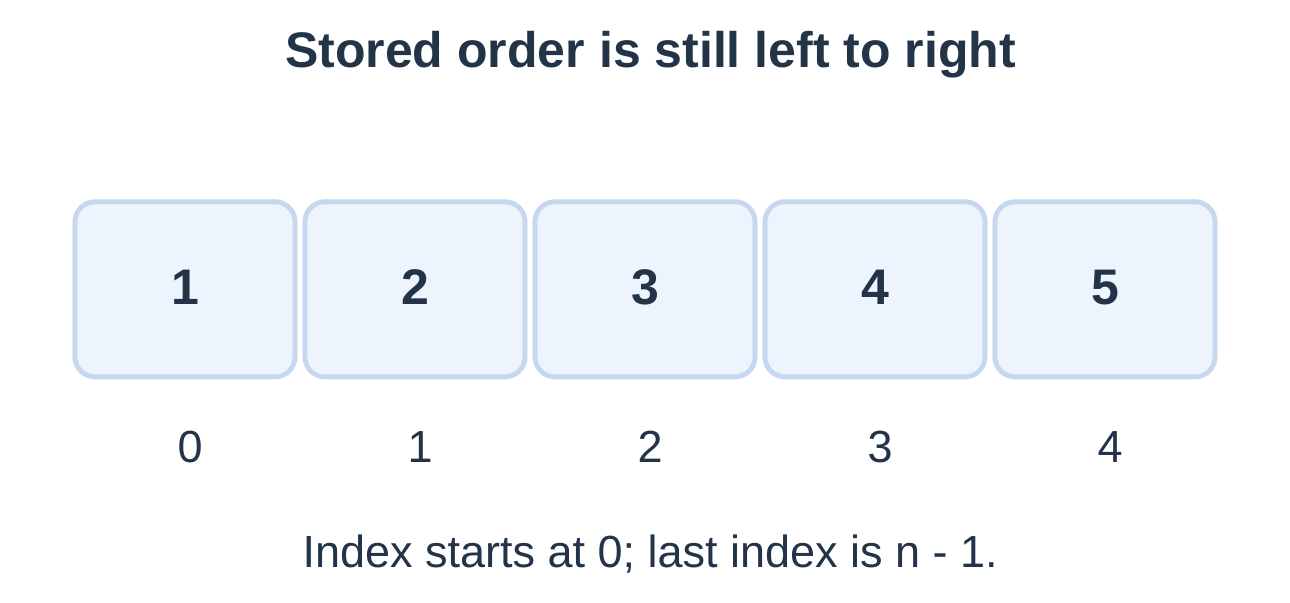
Output: 10 8 6 4 2
The signed counter becomes -1 after the last visit; the failed test prevents access there. An unsigned counter tested with i >= 0 cannot stop through that test.
Copy Elements
int source[4] = {3, 6, 9, 12}; int copy[4]; for (int i = 0; i < 4; ++i) copy[i] = source[i]; copy[0] = 99;Source[0] remains 3; copy[0] becomes 99. Ensure destination capacity before copying.
Reverse Stored Elements
int a[5] = {1, 2, 3, 4, 5}; for (int i = 0; i < 5 / 2; ++i) { int temp = a[i]; a[i] = a[4 – i]; a[4 – i] = temp; }Only n / 2 swaps are required. Swapping every position would reverse each pair twice and restore the original order. The middle element of an odd-length array stays in place.
3.8 C Strings and Storage
A C string is a character sequence ending with the null character ‘\0’. A character array is a string only if a terminator exists within its accessible storage.
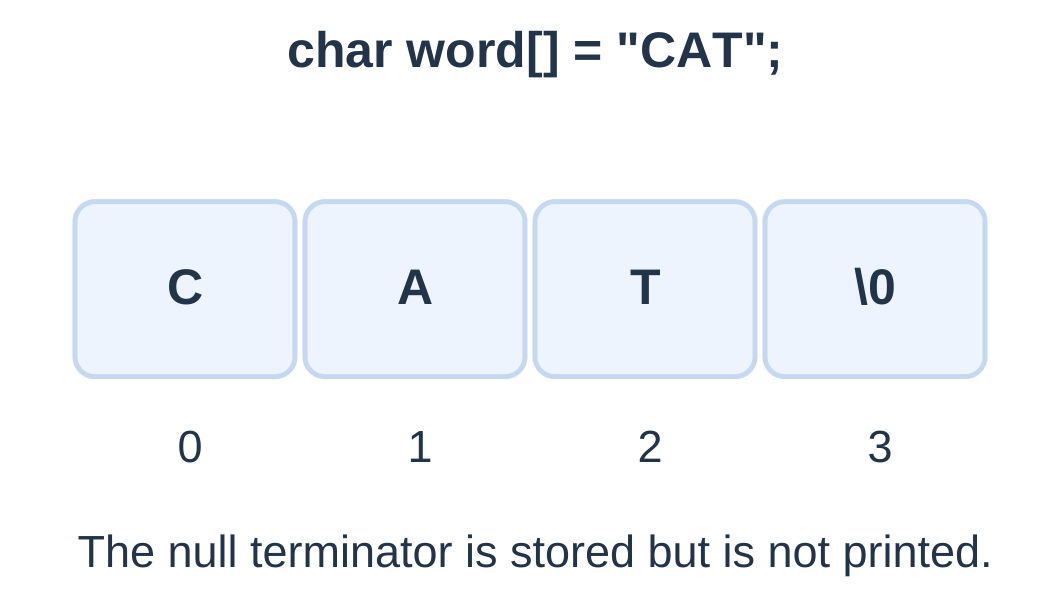
| Quantity for b | Value |
|---|---|
| String length | 3 |
| Terminator index | 3 |
| Capacity | 8 |
| Minimum required capacity | 4 |
L visible characters need at least L + 1 slots.
Distinguish ‘\0’ from the printable digit ‘0’, newline ‘\n’ and a null pointer. The empty string “” still needs a terminator slot.
In {‘A’, ‘B’, ‘\0’, ‘C’, ‘\0’}, the string starting at index zero is AB. String functions stop at the first null.
A declared character array initialized from a literal is writable. Do not modify the characters of a string literal itself.
3.9 Reading a Line Safely
The syllabus names gets, a historical function that discarded the input newline but accepted no capacity argument. It could overrun its destination and was removed from standard C in C11. Use bounded input in working programs.
| Method | Behaviour |
|---|---|
| Historical gets | No destination bound; obsolete |
| fgets | Bounded line or fragment; accepts spaces |
| scanf with %19s | One token, at most 19 text characters plus terminator |
int main(void) { char name[32]; int i = 0; if (fgets(name, sizeof name, stdin) == NULL) return 1;
while (name[i] != '\0' && name[i] != '\n') ++i; if (name[i] == '\n') name[i] = '\0'; printf("Hello, %s!\n", name); return 0;}
Input: Asha Singh followed by Enter.
Output: Hello, Asha Singh!
This short-line example assumes at most 30 text characters followed by Enter. It trims a retained newline but does not reject an overlong line.
For a buffer of size greater than one, successful fgets stores at most size − 1 input characters and adds a terminator. It retains a newline if encountered within the limit. Remaining characters from a longer line stay unread.
Token input into char word[20] uses scanf(“%19s”, word) without & before word. Field width limits storage, but may leave the rest of an overlong token unread.
Mixing scanf and fgets requires attention to leftover newlines. Prefer a consistent strategy in small programs.
3.10 String Output and Traversal
puts writes a valid string followed by a newline. %s output and fputs do not add a newline automatically.
| Call | Output behaviour |
|---|---|
| puts(“C”); | C plus one newline |
| printf(“%s”, “C”); | C without added newline |
| printf(“%s\n”, “C”); | C plus one newline |
| puts(“C\n”); | C plus two newlines |
Use a constant format such as printf(“%s”, text), rather than passing user input as the format string.
Traverse a String
char text[] = “C Lab”; int i = 0; while (text[i] != ‘\0’) { printf(“%d:%c\n”, i, text[i]); ++i; }The loop visits five characters, including the space, then stops at the terminator. An empty string produces zero visits.
If fgets already retained a newline, puts adds another. Use fputs(line, stdout) to preserve the returned layout, or trim the newline before puts.
3.11 Finding Length with strlen
Declared in <string.h>, strlen counts characters before the first null, excluding it. The return type is size_t, printed with %zu.
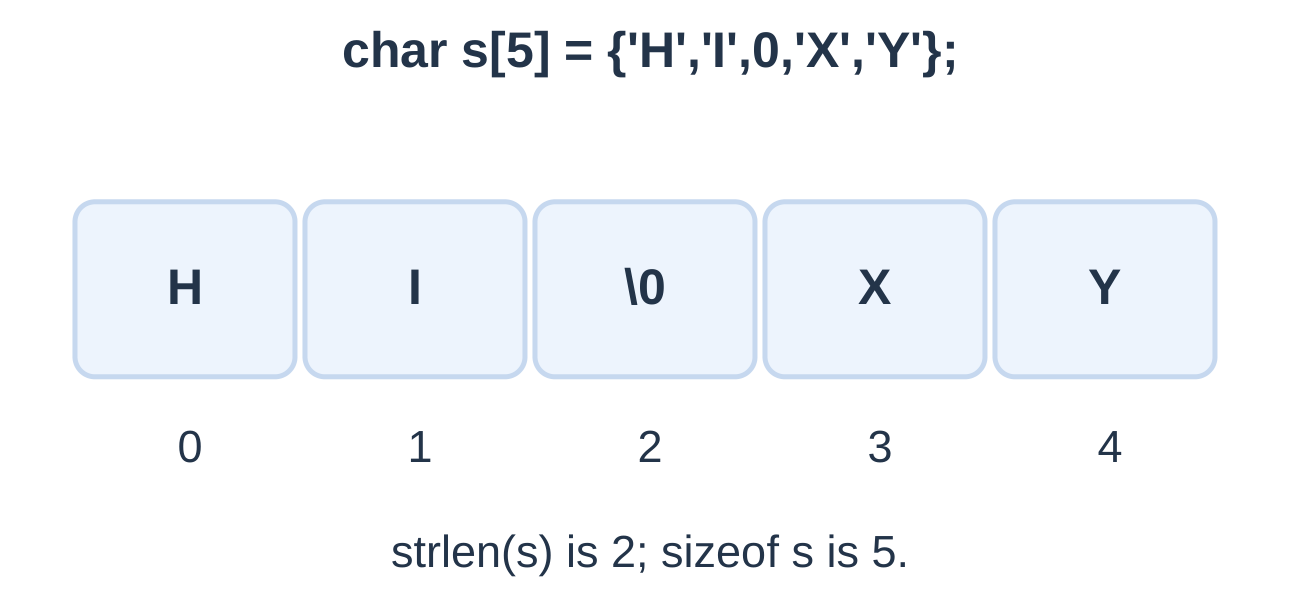
int main(void) { char text[20] = “C Programming”; size_t count = 0; while (text[count] != ‘\0’) ++count;
printf("Manual: %zu\n", count); printf("Library: %zu\n", strlen(text)); printf("Capacity: %zu\n", sizeof text); return 0;}
Output: Manual = 13; Library = 13; Capacity = 20.
| Expression | Result |
|---|---|
| strlen(“AKTU”) | 4 |
| strlen(“”) | 0 |
| strlen(“A B”) | 3 |
| strlen(“A\n”) | 2 |
| sizeof “AKTU” | 5 |
These examples use simple single-byte text. In general, strlen counts bytes, not necessarily displayed Unicode symbols.
Setting s[2] = ‘\0’ in a writable array containing HELLO makes its string HE. Length becomes 2; array capacity is unchanged.
3.12 Copying with strcpy
strcpy(destination, source) copies a valid string including its terminator. It returns the destination pointer but does not check capacity.
Requirements:
- Writable destination.
- Capacity of at least strlen(source) + 1.
- Valid terminated source.
- Nonoverlapping source and destination.
int main(void) { char source[] = “Notes”; char destination[16]; if (strlen(source) >= sizeof destination) return 1;
strcpy(destination, source); destination[0] = 'V'; printf("Source: %s\nCopy: %s\n", source, destination); return 0;}
Output: Source: Notes; Copy: Votes.
The arrays are independent. destination = source is not ordinary array assignment.
A capacity of six fits Notes exactly: five visible characters plus one null. The check is source length < capacity, not less-than-or-equal.
A manual copy loop must also write the final ‘\0’. Replacing long text with short text moves the first terminator earlier; old bytes after it are outside the new string.
3.13 Comparing with strcmp
strcmp(a, b) compares valid strings lexicographically. Test the sign of the result, not an assumed exact -1 or +1.
| Test | Meaning |
|---|---|
| strcmp(a, b) < 0 | a precedes b |
| strcmp(a, b) == 0 | Equal text |
| strcmp(a, b) > 0 | a follows b |
== between array names does not compare their text contents. if (strcmp(a, b)) is true when the strings differ.
The first differing character determines ordering. If one string is an otherwise matching prefix, the shorter one precedes the longer one.
- cat compared with cat: equal.
- car precedes cart.
- The text “10” precedes “2”; this is not numeric comparison.
- Comparison is case-sensitive and based on character codes, not language-specific dictionary collation.
Both operands must be valid strings; strcmp cannot repair missing terminators.
3.14 Count Vowels in a String
Traverse every visible character and count English vowel occurrences, including uppercase forms.
#include <stdio.h>int main(void) { char text[] = “AKTU Notes”; int vowels = 0; for (int i = 0; text[i] != ‘\0’; ++i) { char ch = text[i]; if (ch == ‘a’ || ch == ‘A’ || ch == ‘e’ || ch == ‘E’ || ch == ‘i’ || ch == ‘I’ || ch == ‘o’ || ch == ‘O’ || ch == ‘u’ || ch == ‘U’) ++vowels; } printf(“Vowels = %d\n”, vowels); return 0; }
Output: Vowels = 4
| Text | Count |
|---|---|
| Empty string | 0 |
| rhythm | 0 |
| AEIOU | 5 |
| education | 5 |
| queue | 4 |
Use logical OR because any one vowel match is sufficient. Count occurrences, not distinct vowel kinds. Spaces, digits and punctuation are not vowels, and they are not automatically consonants either.
3.15 Reverse a String
For length n, swap visible positions i and n − 1 − i while i < n / 2. Do not move the terminator.
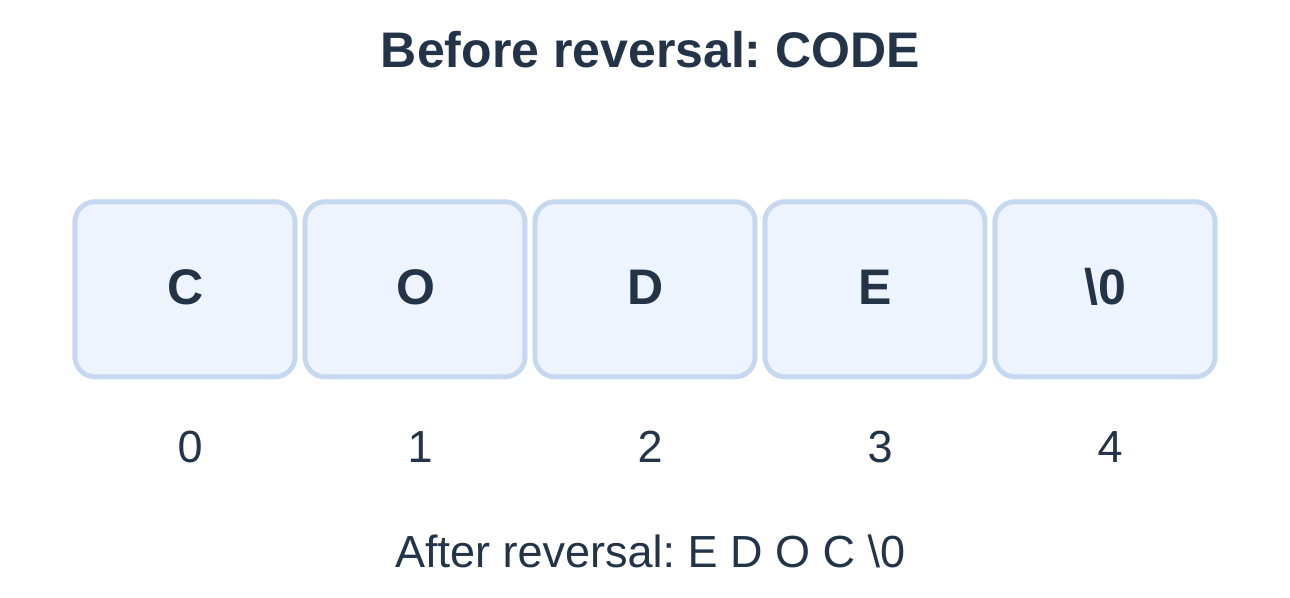
int main(void) { char text[] = “CODE”; size_t n = strlen(text); for (size_t i = 0; i < n / 2; ++i) { char temp = text[i]; text[i] = text[n – 1 – i]; text[n – 1 – i] = temp; } puts(text); return 0; }
Trace: CODE → EODC → EDOC.
The loop handles empty and single-character strings without swaps. Its condition avoids subtracting from an unsigned zero length before establishing that a pair exists.
Reverse output leaves storage unchanged; this algorithm changes the stored characters. Reversal preserves length and character frequencies. Reversing twice restores the original.
3.16 Palindrome Strings
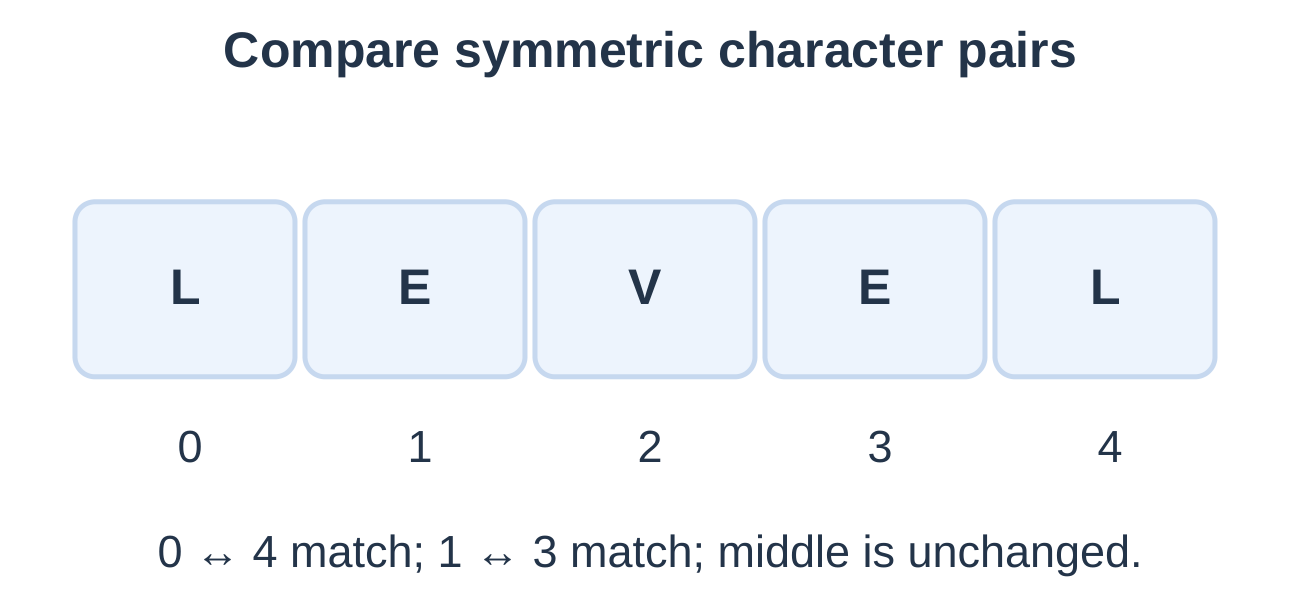
A palindrome reads the same forward and backward. Compare symmetric pairs and stop at the first mismatch.
int main(void) { char text[64]; if (scanf(“%63s”, text) != 1) return 1;
size_t n = strlen(text); int palindrome = 1; for (size_t i = 0; i < n / 2; ++i) { if (text[i] != text[n – 1 – i]) { palindrome = 0; break; } } puts(palindrome ? "Palindrome" : "Not palindrome"); return 0;}
Input contract: one whitespace-free word of at most 63 characters.
| Text | Exact comparison |
|---|---|
| level | Palindrome |
| Level | Not palindrome |
| abba | Palindrome |
| abca | Not palindrome |
For abca, the outer a/a pair matches but b/c does not. This task is case-sensitive. Phrase handling requires line input and an explicit policy for spaces and punctuation.
The algorithm considers an empty string a palindrome because no unequal pair exists, although token-based scanf does not supply an empty token.
3.17 Concatenation and Line Limits
strcat appends a source string at the destination’s terminator and writes a new terminator afterward. Both strings must initially be valid, nonoverlapping and sufficiently stored.
#include <stdio.h> #include <string.h>int main(void) { char name[24] = “Notes”; char suffix[] = “Gallery”; size_t used = strlen(name); if (strlen(suffix) >= sizeof name – used) return 1;
strcat(name, suffix); puts(name); return 0;}
Output: NotesGallery.
Required capacity = 5 + 7 + 1 = 13; available capacity = 24. The subtraction check relies on the destination already being a valid string within its actual array.
Detect an Overlong Line
A bounded fgets read may return a fragment. The following program accepts at most seven text characters, including the exactly-full case, and rejects longer input.
#include <stdio.h> #include <string.h>int main(void) { char text[8]; if (fgets(text, sizeof text, stdin) == NULL) return 1;
size_t n = strlen(text); if (n > 0 && text[n – 1] == '\n') text[n – 1] = '\0'; else { int ch = getchar(); if (ch != '\n' && ch != EOF) { while ((ch = getchar()) != '\n' && ch != EOF) { } puts("Line too long"); return 1; } if (ferror(stdin)) return 1; } puts(text); return 0;}
Assume ordinary text without embedded null bytes. Seven text characters followed by newline or EOF are accepted; eight are rejected. Draining the rejected remainder prepares the stream for a later read.
3.18 Addresses and Pointer Variables
An object’s address identifies its location. A pointer variable stores an address value.
int value = 25; int *p = &value;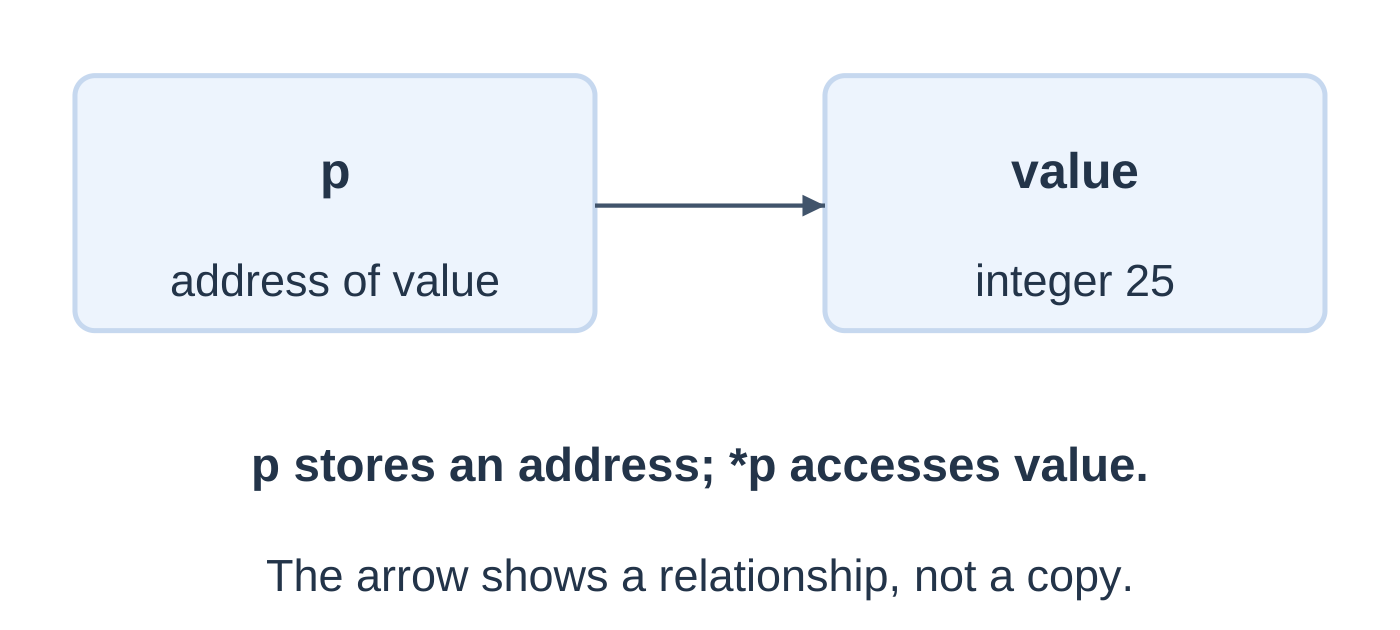
| Expression | Meaning |
|---|---|
| value | Stored integer |
| &value | Address of the integer object |
| p | Address stored in the pointer |
| &p | Address of the separate pointer object |
| *p | Pointed-to integer object |
The first three numeric results are 25, 1 and 25. %p expects void pointer, so the example casts accordingly. Address text is implementation-defined and may vary between runs.
Changing value does not redirect p. The pointer continues identifying the same object and reads its current contents.
3.19 Basic Indirection
Dereferencing a valid pointer accesses its target. Distinguish changing the target’s value from changing where the pointer points.
#include <stdio.h>int main(void) { int x = 10, y = 20; int *p = &x; *p = 40; p = &y; *p = 70; printf(“x = %d, y = %d\n”, x, y); return 0; }
Output: x = 40, y = 70
| Statement | Effect |
|---|---|
| int *p = &x; | Initialize p to identify x |
| *p = 40; | Change x |
| p = &y; | Redirect p to y |
| *p = 70; | Change y |
An uninitialized pointer has no known valid target. NULL explicitly indicates no target and must not be dereferenced. Use pointers only while their compatible target objects still exist.
In int *p, q;, only p is a pointer; q is int. The star declares a pointer in int *p, dereferences in *p, and multiplies in a * b.
This explains scanf: &age supplies the destination address for %d. Passing age itself would supply a value instead of the required pointer.
3.20 Structures: One Record
A structure groups named members that may have different types.
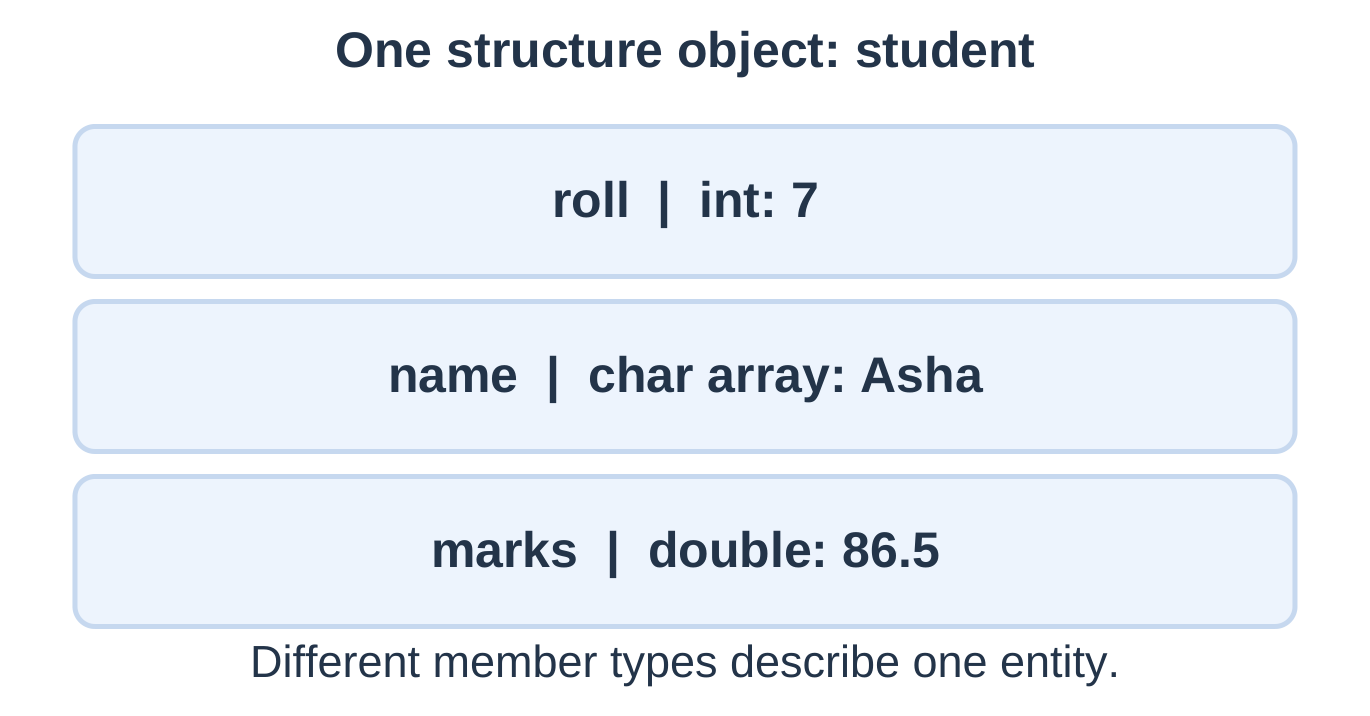
struct Student { int roll; char name[20]; double marks; };
int main(void) { struct Student s = {7, “Asha”, 86.5}; printf(“Roll: %d\n”, s.roll); printf(“Name: %s\n”, s.name); printf(“Marks: %.1f\n”, s.marks); return 0; }
Output: Roll: 7; Name: Asha; Marks: 86.5, on separate lines.
The semicolon after the structure definition is required. A definition describes the type; declaring s creates an actual object. The dot operator selects a member.
| Array | Structure |
|---|---|
| Same-type elements | Members may have different types |
| Elements selected by index | Members selected by name |
| Models a list | Models one record |
Padding may exist between members. Do not assume structure size equals the simple sum of member sizes.
3.21 Updating and Copying Records
Scalar members can be assigned directly. Character-array members still follow array rules.
s.roll = 8; s.marks = 90.0; /* With sufficient name capacity: */ strcpy(s.name, “Ravi”);s.name = “Ravi”; is invalid array assignment.
Whole structures of compatible type can be assigned:
struct Student original = {7, “Asha”, 86.5}; struct Student copy = original; copy.roll = 8; copy.marks = 91.0;The embedded array’s contents are copied too. With these scalar-and-array members, modifying the copy does not change the original. Pointer members in other designs would copy addresses without duplicating their separate targets.
struct Student s = {0}; initializes the fields appropriately to zero. An uninitialized automatic record does not provide meaningful default data.
C does not provide whole-structure ==. Compare meaningful fields individually, using strcmp for strings. Raw-byte comparison is unsuitable for semantic equality because padding may exist.
3.22 Input and Arrays of Structures
An array of structures stores multiple records. s[i] selects the record; s[i].marks selects its marks member.
#include <stdio.h>struct Student { int roll; char name[20]; double marks; };
int main(void) { struct Student s[2]; int best = 0; for (int i = 0; i < 2; ++i) { if (scanf(“%d %19s %lf”, &s[i].roll, s[i].name, &s[i].marks) != 3) return 1; if (!(s[i].marks >= 0.0 && s[i].marks <= 100.0)) return 1; }
for (int i = 1; i < 2; ++i) if (s[i].marks > s[best].marks) best = i; printf("Best: %d %s %.1f\n", s[best].roll, s[best].name, s[best].marks); return 0;}
Input: 7 Asha 86.5 and 8 Ravi 91.0.
Output: Best: 8 Ravi 91.0
Names must be single tokens of at most 19 characters; numeric values must fit the types. The positive marks-range test also rejects NaN if supplied by the implementation.
A strict greater-than comparison retains the first tied best record. Valid record indexes do not remove the separate capacity requirements of string members.
3.23 File Handling Fundamentals
A file preserves data beyond one program run. A stream connects the program with input or output. FILE pointer values are library-managed stream handles.
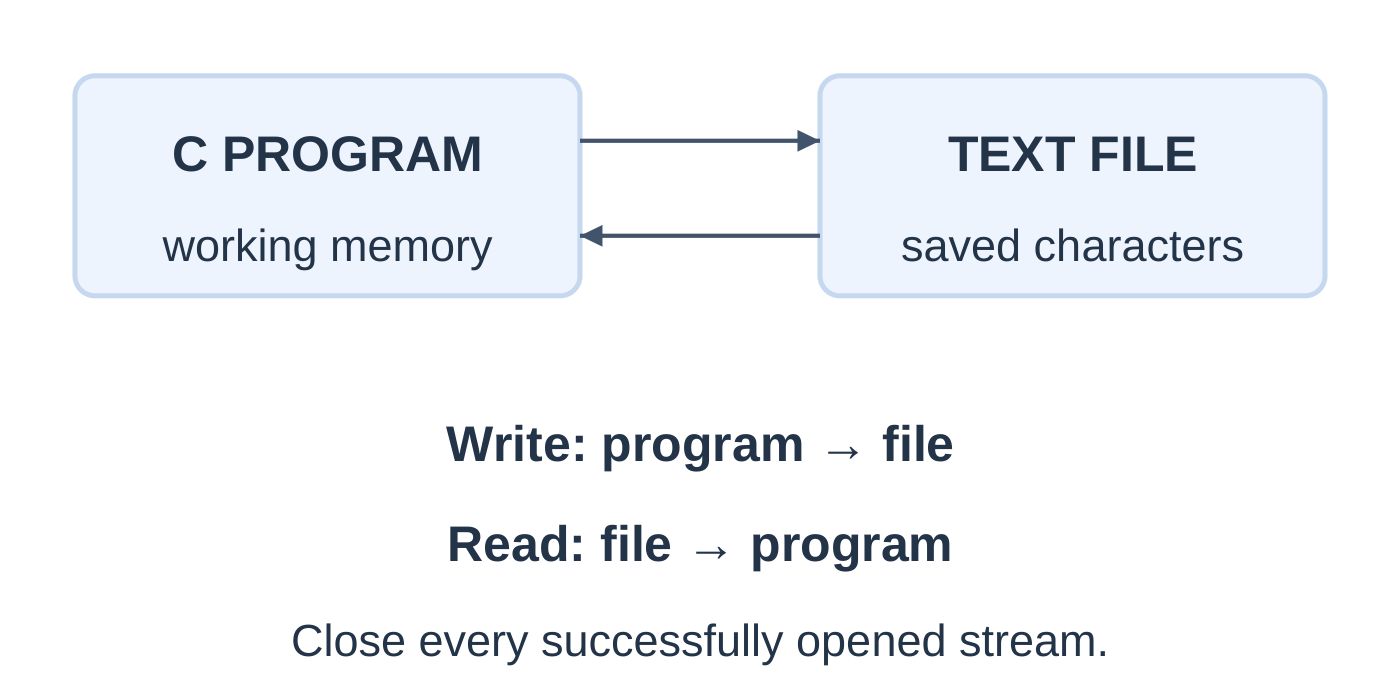
Open → Check → Process → Close
FILE *fp = fopen(“ng_demo.txt”, “r”); if (fp == NULL) return 1; /* Read here, checking results. */ if (fclose(fp) != 0) return 1;| Mode | Existing file | Absent file |
|---|---|---|
| r | Read; retain content | Fail |
| w | Write; truncate existing content | Create |
| a | Append at end; retain content | Create |
| r+ | Read/write; retain content | Fail |
| w+ | Read/write; truncate | Create |
| a+ | Read/append; writes at end | Create |
Adding b requests binary mode. The examples use text streams. Update modes require additional rules when changing I/O direction.
Relative paths refer to the program’s current working directory, which may differ from the source-file folder. A successful open does not guarantee every later operation succeeds.
| Function | Purpose |
|---|---|
| fopen, fclose | Open and close |
| fprintf, fscanf | Formatted output and input |
| fputs, fgets | String output and bounded input |
| fputc, fgetc | Character output and input |
| ferror | Inspect stream error indicator |
3.24 Write Text to a File
Write mode creates or replaces content. Check writes and close even after a write failure.
#include <stdio.h>int main(void) { FILE *fp = fopen(“ng_write.txt”, “w”); if (fp == NULL) return 1;
int ok = 1; if (fputs("NotesGallery\n", fp) == EOF) ok = 0; if (ok && fprintf(fp, "Score: %.1f\n", 86.5) < 0) ok = 0; if (fclose(fp) != 0) ok = 0; if (!ok) { puts("Write failed"); return 1; } puts("Saved"); return 0;}
File content:
NotesGallery Score: 86.5The console prints Saved only after successful writing and closing. fputs does not add its own newline; the strings supply it. String terminators are not written as text.
| Operation | Failure indication |
|---|---|
| fprintf | Negative result |
| fputs or fputc | EOF |
| fclose | EOF; success is zero |
Closing completes buffered output and releases the stream. Do not use or close that stream again afterward. Opening with w truncates existing content immediately; use a for appending.
3.25 Read Text from a File
Let the read operation’s result control the loop. Afterward, distinguish ordinary end of input from an error.
#include <stdio.h>int main(void) { FILE *fp = fopen(“ng_read.txt”, “r”); char line[80]; int ok = 1; if (fp == NULL) return 1;
while (fgets(line, sizeof line, fp) != NULL) { if (fputs(line, stdout) == EOF) { ok = 0; break; } } if (ferror(fp)) ok = 0; if (fclose(fp) != 0) ok = 0; return ok ? 0 : 1;}
If ng_read.txt contains Arrays and Strings on separate lines, the program displays those same lines.
- Missing file: open fails.
- Empty file: zero body executions.
- Final line without newline: its characters are still processed.
- Long line: fgets may return several fragments; fputs preserves their order without adding newlines.
Do not use while (!feof(fp)) to predict read success. The EOF indicator reflects an encountered end-of-input condition, not a forecast. Process a buffer only after a successful read.
3.26 Character Input and EOF
fgetc returns int: either an unsigned-char value converted to int, or EOF. Store its result in int so character values and EOF remain distinguishable.
#include <stdio.h>int main(void) { FILE *fp = fopen(“ng_chars.txt”, “r”); int ch, ok = 1; unsigned long count = 0, newlines = 0; if (fp == NULL) return 1;
while ((ch = fgetc(fp)) != EOF) { ++count; if (ch == '\n') ++newlines; } if (ferror(fp)) ok = 0; if (fclose(fp) != 0) ok = 0; if (!ok) return 1; printf("Characters = %lu\nNewlines = %lu\n", count, newlines); return 0;}
Assume a small file whose counts fit unsigned long.
| File content | Characters | Newlines |
|---|---|---|
| A B followed by newline, then Hi followed by newline | 7 | 2 |
| XYZ without newline | 3 | 0 |
| A, newline, B | 3 | 1 |
| Empty file | 0 | 0 |
EOF is a library reporting value, not a character stored at the end of a file. Do not count it. Newline count is not always the number of human-readable lines. Text-stream characters are not necessarily displayed Unicode symbols.
3.27 Append and Formatted Records
Append mode retains existing content and writes new data at the end.
#include <stdio.h>int main(void) { FILE *fp = fopen(“ng_log.txt”, “a”); if (fp == NULL) return 1; int ok = fputs(“Unit III complete\n”, fp) != EOF; if (fclose(fp) != 0) ok = 0; if (!ok) return 1; puts(“Appended”); return 0; }
Each successful run adds another line. If a preceding file has no final newline, append mode does not create a separator automatically.
Formatted Records
An opened output stream can receive records using fprintf(fp, “%s %d\n”, “Asha”, 86), with the result checked.
#include <stdio.h>int main(void) { FILE *fp = fopen(“ng_records.txt”, “r”); char name[20]; int mark, result = 0, ok = 1; if (fp == NULL) return 1;
while ((result = fscanf(fp, "%19s %d", name, &mark)) == 2) { if (mark < 0 || mark > 100) { ok = 0; break; } printf("%s: %d\n", name, mark); } if (ferror(fp) || result != EOF) ok = 0; if (fclose(fp) != 0) ok = 0; if (!ok) { puts("Read failed"); return 1; } return 0;}
For records Asha 86 and Ravi 91, output is:
Asha: 86 Ravi: 91| fscanf result | Meaning here |
|---|---|
| 2 | Both fields assigned |
| 1 | Incomplete record after name |
| 0 | No conversion assigned |
| EOF | Input failure before first assignment; inspect ferror |
Names must be single tokens of at most 19 characters. Numeric tokens must fit int; marks must be 0–100. Whitespace separates fields, so this format does not enforce one record per physical line. Full-line validation and names with spaces need a more explicit parser.
3.28 Quick Revision and Examination Practice
Core Rules
- Arrays contain same-type elements with indexes 0 through n − 1.
- Capacity and active count are different.
- Initialize extrema from the first element of nonempty input.
- Cast before integer division to preserve fractional means.
- C strings require a null terminator within accessible storage.
- L text characters need L + 1 slots.
- strlen excludes the terminator; sizeof an actual array measures capacity in bytes.
- strcpy copies the terminator but does not check destination capacity.
- strcmp results are interpreted by sign.
- Pointers need valid compatible targets before dereferencing.
- Structures group named fields that may have different types.
- Whole structures can be copied; ordinary arrays cannot be assigned wholesale.
- File processing follows open, check, process and close.
- w replaces content; a appends.
- Test read success before processing; store fgetc results in int.
Short-Answer Questions
- Distinguish capacity, active count and last valid index.
- Why should maximum and minimum start from a[0]?
- What is the difference between reverse traversal and in-place reversal?
- Why does a string need length plus one slots?
- Distinguish ‘\0’, ‘0’ and ‘\n’.
- Why is gets unsuitable for modern working programs?
- Compare strlen with sizeof an actual character array.
- State the preconditions for strcpy and strcat.
- Why should strcmp be tested by sign?
- Explain value, &value, p and *p.
- Compare arrays and structures.
- Why must fgetc results be stored in int?
Long-Answer Questions
- Write a bounded array-input program and find maximum, minimum, sum and mean.
- Explain linear search with a first-match trace and not-found case.
- Explain string storage and compare strlen, strcpy and strcmp.
- Write and trace string reversal, vowel-count and palindrome programs.
- Explain pointer initialization, dereferencing and redirection.
- Define a student structure and find the highest-mark record in an array.
- Explain file modes and programs for writing, line reading and character counting.
- Explain append mode and formatted record input with error checks.
Solved Answer Checks
| Question | Answer |
|---|---|
| int a[5] = {2, 4}; Find a[3] | 0 |
| char s[10] = “AKTU”; Length, capacity, terminator index | 4, 10, 4 |
| Can four char slots hold NOTE as a string? | No; five needed |
| x = 5; p = &x; *p = 9; find x | 9 |
| File XYZ with no newline | Three characters, zero newlines |
| Maximum of {-8, -3, -12, -1, -6} | -1 |
| First index of 9 in {4, 9, 2, 9, 7} | 1 |
| Reverse CODE | EDOC |
| Vowels in AKTU Notes | 4 |
| Notes + Gallery required string capacity | 13 |
Frequently Asked Questions
What does Programming Languages Unit 3 cover?
It covers one-dimensional arrays, strings and string functions, basic pointers, structures and text-file handling in C.
Does a character array always contain a valid string?
No. A valid C string needs an accessible null terminator. A character array without one must not be passed as an ordinary string.
Why is strcmp(a, b) == 0 used for equality?
strcmp returns zero when the strings contain equal text. Negative and positive results indicate ordering.
Does copying a pointer copy its target?
No. It copies an address value. A separate target object is not duplicated by that operation.
What is the difference between w and a file modes?
w creates or truncates a file for writing. a preserves existing content and sends new writes to the end.
Why should a reader not loop on !feof?
The EOF indicator is set by an input operation encountering end of input. Use the actual read result to decide whether fresh data exists.
How should this unit be revised?
Draw storage and indexes, locate each string terminator, trace loops, identify pointer targets and follow every stream from opening through error checks to closing.